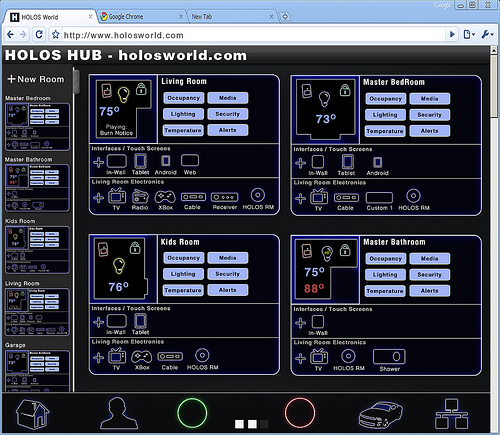
If you’ve ever been inside a dormitory full of
computer science undergraduates, you know what horrors come of young men
free of responsibility. To help combat the lack of homemaking skills in
nerds everywhere, a group of them banded together to create MOTHER,
a combination of home automation, basic artificial intelligence and
gentle nagging designed to keep a domicile running at peak efficiency.
And also possibly kill an entire crew of space truckers if they should
come in contact with a xenomorphic alien – but that code module hasn’t
been installed yet.
The project comes from the LVL1 Hackerspace, a group of like-minded
programmers and engineers. The aim is to create an AI suited for a home
environment that detect issues and gets its users (i.e. the people living in
the home) to fix it. Through an array of digital sensors, MOTHER knows
when the trash needs to be taken out, when the door is left unlocked, et
cetera. If something isn’t done soon enough, she it can even
disable the Internet connection for individual computers. MOTHER can
notify users of tasks that need to be completed through a standard
computer, phones or email, or stock ticker-like displays. In addition,
MOTHER can use video and audio tools to recognize individual users,
adjust the lighting, video or audio to their tastes, and generally keep
users informed and creeped out at the same time.
MOTHER’s abilities are technically limitless – since it’s all based
on open source software, those with the skill, inclination and hardware
components can add functions at any time. Some of the more humorous
additions already in the project include an instant dubstep command. You
can build your own MOTHER (boy, there’s a sentence I never thought I’d
be writing) by reading through the official Wiki
and assembling the right software, sensors, servers and the like. Or
you could just invite your mom over and take your lumps. Your choice.
Indie movie makers can be a strange bunch, pushing the envelope of
their craft and often losing us along the way. In any case, if you’re
going to produce something unintelligible anyway, why not let a computer
do it? Eve Sussmam and the Rufus Corporation
did just that. She and lead actor Jeff Wood traveled to the Kazakhstan
border of the Caspian Sea for two years of filming. But instead of a
movie with a beginning, middle and end, they shot 3,000 individual and
unrelated clips. To the clips they added 80 voice-overs and 150 pieces
of music, mixed it all together and put it in a computer. A program on
her Mac G5 tower, known at Rufus as the “serendipity machine,” then
splices the bits together to create a final product.
As you might imagine, the resultant film doesn’t always make sense. But that’s part of the fun! As the Rufus Corporation writes on their website, “The unexpected juxtapositions create a sense of suspense alluding to a story that the viewer composes.”
It’s a clever experiment even if some viewers end up wanting to gouge
their eyes out after a sitting. And there is some method to their
madness. The film, titled “whiteonwhite:algorithnoir,” is centered on a
geophysicist named Holz (played by Wood) who’s stuck in a gloomy,
1970’s-looking city operated by the New Method Oil Well Cementing
Company. Distinct scenes such as wire tapped conversations or a job
interview for Mr. Holz are (hopefully) woven together by distinct
voiceovers and dialogues. When the scenes and audio are entered into the
computer they’re tagged with keywords. The program then pieces them
together in a way similar to Pandora’s stringing together of like music.
If a clip is tagged “white,” the computer will randomly select from
tens of other clips also having the “white” tag. The final product is
intended to be a kind of “dystopian futuropolis.” What that means,
however, changes with each viewing as no two runs are the same.
Watching the following trailer, I actually got a sense…um, I think…of a story.
Rufus Corporation says the movie was “inspired by Suprematist quests
for transcendence, pure space and artistic higher ground.” I have no
idea what that means but I hope they’ve achieved it. Beautiful things
can happen when computers create art.
And it’s only a matter of time before people attempt the same sort of
thing with novel writing. Just watching the trailer, it’s hard to tell
if the movie’s any good or not. I missed the showings at the Sundance
Film Festival, but even so, they probably didn’t resemble the trailer
anyway. And that’s okay, because that’s the whole point.
[image credits: Rufus Corporation and PRI via YouTube]
[video credit: PRI via YouTube]
As everyone reading this blog, and those in the Kinect for Windows
space, knows today is a big day. From what was a cool peripheral for
the XBox 360 last year, the Kinect for Windows SDK and now dedicated
Kinect for Windows hardware device, has taken the world by storm. In the
last year we've seen some simply amazing ideas and projects, many
highlighted here in the Kinect for Windows Gallery, from health to
education, to music expression to simply just fun.
And that was all with beta software and a device meant for a gaming console.
With a fully supported, allowed for use in commercial products, dedicated device and updated SDK, today the world changes again.
On January 9th, Steve Ballmer announced at CES that we would be shipping Kinect for Windows on February 1st. I am very pleased to report that today version 1.0 of our SDK and runtime
were made available for download, and distribution partners in our
twelve launch countries are starting to ship Kinect for Windows
hardware, enabling companies to start to deploy their solutions. The
suggested retail price is $249, and later this year, we will offer
special academic pricing of $149 for Qualified Educational Users.
In the three months since we released Beta 2, we have made many improvements to our SDK and runtime, including:
Support for up to four Kinect sensors plugged into the same computer
Significantly
improved skeletal tracking, including the ability for developers to
control which user is being tracked by the sensor
Near Mode for
the new Kinect for Windows hardware, which enables the depth camera to
see objects as close as 40 centimeters in front of the device
Many API updates and enhancements in the managed and unmanaged runtimes
The latest Microsoft Speech components (V11) are now included as part of the SDK and runtime installer
Improved “far-talk” acoustic model that increases speech recognition accuracy
New
and updated samples, such as Kinect Explorer, which enables developers
to explore the full capabilities of the sensor and SDK, including audio
beam and sound source angles, color modes, depth modes, skeletal
tracking, and motor controls
A commercial-ready installer which
can be included in an application’s set-up program, making it easy to
install the Kinect for Windows runtime and driver components for
end-user deployments.
Robustness improvements including driver stability, runtime fixes, and audio fixes
5. Changes since the Kinect for Windows SDK Beta 2 release
Support for up to 4 Kinect sensors
plugged into the same computer, assuming the computer is powerful
enough and they are plugged in to different USB controllers so that
there is enough bandwidth available. (As before, skeletal tracking can
only be used on one Kinect per process. The developer can choose which
Kinect sensor.)
· Skeletal Tracking
The
Kinect for Windows Skeletal Tracking system is now tracking subjects
with results equivalent to the Skeletal Tracking library available in
the November 2011 Xbox 360 Development Kit.
The Near Mode feature is now available. It is only functional on Kinect for Windows Hardware; see the Kinect for Windows Blog post for more information.
Robustness improvement including driver stability, runtime and audio fixes.
API Updates and Enhancements
See a blog post detailing migration information from Beta 2 to v1.0 here: Migrating from Beta 2
Many renaming changes to both the managed and native APIs for consistency and ease of development. Changes include:
Consolidation of managed and native runtime components into a minimal set of DLLs
Renaming of managed and native APIs to align with product team design guidelines
Renaming of headers, libs, and references assemblies
Significant managed API improvements:
Consolidation of namespaces into Microsoft.Kinect
Improvements to DepthData object
Skeleton data is now serializable
Audio API improvements, including the ability to connect to a specific Kinect on a computer with multiple Kinects
Improved error handling
Improved initialization APIs, including addition the Initializing state into the Status property and StatusChanged events
Set
Tracked Skeleton API support is now available in native and managed
code. Developers can use this API to lock on to 1 or 2 skeletons, among
the possible 6 proposed.
Mapping APIs: The
mapping APIs on KinectSensor that allow you to map depth pixels to color
pixels have been updated for simplicity of usage, and are no longer
restricted to 320x240 depth format.
The
high-res RGB color mode of 1280x1024 has been replaced by the similar
1280x960 mode, because that is the mode supported by the official Kinect
for Windows hardware.
Frame event
improvements. Developers now receive frame events in the same order as
Xbox 360, i.e. color then depth then skeleton, followed by an
AllFramesReady event when all data frames are available.
Managed API Updates
Correct FPS for High Res Mode
ColorImageFormat.RgbResolution1280x960Fps15 to ColorImageFormat.RgbResolution1280x960Fps12
Enum Polish
Added Undefined enum value to a few Enums: ColorImageFormat, DepthImageFormat, and KinectStatus
Depth Values
DepthImageStream now defaults IsTooFarRangeEnabled to true (and removed the property).
Beyond
the depth values that are returnable (800-4000 for DepthRange.Default
and 400-3000 for DepthRange.Near), we also will return the following
values:
DepthImageStream.TooNearDepth (for things that we know are less than the DepthImageStream.MinDepth)
DepthImageStream.TooFarDepth (for things that we know are more than the DepthImageStream.MaxDepth)
DepthImageStream.UnknownDepth (for things that we don’t know.)
Serializable Fixes for Skeleton Data
We’ve added the SerializableAttribute on Skeleton, JointCollection, Joint and SkeletonPoint
Mapping APIs
Performance improvements to the existing per pixel API.
Added a new API for doing full-frame conversions:
public
void MapDepthFrameToColorFrame(DepthImageFormat depthImageFormat,
short[] depthPixelData, ColorImageFormat colorImageFormat,
ColorImagePoint[] colorCoordinates);
Added KinectSensor.MapSkeletonPointToColor()
public ColorImagePoint MapSkeletonPointToColor(SkeletonPoint skeletonPoint, ColorImageFormat colorImageFormat);
Misc
Renamed Skeleton.Quality to Skeleton.ClippedEdges
Changed return type of SkeletonFrame.FloorClipPlane to Tuple<int, int, int, int>.
Removed SkeletonFrame.NormalToGravity property.
· Audio & Speech
The
Kinect SDK now includes the latest Microsoft Speech components (V11
QFE). Our runtime installer chain-installs the appropriate runtime
components (32-bit speech runtime for 32-bit Windows, and both 32-bit
and 64-bit speech runtimes for 64-bit Windows), plus an updated English
Language pack (en-us locale) with improved recognition accuracy.
Updated acoustic model that improves the accuracy in the confidence numbers returned by the speech APIs
Kinect Speech Acoustic Model has now the same icon and similar description as the rest of the Kinect components
Echo
cancellation will now recognize the system default speaker and attempt
to cancel the noise coming from it automatically, if enabled.
Kinect Audio with AEC enabled now works even when no sound is coming from the speakers. Previously, this case caused problems.
Audio initialization has changed:
C++ code must call NuiInitialize before using the audio stream
Managed code must call KinectSensor.Start() before KinectAudioSource.Start()
It takes about 4 seconds after initialize is called before audio data begins to be delivered
Audio/Speech samples now wait for 4 seconds for Kinect device to be ready before recording audio or recognizing speech.
· Samples
A sample browser has been added, making it easier to find and view samples. A link to it is installed in the Start menu.
ShapeGame
and KinectAudioDemo (via a new KinectSensorChooser component)
demonstrate how to handle Kinect Status as well as inform users about
erroneously trying to use a Kinect for Xbox 360 sensor.
The
Managed Skeletal Viewer sample has been replaced by Kinect Explorer,
which adds displays for audio beam angle and sound source
angle/confidence, and provides additional control options for the color
modes, depth modes, skeletal tracking options, and motor control. Click
on “(click for settings)” at the bottom of the screen for all the bells
and whistles.
Kinect Explorer (via an
improved SkeletonViewer component) displays bones and joints
differently, to better illustrate which joints are tracked with high
confidence and which are not.
KinectAudioDemo no longer saves unrecognized utterances files in temp folder.
An example of AEC and Beam Forming usage has been added to the KinectAudioDemo application.
Redistributable Kinect for Windows Runtime package
There
is a redist package, located in the redist subdirectory of the SDK
install location. This redist is an installer exe that an application
can include in its setup program, which installs the Kinect for Windows
runtime and driver components.