Entries tagged as cloud
Monday, February 02. 2015
ConnectX wants to put server farms in space
Via Geek
-----
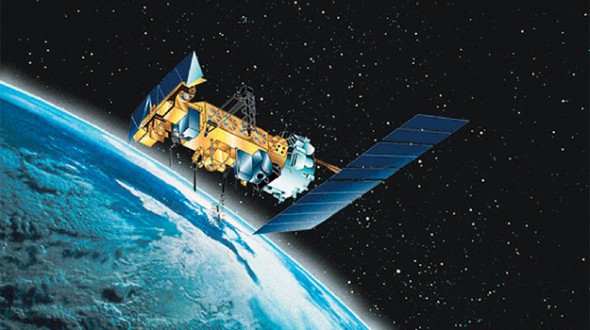
The next generation of cloud servers might be deployed where the clouds can be made of alcohol and cosmic dust: in space. That’s what ConnectX wants to do with their new data visualization platform.
Why space? It’s not as though there isn’t room to set up servers here on Earth, what with Germans willing to give up space in their utility rooms in exchange for a bit of ambient heat and malls now leasing empty storefronts to service providers. But there are certain advantages.
The desire to install servers where there’s abundant, free cooling makes plenty of sense. Down here on Earth, that’s what’s driven companies like Facebook to set up shop in Scandinavia near the edge of the Arctic Circle. Space gets a whole lot colder than the Arctic, so from that standpoint the ConnectX plan makes plenty of sense. There’s also virtually no humidity, which can wreak havoc on computers.
They also believe that the zero-g environment would do wonders for the lifespan of the hard drives in their servers, since it could reduce the resistance they encounter while spinning. That’s the same reason Western Digital started filling hard drives with helium.
But what about data transmission? How does ConnectX plan on moving the bits back and forth between their orbital servers and networks back on the ground? Though something similar to NASA’s Lunar Laser Communication Demonstration — which beamed data to the moon 4,800 times faster than any RF system ever managed — seems like a decent option, they’re leaning on RF.
Mind you, it’s a fairly complex setup. ConnectX says they’re polishing a system that “twists” signals to reap massive transmission gains. A similar system demonstrated last year managed to push data over radio waves at a staggering 32gbps, around 30 times faster than LTE.
So ConnectX seems to have that sorted. The only real question is the cost of deployment. Can the potential reduction in long-term maintenance costs really offset the massive expense of actually getting their servers into orbit? And what about upgrading capacity? It’s certainly not going to be nearly as fast, easy, or cheap as it is to do on Earth. That’s up to ConnectX to figure out, and they seem confident that they can make it work.
Wednesday, October 16. 2013
What Big Data Knows About Us
Via Mashable
-----


The world of Big Data is one of pervasive data collection and aggressive analytics. Some see the future and cheer it on; others rebel. Behind it all lurks a question most of us are asking — does it really matter? I had a chance to find out recently, as I got to see what Acxiom, a large-scale commercial data aggregator, had collected about me.
At least in theory large-scale data collection matters quite a bit. Large data sets can be used to create social network maps and can form the seeds for link analysis of connections between individuals. Some see this as a good thing; others as a bad one — but whatever your viewpoint, we live in a world which sees increasing power and utility in Big Data’s large-scale data sets.
Of course, much of the concern is about government collection. But it’s difficult to assess just how useful this sort of data collection by the government is because, of course, most governmental data collection projects are classified. The good news, however, is that we can begin to test the utility of the program in the private sector arena. A useful analog in the private sector just became publicly available and it’s both moderately amusing and instructive to use it as a lens for thinking about Big Data.
Acxiom is one of the largest commercial, private sector data aggregators around. It collects and sells large data sets about consumers — sometimes even to the government. And for years it did so quietly, behind the scene — as one writer put it “mapping the consumer genome.” Some saw this as rather ominous; others as just curious. But it was, for all of us, mysterious. Until now.
In September, the data giant made available to the public a portion of its data set. They created a new website — Abouthedata.com — where a consumer could go to see what data the company had collected about them. Of course, in order to access the data about yourself you had to first verify your own identity (I had to send in a photocopy of my driver’s license), but once you had done so, it would be possible to see, in broad terms, what the company thought it knew about you — and how close that knowledge was to reality.
I was curious, so I thought I would go explore myself and see what it was they knew and how accurate they were. The results were at times interesting, illuminating and mundane. Here are a few observations:
To begin with, the fundamental purpose of the data collection is to sell me things — that’s what potential sellers want to know about potential buyers and what, say, Amazon might want to know about me. So I first went and looked at a category called “Household Purchase Data” — in other words what I had recently bought.
It turns out that I buy … well … everything. I buy food, beverages, art, computing equipment, magazines, men’s clothing, stationary, health products, electronic products, sports and leisure products, and so forth. In other words, my purchasing habits were, to Acxiom, just an undifferentiated mass. Save for the notation that I had bought an antique in the past and that I have purchased “High Ticket Merchandise,” it seems that almost everything I bought was something that most any moderately well-to-do consumer would buy.
I do suppose that the wide variety of purchases I made is, itself, the point — by purchasing so widely I self-identify as a “good” consumer. But if that’s the point then the data set seems to miss the mark on “how good” I really am. Under the category of “total dollars spent,” for example, it said that I had spent just $1,898 in the past two years. Without disclosing too much about my spending habits in this public forum, I think it is fair to say that this is a significant underestimate of my purchasing activity.
The next data category of “Household Interests” was equally unilluminating. Acxiom correctly said I was interested in computers, arts, cooking, reading and the like. It noted that I was interested in children’s items (for my grandkids) and beauty items and gardening (both my wife’s interest, probably confused with mine). Here, as well, there was little differentiation, and I assume the breadth of my interests is what matters rather that the details. So, as a consumer, examining what was collected about me seemed to disclose only a fairly anodyne level of detail.
[Though I must object to the suggestion that I am an Apple user J. Anyone who knows me knows I prefer the Windows OS. I assume this was also the result of confusion within the household and a reflection of my wife’s Apple use. As an aside, I was invited throughout to correct any data that was in error. This I chose not to do, as I did not want to validate data for Acxiom – that’s their job not mine—and I had no real interest in enhancing their ability to sell me to other marketers. On the other hand I also did not take the opportunity they offered to completely opt-out of their data system, on the theory that a moderate amount of data in the world about me may actually lead to being offered some things I want to purchase.]
Things became a bit more intrusive (and interesting) when I started to look at my “Characteristic Data” — that is data about who I am. Some of the mistakes were a bit laughable — they pegged me as of German ethnicity (because of my last name, naturally) when, with all due respect to my many German friends, that isn’t something I’d ever say about myself. And they got my birthday wrong — lord knows why.
But some of their insights were at least moderately invasive of my privacy, and highly accurate. Acxiom “inferred” for example, that I’m married. They identified me accurately as a Republican (but notably not necessarily based on voter registration — instead it was the party I was “associated with by voter registration or as a supporter”). They knew there were no children in my household (all grown up) and that I run a small business and frequently work from home. And they knew which sorts of charities we supported (from surveys, online registrations and purchasing activity). Pretty accurate, I’d say.
Finally, it was completely unsurprising that the most accurate data about me was closely related to the most easily measurable and widely reported aspect of my life (at least in the digital world) — namely, my willingness to dive into the digital financial marketplace.
Acxiom knew that I had several credit cards and used them regularly. It had a broadly accurate understanding of my household total income range [I’m not saying!].Acxiom knew that I had several credit cards and used them regularly.
They also knew all about my house — which makes sense since real estate and liens are all matters of public record. They knew I was a home owner and what the assessed value was. The data showed, accurately, that I had a single family dwelling and that I’d lived there longer than 14 years. It disclosed how old my house was (though with the rather imprecise range of having been built between 1900 and 1940). And, of course, they knew what my mortgage was, and thus had a good estimate of the equity I had in my home.
So what did I learn from this exercise?
In some ways, very little. Nothing in the database surprised me, and the level of detail was only somewhat discomfiting. Indeed, I was more struck by how uninformative the database was than how detailed it was — what, after all, does anyone learn by knowing that I like to read? Perhaps Amazon will push me book ads, but they already know I like to read because I buy directly from them. If they had asserted that I like science fiction novels or romantic comedy movies, that level of detail might have demonstrated a deeper grasp of who I am — but that I read at all seems pretty trivial information about me.
I do, of course, understand that Acxiom has not completely lifted the curtains on its data holdings. All we see at About The Data is summary information. You don’t get to look at the underlying data elements. But even so, if that’s the best they can do ….
In fact, what struck me most forcefully was (to borrow a phrase from Hannah Arendt) the banality of it all. Some, like me, see great promise in big data analytics as a way of identifying terrorists or tracking disease. Others, with greater privacy concerns, look at big data and see Big Brother. But when I dove into one big data set (albeit only partially), held by one of the largest data aggregators in the world, all I really became was a bit bored.
Maybe that’s what they wanted as a way of reassuring me. If so, Acxiom succeeded, in spades.
Friday, November 23. 2012
Why Big Data Falls Short of Its Political Promise
Via Mashable
-----

Politics Transformed: The High Tech Battle for Your Vote is an in-depth look at how digital media is affecting elections. Mashable explores the trends changing politics in 2012 and beyond in these special reports.
Big Data. The very syntax of it is so damn imposing. It promises such relentless accuracy. It inspires so much trust –- a cohering framework in a time of chaos.
Big Data is all the buzz in consumer marketing. And the pundits are jabbering about 2012 as the year of Big Data in politics, much as social media itself was the dizzying buzz in 2008. Four years ago, Obama stunned us with his use of the web to raise money, to organize, to get out the vote. Now it’s all about Big Data’s ability to laser in with drone-like precision on small niches and individual voters, picking them off one by one.
It in its simplest form, Big Data describes the confluence of two forces — one technological, one social. The new technological reality is the amount of processing power and analytics now available, either free or at no cost. Google has helped pioneer that; as Wired puts it, one of its tools, called Dremel, makes “big data small.”
This level of mega-crunchability is what’s required to process the amount of data now available online, especially via social networks like Facebook and Twitter. Every time we Like something, it’s recorded on some cosmic abacus in the sky.
Then there’s our browsing history, captured and made available to advertisers through behavioral targeting. Add to that available public records on millions of voters — political consultants and media strategists have the ability drill down as god-like dentists.
Website TechPresident describes the conventional wisdom of Big Data as it relates to elections:
… data is dominating both the study and practice of political campaigns. Most observers readily acknowledge that the 2012 presidential campaign will be decided by the outcome of a handful of battles in just a few key swing states — identified thanks to the reckoning of data scientists and pollsters.
There are two sides to the use of Big Data. One is predictive — Twitter has its own sentiment index, analyzing tweets as 140-character barometers. Other companies, like GlobalPoint, aggregate social data and draw algorithmic conclusions.
But Big Data has a role beyond digital clairvoyance. It’s the role of digital genotyping in the political realm. Simply find the undecided voters and then message accordingly, based on clever connections and peeled-back insights into voter belief systems and purchase behaviors. Find the linkages and exploit them. If a swing voter in Ohio watches 30 Rock and scrubs with Mrs. Meyers Geranium hand soap, you know what sites to find her on and what issues she cares about. Tell them that your candidate supports their views, or perhaps more likely, call out your opponent’s demon views on geranium subsidies.
Central to this belief is that the election won’t be determined by big themes but by small interventions. Big Data’s governing heuristic is that shards of insight about you and your social network will lead to a new era of micro-persuasion. But there are three fallacies that undermine this shiny promise.
Atomic Fallacy
The atomic fallacy is the assumption that just because you can find small, Seurat-like dots in my behavior which indicate preferences, you can motivate me by appealing to those interests.
Yes, I may have searched for a Prius out of curiosity. I may follow environmental groups or advocates on Twitter. I may even have Facebook friends who actively oppose off-shore drilling and fracking. Big Data can identify those patterns, but it still doesn’t mean that Romney’s support of the Keystone pipeline will determine my vote.
There are thousands of issues like this. We care about subjects and might research them online, and those subjects that might lead us to join certain groups, but they aren’t going to change our voting behavior. Candidates can go down a rabbit hole looking for them. Give a child a hammer and everything is a nail; give a data scientist a preference and everything is a trigger.
And then when a candidate gets it wrong — and that’s inevitable — all credibility is lost. This data delinquency was memorialized in a famous Wall Street Journal story a decade ago: “If TiVo Thinks You Are Gay, Here’s How to Set It Straight.”
Big Data still hasn’t solved its over-compensation problem when it comes to recommendations.
Interruption Fallacy
I define the interruption fallacy as the mistaken notion that a marketer or a candidate (the difference is only the level of sanctimony) can rudely insert his message and magically recalibrate deeply ingrained passions.
So even if Big Data succeeds in identifying subjects of paramount importance to me, the interruption fallacy makes it extremely unlikely that digital marketing can overcome what behavioral psychologists call the confirmation bias and move minds. Targeting voters can reinforce positions, but that’s not what pundits are concerned about. They’re opining that Big Data has the ability to shift undecideds a few points in the swing states.
Those who haven’t made up their minds after being assaulted by locally targeted advertising, with messaging that has been excruciatingly poll-tested, are victims of media scorch. They’re burned out. They are suffering from banner blindness. Big Data will simply become a Big Annoyance.
Mobile devices pose another set of challenges for advertisers and candidates, as Randall Stross recently pointed out in The New York Times. There’s a tricky and perhaps non-negotiable tradeoff between intrusiveness and awareness, as well as that pesky privacy issue. Stross writes:
Digital advertisers working with smartphones must somehow make their ads large enough to be noticed, but not so large as to be an interruption. And they must be chosen to match a user’s interests, but not so closely as to induce a shiver.
But that shiver is exactly what Big Data’s crunching is designed to produce– a jolt of hyper-awareness that can easily cross over into creepy.
And then there’s the ongoing decline in the overall effectiveness of online advertising. As Business Insider puts it, “The clickthrough rates of banner ads, email invites and many other marketing channels on the web have decayed every year since they were invented.”
No matter how much Big Data is being paid to slice and dice, we’re just not paying attention.
Narrative Fallacy
If Big Data got its way, elections would be decided based on a checklist that matched a candidate’s position with a voter’s belief systems. Tax the rich? Check. Get government off the back of small business? Check. Starve public radio? Check. It’s that simple.
Or is it? We know from neuromarketing and behavioral psychology that elections are more often than not determined by the way a candidate frames the issues, and the neural networks those narratives ignite. I’ve written previously for Mashable about The Political Brain, a book by Drew Westen that explains how we process stories and images and turn them into larger structures. Isolated, random messages — no matter how exquisitely relevant they are — don’t create a story. And without that psychological framework, a series of disconnected policy positions — no matter how hyper-relevant — are effectively individual ingredients lacking a recipe. They seem good on paper but lack combinatorial art.
This is not to say that Big Data has no role in politics. But it’s simply a part of a campaign’s strategy, not its seminal machinery. After all, segmentation has long enabled candidates to efficiently refine and target their messages, but the latest religion of reductionism takes the proposition too far.
And besides, there’s an amazing — if not embarrassing — number of Big Data revelations that are intuitively transparent and screechingly obvious. A Washington Post story explains what our browsing habits tell us about our political views. The article shared this shocking insight: “If you use Spotify to listen to music, Tumblr to consume content or Buzzfeed to keep up on the latest in social media, you are almost certainly a vote for President Obama.”
Similarly, a company called CivicScience, which offers “real-time intelligence” by gathering and organizing the world’s opinions, and that modestly describes itself as “a bunch of machines and algorithms built from brilliant engineers from Carnegie Mellon University,” recently published a list of “255 Ways to Tell an Obama Supporter from a Romney Supporter.” In case you didn’t know, Obama supporters favor George Clooney and Woody Allen, while mysteriously, Romney supporters prefer neither of those, but like Mel Gibson.
At the end of the day, Big Data can be enormously useful. But its flaw is that it is far more logical, predicable and rational than the people it measures.
Personal Comment:
Tuesday, October 30. 2012
The Pirate Bay switches to cloud-based servers
Via Slash Gear
-----
It isn’t exactly a secret that authorities and entertainment groups don’t like The Pirate Bay, but today the infamous site made it a little bit harder for them to bring it down. The Pirate Bay announced today that it has move its servers to the cloud. This works in a couple different ways: it helps the people who run The Pirate Bay save money, while it makes it more difficult for police to carry out a raid on the site.

“All attempts to attack The Pirate Bay from now on is an attack on everything and nothing,” a Pirate Bay blog post reads. “The site that you’re at will still be here, for as long as we want it to. Only in a higher form of being. A reality to us. A ghost to those who wish to harm us.” The site told TorrentFreak after the switch that its currently being hosted by two different cloud providers in two different countries, and what little actual hardware it still needs to use is being kept in different countries as well. The idea is not only to make it harder for authorities to bring The Pirate Bay down, but also to make it easier to bring the site back up should that ever happen.
Even if authorities do manage to get their hands on The Pirate Bay’s remaining hardware, they’ll only be taking its transit router and its load balancer – the servers are stored in several Virtual Machine instances, along with all of TPB’s vital data. The kicker is that these cloud hosting companies aren’t aware that they’re hosting The Pirate Bay, and if they discovered the site was using their service, they’d have a hard time digging up any dirt on users since the communication between the VMs and the load balancer is encrypted.
In short, it sounds like The Pirate Bay has taken a huge step in not only protecting its own rear end, but those of users as well. If all of this works out the way The Pirate Bay is claiming it will, then don’t expect to hear about the site going down anytime soon. Still, there’s nothing stopping authorities from trying to bring it down, or from putting in the work to try and figure out who the people behind The Pirate Bay are. Stay tuned
Tuesday, September 25. 2012
Power, Pollution and the Internet
Via New York Times
-----
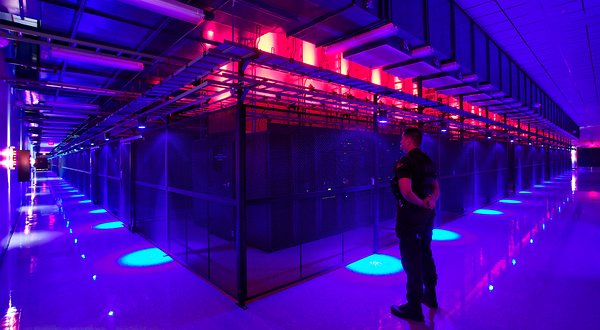
SANTA CLARA, Calif. — Jeff Rothschild’s machines at Facebook had a problem he knew he had to solve immediately. They were about to melt.
The company had been packing a 40-by-60-foot rental space here with racks of computer servers that were needed to store and process information from members’ accounts. The electricity pouring into the computers was overheating Ethernet sockets and other crucial components.
Thinking fast, Mr. Rothschild, the company’s engineering chief, took some employees on an expedition to buy every fan they could find — “We cleaned out all of the Walgreens in the area,” he said — to blast cool air at the equipment and prevent the Web site from going down.
That was in early 2006, when Facebook had a quaint 10 million or so users and the one main server site. Today, the information generated by nearly one billion people requires outsize versions of these facilities, called data centers, with rows and rows of servers spread over hundreds of thousands of square feet, and all with industrial cooling systems.
They are a mere fraction of the tens of thousands of data centers that now exist to support the overall explosion of digital information. Stupendous amounts of data are set in motion each day as, with an innocuous click or tap, people download movies on iTunes, check credit card balances through Visa’s Web site, send Yahoo e-mail with files attached, buy products on Amazon, post on Twitter or read newspapers online.
A yearlong examination by The New York Times has revealed that this foundation of the information industry is sharply at odds with its image of sleek efficiency and environmental friendliness.
Most data centers, by design, consume vast amounts of energy in an incongruously wasteful manner, interviews and documents show. Online companies typically run their facilities at maximum capacity around the clock, whatever the demand. As a result, data centers can waste 90 percent or more of the electricity they pull off the grid, The Times found.
To guard against a power failure, they further rely on banks of generators that emit diesel exhaust. The pollution from data centers has increasingly been cited by the authorities for violating clean air regulations, documents show. In Silicon Valley, many data centers appear on the state government’s Toxic Air Contaminant Inventory, a roster of the area’s top stationary diesel polluters.
Worldwide, the digital warehouses use about 30 billion watts of electricity, roughly equivalent to the output of 30 nuclear power plants, according to estimates industry experts compiled for The Times. Data centers in the United States account for one-quarter to one-third of that load, the estimates show.
“It’s staggering for most people, even people in the industry, to understand the numbers, the sheer size of these systems,” said Peter Gross, who helped design hundreds of data centers. “A single data center can take more power than a medium-size town.”
Energy efficiency varies widely from company to company. But at the request of The Times, the consulting firm McKinsey & Company analyzed energy use by data centers and found that, on average, they were using only 6 percent to 12 percent of the electricity powering their servers to perform computations. The rest was essentially used to keep servers idling and ready in case of a surge in activity that could slow or crash their operations.
A server is a sort of bulked-up desktop computer, minus a screen and keyboard, that contains chips to process data. The study sampled about 20,000 servers in about 70 large data centers spanning the commercial gamut: drug companies, military contractors, banks, media companies and government agencies.
“This is an industry dirty secret, and no one wants to be the first to say mea culpa,” said a senior industry executive who asked not to be identified to protect his company’s reputation. “If we were a manufacturing industry, we’d be out of business straightaway.”
These physical realities of data are far from the mythology of the Internet: where lives are lived in the “virtual” world and all manner of memory is stored in “the cloud.”
The inefficient use of power is largely driven by a symbiotic relationship between users who demand an instantaneous response to the click of a mouse and companies that put their business at risk if they fail to meet that expectation.
Even running electricity at full throttle has not been enough to satisfy the industry. In addition to generators, most large data centers contain banks of huge, spinning flywheels or thousands of lead-acid batteries — many of them similar to automobile batteries — to power the computers in case of a grid failure as brief as a few hundredths of a second, an interruption that could crash the servers.
“It’s a waste,” said Dennis P. Symanski, a senior researcher at the Electric Power Research Institute, a nonprofit industry group. “It’s too many insurance policies.”
Friday, May 11. 2012
The Cloud Storage Showdown – Dropbox, Google Drive, SkyDrive & More
Via makeuseof
-----
The cloud storage scene has heated up recently, with a long-awaited entry by Google and a revamped SkyDrive from Microsoft. Dropbox has gone unchallenged by the major players for a long time, but that’s changed – both Google and Microsoft are now challenging Dropbox on its own turf, and all three services have their own compelling features. One thing’s for sure – Dropbox is no longer the one-size-fits-all solution.
These three aren’t the only cloud storage services – the cloud storage arena is full of services with different features and priorities, including privacy-protecting encryption and the ability to synchronize any folder on your system.
Dropbox
Dropbox introduced cloud storage to the masses, with its simple approach to cloud storage and synchronization – a single magic folder that follows you everywhere. Dropbox deserves credit for being a pioneer in this space and the new Google Drive and SkyDrive both build on the foundation that Dropbox laid.
Dropbox doesn’t have strong integration with any ecosystems – which can be a good thing, as it is an ecosystem-agnostic approach that isn’t tied to Google, Microsoft, Apple, or any other company’s platform.

Dropbox today is a compelling and mature offering supporting a wide variety of platforms. Dropbox offers less free storage than the other services (unless you get involved in their referral scheme) and its prices are significantly higher than those of competing services – for example, an extra 100GB is four times more expensive with Dropbox compared to Google Drive.
- Supported Platforms: Windows, Mac, Linux, Android, iOS, Blackberry, Web.
- Free Storage: 2 GB (up to 16 GB with referrals).
- Price for Additional Storage: 50 GB for $10/month, 100 GB for $20/month.
- File Size Limit: Unlimited.
- Standout Features: the Public folder is an easy way to share files. Other services allow you to share files, but it isn’t quite as easy. You can sync files from other computers running Dropbox over the local network, speeding up transfers and taking a load off your Internet connection.

Google Drive
Google Drive is the evolution of Google Docs, which already allowed you to upload any file – Google Drive bumps the storage space up from 1 GB to 5 GB, offers desktop sync clients, and provides a new web interface and APIs for web app developers.
Google Drive is a serious entry from Google, not just an afterthought like the upload-any-file option was in Google Docs.

Its integration with third-party web apps – you can install apps and associate them with file types in Google Drive – shows Google’s vision of Google Drive being a web-based hard drive that eventually replaces the need for desktop sync clients entirely.
- Supported Platforms: Windows, Mac, Android, Web, iOS (coming soon), Linux (coming soon).
- Free Storage: 5 GB.
- Price for Additional Storage: 25 GB for $2.49/month, 100 GB for $4.99/month.
- File Size Limit: 10 GB.
- Standout Features: Deep search with automatic OCR and image recognition, web interface that can launch files directly in third-party web apps.

You can actually purchase up to 16 TB of storage space with Google Drive – for $800/month!
SkyDrive
Microsoft released a revamped SkyDrive the day before Google Drive launched, but Google Drive stole its thunder. Nevertheless, SkyDrive is now a compelling product, particularly for people into Microsoft’s ecosystem of Office web apps, Windows Phone, and Windows 8, where it’s built into Metro by default.
Like Google with Google Drive, Microsoft’s new SkyDrive product imitates the magic folder pioneered by Dropbox.

Microsoft offers the most free storage space at 7 GB – although this is down from the original 25 GB. Microsoft also offers good prices for additional storage.
- Supported Platforms: Windows, Mac, Windows Phone, iOS, Web.
- Free Storage: 7 GB.
- Price for Additional Storage: 20 GB for $10/year, 50 GB for $25/year, 100 GB for $50/year
- File Size Limit: 2 GB
- Standout Features: Ability to fetch unsynced files from outside the synced folders on connected PCs, if they’ve been left on.

Other Services
SugarSync is a popular alternative to Dropbox. It offers a free 5 GB of storage and it lets you choose the folders you want to synchronize – a feature missing in the above services, although you can use some tricks to synchronize other folders. SugarSync also has clients for mobile platforms that don’t get a lot of love, including Symbian, Windows Mobile, and Blackberry (Dropbox also has a Blackberry client).

Amazon also offers their own cloud storage service, known as Amazon Cloud Drive. There’s one big problem, though – there’s no official desktop sync client. Expect Amazon to launch their own desktop sync program if they’re serious about competing in this space. If you really want to use Amazon Cloud Drive, you can use a third-party application to access it from your desktop.

Box is popular, but its 25 MB file size limit is extremely low. It also offers no desktop sync client (except for businesses). While Box may be a good fit for the enterprise, it can’t stand toe-to-toe with the other services here for consumer cloud storage and syncing.
If you’re worried about the privacy of your data, you can use an encrypted service, such as SpiderOak or Wuala, instead. Or, if you prefer one of these services, use an app like BoxCryptor to encrypt files and store them on any cloud storage service.
Tuesday, April 03. 2012
Cracking the cloud: An Amazon Web Services primer
Via ars technica
-----
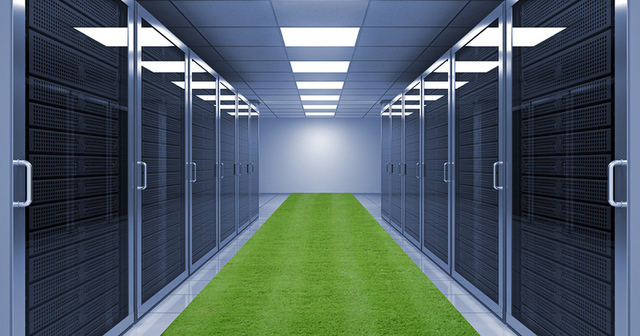
It's nice to imagine the cloud as an idyllic server room—with faux grass, no less!—but there's actually far more going on than you'd think.
Maybe you're a Dropbox devotee. Or perhaps you really like streaming Sherlock on Netflix. For that, you can thank the cloud.
In fact, it's safe to say that Amazon Web Services (AWS) has become synonymous with cloud computing; it's the platform on which some of the Internet's most popular sites and services are built. But just as cloud computing is used as a simplistic catchall term for a variety of online services, the same can be said for AWS—there's a lot more going on behind the scenes than you might think.
If you've ever wanted to drop terms like EC2 and S3 into casual conversation (and really, who doesn't?) we're going to demystify the most important parts of AWS and show you how Amazon's cloud really works.
Elastic Cloud Compute (EC2)
Think of EC2 as the computational brain behind an online application or service. EC2 is made up of myriad instances, which is really just Amazon's way of saying virtual machines. Each server can run multiple instances at a time, in either Linux or Windows configurations, and developers can harness multiple instances—hundreds, even thousands—to handle computational tasks of varying degrees. This is what the elastic in Elastic Cloud Compute refers to; EC2 will scale based on a user's unique needs.
Instances can be configured as either Windows machines, or with various flavors of Linux. Again, each instance comes in different sizes, depending on a developer's needs. Micro instances, for example, only come with 613 MB of RAM, while Extra Large instances can go up to 15GB. There are also other configurations for various CPU or GPU processing needs.
Finally, EC2 instances can be deployed across multiple regions—which is really just a fancy way of referring to the geographic location of Amazon's data centers. Multiple instances can be deployed within the same region (on separate blocks of infrastructure called availability zones, such as US East-1, US East-2, etc.), or across more than one region if increased redundancy and reduced latency is desired
Elastic Load Balance (ELB)
Another reason why a developer might deploy EC2 instances across multiple availability zones and regions is for the purpose of load balancing. Netflix, for example, uses a number of EC2 instances across multiple geographic location. If there was a problem with Amazon's US East center, for example, users would hopefully be able to connect to Netflix via the service's US West instances instead.
But what if there is no problem, and a higher number of users are connecting via instances on the East Coast than on the West? Or what if something goes wrong with a particular instance in a given availability zone? Amazon's Elastic Load Balance allows developers to create multiple EC2 instances and set rules that allow traffic to be distributed between them. That way, no one instance is needlessly burdened while others idle—and when combined with the ability for EC2 to scale, more instances can also be added for balance where required.
Elastic Block Storage (EBS)
Think of EBS as a hard drive in your computer—it's where an EC2 instance stores persistent files and applications that can be accessed again over time. An EBS volume can only be attached to one EC2 instance at a time, but multiple volumes can be attached to the same instance. An EBS volume can range from 1GB to 1TB in size, but must be located in the same availability zone as the instance you'd like to attach to.
Because EC2 instances by default don't include a great deal of local storage, it's possible to boot from an EBS volume instead. That way, when you shut down an EC2 instance and want to re-launch it at a later date, it's not just files and application data that persist, but the operating system itself.
Simple Storage Service (S3)
Unlike EBS volumes, which are used to store operating system and application data for use with an EC2 instance, Amazon's Simple Storage Service is where publicly facing data is usually stored instead. In other words, when you upload a new profile picture to Twitter, it's not being stored on an EBS volume, but with S3.
S3 is often used for static content, such as videos, images or music, though virtually anything can be uploaded and stored. Files uploaded to S3 are referred to as objects, which are then stored in buckets. As with EC2, S3 storage is scalable, which means that the only limit on storage is the amount of money you have to pay for it.
Buckets are also stored in regions, and within that region “are redundantly stored on multiple devices across multiple facilities.” However, this can cause latency issues if a user in Europe is trying to access files stored in a bucket within the US West region, for example. As a result, Amazon also offers a service called CloudFront, which allows objects to be mirrored across other regions.
While these are the core features that make up Amazon Web Services, this is far from a comprehensive list. For example, on the AWS landing page alone, you'll find things such as DynamoDB, Route53, Elastic Beanstalk, and other features that would take much longer to detail here.
However, if you've ever been confused about how the basics of AWS work—specifically, how computational data and storage is provisioned and scaled—we hope this gives you a better sense of how Amazon's brand of cloud works.
Correction: Initially, we confused regions in AWS with availability zones. As Mhj.work explains in the comments of this article, "availability Zones are actually "discrete" blocks of infrastructure ... at a single geographical location, whereas the geographical units are called Regions. So for example, EU-West is the Region, whilst EU-West-1, EU-West-2, and EU-West-3 are Availability Zones in that Region." We have updated the text to make this point clearer.
Monday, February 06. 2012
The Great Disk Drive in the Sky: How Web giants store big—and we mean big—data
Via Ars Technica
-----
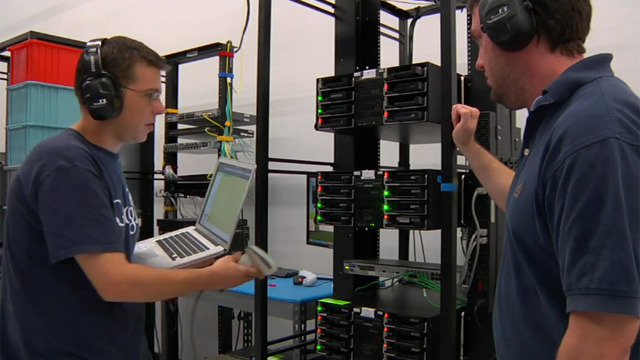
Google technicians test hard drives at their data center in Moncks Corner, South Carolina -- Image courtesy of Google Datacenter Video
Consider the tech it takes to back the search box on Google's home page: behind the algorithms, the cached search terms, and the other features that spring to life as you type in a query sits a data store that essentially contains a full-text snapshot of most of the Web. While you and thousands of other people are simultaneously submitting searches, that snapshot is constantly being updated with a firehose of changes. At the same time, the data is being processed by thousands of individual server processes, each doing everything from figuring out which contextual ads you will be served to determining in what order to cough up search results.
The storage system backing Google's search engine has to be able to serve millions of data reads and writes daily from thousands of individual processes running on thousands of servers, can almost never be down for a backup or maintenance, and has to perpetually grow to accommodate the ever-expanding number of pages added by Google's Web-crawling robots. In total, Google processes over 20 petabytes of data per day.
That's not something that Google could pull off with an off-the-shelf storage architecture. And the same goes for other Web and cloud computing giants running hyper-scale data centers, such as Amazon and Facebook. While most data centers have addressed scaling up storage by adding more disk capacity on a storage area network, more storage servers, and often more database servers, these approaches fail to scale because of performance constraints in a cloud environment. In the cloud, there can be potentially thousands of active users of data at any moment, and the data being read and written at any given moment reaches into the thousands of terabytes.
The problem isn't simply an issue of disk read and write speeds. With data flows at these volumes, the main problem is storage network throughput; even with the best of switches and storage servers, traditional SAN architectures can become a performance bottleneck for data processing.
Then there's the cost of scaling up storage conventionally. Given the rate that hyper-scale web companies add capacity (Amazon, for example, adds as much capacity to its data centers each day as the whole company ran on in 2001, according to Amazon Vice President James Hamilton), the cost required to properly roll out needed storage in the same way most data centers do would be huge in terms of required management, hardware, and software costs. That cost goes up even higher when relational databases are added to the mix, depending on how an organization approaches segmenting and replicating them.
The need for this kind of perpetually scalable, durable storage has driven the giants of the Web—Google, Amazon, Facebook, Microsoft, and others—to adopt a different sort of storage solution: distributed file systems based on object-based storage. These systems were at least in part inspired by other distributed and clustered filesystems such as Red Hat's Global File System and IBM's General Parallel Filesystem.
The architecture of the cloud giants' distributed file systems separates the metadata (the data about the content) from the stored data itself. That allows for high volumes of parallel reading and writing of data across multiple replicas, and the tossing of concepts like "file locking" out the window.
The impact of these distributed file systems extends far beyond the walls of the hyper-scale data centers they were built for— they have a direct impact on how those who use public cloud services such as Amazon's EC2, Google's AppEngine, and Microsoft's Azure develop and deploy applications. And companies, universities, and government agencies looking for a way to rapidly store and provide access to huge volumes of data are increasingly turning to a whole new class of data storage systems inspired by the systems built by cloud giants. So it's worth understanding the history of their development, and the engineering compromises that were made in the process.
Google File System
Google was among the first of the major Web players to face the storage scalability problem head-on. And the answer arrived at by Google's engineers in 2003 was to build a distributed file system custom-fit to Google's data center strategy—Google File System (GFS).
GFS is the basis for nearly all of the company's cloud services. It handles data storage, including the company's BigTable database and the data store for Google's AppEngine platform-as-a-service, and it provides the data feed for Google's search engine and other applications. The design decisions Google made in creating GFS have driven much of the software engineering behind its cloud architecture, and vice-versa. Google tends to store data for applications in enormous files, and it uses files as "producer-consumer queues," where hundreds of machines collecting data may all be writing to the same file. That file might be processed by another application that merges or analyzes the data—perhaps even while the data is still being written.
Google keeps most technical details of GFS to itself, for obvious reasons. But as described by Google research fellow Sanjay Ghemawat, principal engineer Howard Gobioff, and senior staff engineer Shun-Tak Leung in a paper first published in 2003, GFS was designed with some very specific priorities in mind: Google wanted to turn large numbers of cheap servers and hard drives into a reliable data store for hundreds of terabytes of data that could manage itself around failures and errors. And it needed to be designed for Google's way of gathering and reading data, allowing multiple applications to append data to the system simultaneously in large volumes and to access it at high speeds.
Much in the way that a RAID 5 storage array "stripes" data across multiple disks to gain protection from failures, GFS distributes files in fixed-size chunks which are replicated across a cluster of servers. Because they're cheap computers using cheap hard drives, some of those servers are bound to fail at one point or another—so GFS is designed to be tolerant of that without losing (too much) data.
But the similarities between RAID and GFS end there, because those servers can be distributed across the network—either within a single physical data center or spread over different data centers, depending on the purpose of the data. GFS is designed primarily for bulk processing of lots of data. Reading data at high speed is what's important, not the speed of access to a particular section of a file, or the speed at which data is written to the file system. GFS provides that high output at the expense of more fine-grained reads and writes to files and more rapid writing of data to disk. As Ghemawat and company put it in their paper, "small writes at arbitrary positions in a file are supported, but do not have to be efficient."
This distributed nature, along with the sheer volume of data GFS handles—millions of files, most of them larger than 100 megabytes and generally ranging into gigabytes—requires some trade-offs that make GFS very much unlike the sort of file system you'd normally mount on a single server. Because hundreds of individual processes might be writing to or reading from a file simultaneously, GFS needs to supports "atomicity" of data—rolling back writes that fail without impacting other applications. And it needs to maintain data integrity with a very low synchronization overhead to avoid dragging down performance.
GFS consists of three layers: a GFS client, which handles requests for data from applications; a master, which uses an in-memory index to track the names of data files and the location of their chunks; and the "chunk servers" themselves. Originally, for the sake of simplicity, GFS used a single master for each cluster, so the system was designed to get the master out of the way of data access as much as possible. Google has since developed a distributed master system that can handle hundreds of masters, each of which can handle about 100 million files.
When the GFS client gets a request for a specific data file, it requests the location of the data from the master server. The master server provides the location of one of the replicas, and the client then communicates directly with that chunk server for reads and writes during the rest of that particular session. The master doesn't get involved again unless there's a failure.
To ensure that the data firehose is highly available, GFS trades off some other things—like consistency across replicas. GFS does enforce data's atomicity—it will return an error if a write fails, then rolls the write back in metadata and promotes a replica of the old data, for example. But the master's lack of involvement in data writes means that as data gets written to the system, it doesn't immediately get replicated across the whole GFS cluster. The system follows what Google calls a "relaxed consistency model" out of the necessities of dealing with simultaneous access to data and the limits of the network.
This means that GFS is entirely okay with serving up stale data from an old replica if that's what's the most available at the moment—so long as the data eventually gets updated. The master tracks changes, or "mutations," of data within chunks using version numbers to indicate when the changes happened. As some of the replicas get left behind (or grow "stale"), the GFS master makes sure those chunks aren't served up to clients until they're first brought up-to-date.
But that doesn't necessarily happen with sessions already connected to those chunks. The metadata about changes doesn't become visible until the master has processed changes and reflected them in its metadata. That metadata also needs to be replicated in multiple locations in case the master fails—because otherwise the whole file system is lost. And if there's a failure at the master in the middle of a write, the changes are effectively lost as well. This isn't a big problem because of the way that Google deals with data: the vast majority of data used by its applications rarely changes, and when it does data is usually appended rather than modified in place.
While GFS was designed for the apps Google ran in 2003, it wasn't long before Google started running into scalability issues. Even before the company bought YouTube, GFS was starting to hit the wall—largely because the new applications Google was adding didn't work well with the ideal 64-megabyte file size. To get around that, Google turned to Bigtable, a table-based data store that vaguely resembles a database and sits atop GFS. Like GFS below it, Bigtable is mostly write-once, so changes are stored as appends to the table—which Google uses in applications like Google Docs to handle versioning, for example.
The foregoing is mostly academic if you don't work at Google (though it may help users of AppEngine, Google Cloud Storage and other Google services to understand what's going on under the hood a bit better). While Google Cloud Storage provides a public way to store and access objects stored in GFS through a Web interface, the exact interfaces and tools used to drive GFS within Google haven't been made public. But the paper describing GFS led to the development of a more widely used distributed file system that behaves a lot like it: the Hadoop Distributed File System.
Hadoop DFS
Developed in Java and open-sourced as a project of the Apache Foundation, Hadoop has developed such a following among Web companies and others coping with "big data" problems that it has been described as the "Swiss army knife of the 21st Century." All the hype means that sooner or later, you're more likely to find yourself dealing with Hadoop in some form than with other distributed file systems—especially when Microsoft starts shipping it as an Windows Server add-on.
Named by developer Doug Cutting after his son's stuffed elephant, Hadoop was "inspired" by GFS and Google's MapReduce distributed computing environment. In 2004, as Cutting and others working on the Apache Nutch search engine project sought a way to bring the crawler and indexer up to "Web scale," Cutting read Google's papers on GFS and MapReduce and started to work on his own implementation. While most of the enthusiasm for Hadoop comes from Hadoop's distributed data processing capability, derived from its MapReduce-inspired distributed processing management, the Hadoop Distributed File System is what handles the massive data sets it works with.
Hadoop is developed under the Apache license, and there are a number of commercial and free distributions available. The distribution I worked with was from Cloudera (Doug Cutting's current employer)—the Cloudera Distribution Including Apache Hadoop (CDH), the open-source version of Cloudera's enterprise platform, and Cloudera Service and Configuration Express Edition, which is free for up to 50 nodes.
HortonWorks, the company with which Microsoft has aligned to help move Hadoop to Azure and Windows Server (and home to much of the original Yahoo team that worked on Hadoop), has its own Hadoop-based HortonWorks Data Platform in a limited "technology preview" release. There's also a Debian package of the Apache Core, and a number of other open-source and commercial products that are based on Hadoop in some form.
HDFS can be used to support a wide range of applications where high volumes of cheap hardware and big data collide. But because of its architecture, it's not exactly well-suited to general purpose data storage, and it gives up a certain amount of flexibility. HDFS has to do away with certain things usually associated with file systems in order to make sure it can perform well with massive amounts of data spread out over hundreds, or even thousands, of physical machines—things like interactive access to data.
While Hadoop runs in Java, there are a number of ways to interact with HDFS besides its Java API. There's a C-wrapped version of the API, a command line interface through Hadoop, and files can be browsed through HTTP requests. There's also MountableHDFS, an add-on based on FUSE that allows HDFS to be mounted as a file system by most operating systems. Developers are working on a WebDAV interface as well to allow Web-based writing of data to the system.
HDFS follows the architectural path laid out by Google's GFS fairly closely, following its three-tiered, single master model. Each Hadoop cluster has a master server called the "NameNode" which tracks the metadata about the location and replication state of each 64-megabyte "block" of storage. Data is replicated across the "DataNodes" in the cluster—the slave systems that handle data reads and writes. Each block is replicated three times by default, though the number of replicas can be increased by changing the configuration of the cluster.
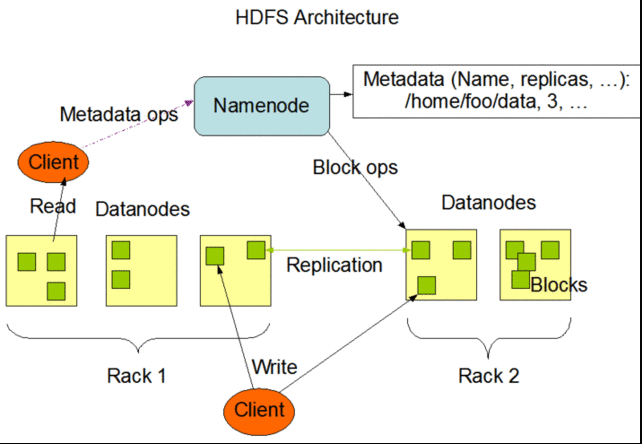
As in GFS, HDFS gets the master server out of the read-write loop as quickly as possible to avoid creating a performance bottleneck. When a request is made to access data from HDFS, the NameNode sends back the location information for the block on the DataNode that is closest to where the request originated. The NameNode also tracks the health of each DataNode through a "heartbeat" protocol and stops sending requests to DataNodes that don't respond, marking them "dead."
After the handoff, the NameNode doesn't handle any further interactions. Edits to data on the DataNodes are reported back to the NameNode and recorded in a log, which then guides replication across the other DataNodes with replicas of the changed data. As with GFS, this results in a relatively lazy form of consistency, and while the NameNode will steer new requests to the most recently modified block of data, jobs in progress will still hit stale data on the DataNodes they've been assigned to.
That's not supposed to happen much, however, as HDFS data is supposed to be "write once"—changes are usually appended to the data, rather than overwriting existing data, making for simpler consistency. And because of the nature of Hadoop applications, data tends to get written to HDFS in big batches.
When a client sends data to be written to HDFS, it first gets staged in a temporary local file by the client application until the data written reaches the size of a data block—64 megabytes, by default. Then the client contacts the NameNode and gets back a datanode and block location to write the data to. The process is repeated for each block of data committed, one block at a time. This reduces the amount of network traffic created, and it slows down the write process as well. But HDFS is all about the reads, not the writes.
Another way HDFS can minimize the amount of write traffic over the network is in how it handles replication. By activating an HDFS feature called "rack awareness" to manage distribution of replicas, an administrator can specify a rack ID for each node, designating where it is physically located through a variable in the network configuration script. By default, all nodes are in the same "rack." But when rack awareness is configured, HDFS places one replica of each block on another node within the same data center rack, and another in a different rack to minimize the amount of data-writing traffic across the network—based on the reasoning that the chance of a whole rack failure is less likely than the failure of a single node. In theory, this improves overall write performance to HDFS without sacrificing reliability.
As with the early version of GFS, HDFS's NameNode potentially creates a single point of failure for what's supposed to be a highly available and distributed system. If the metadata in the NameNode is lost, the whole HDFS environment becomes essentially unreadable—like a hard disk that has lost its file allocation table. HDFS supports using a "backup node," which keeps a synchronized version of the NameNode's metadata in-memory, and stores snap-shots of previous states of the system so that it can be rolled back if necessary. Snapshots can also be stored separately on what's called a "checkpoint node." However, according to the HDFS documentation, there's currently no support within HDFS for automatically restarting a crashed NameNode, and the backup node doesn't automatically kick in and replace the master.
HDFS and GFS were both engineered with search-engine style tasks in mind. But for cloud services targeted at more general types of computing, the "write once" approach and other compromises made to ensure big data query performance are less than ideal—which is why Amazon developed its own distributed storage platform, called Dynamo.
Amazon's S3 and Dynamo
As Amazon began to build its Web services platform, the company had much different application issues than Google.
Until recently, like GFS, Dynamo hasn't been directly exposed to customers. As Amazon CTO Werner Vogels explained in his blog in 2007, it is the underpinning of storage services and other parts of Amazon Web Services that are highly exposed to Amazon customers, including Amazon's Simple Storage Service (S3) and SimpleDB. But on January 18 of this year, Amazon launched a database service called DynamoDB, based on the latest improvements to Dynamo. It gave customers a direct interface as a "NoSQL" database.
Dynamo has a few things in common with GFS and HDFS: it's also designed with less concern for consistency of data across the system in exchange for high availability, and to run on Amazon's massive collection of commodity hardware. But that's where the similarities start to fade away, because Amazon's requirements for Dynamo were totally different.
Amazon needed a file system that could deal with much more general purpose data access—things like Amazon's own e-commerce capabilities, including customer shopping carts, and other very transactional systems. And the company needed much more granular and dynamic access to data. Rather than being optimized for big streams of data, the need was for more random access to smaller components, like the sort of access used to serve up webpages.
According to the paper presented by Vogels and his team at the Symposium on Operating Systems Principles conference in October 2007, "Dynamo targets applications that need to store objects that are relatively small (usually less than 1 MB)." And rather than being optimized for reads, Dynamo is designed to be "always writeable," being highly available for data input—precisely the opposite of Google's model.
"For a number of Amazon services," the Amazon Dynamo team wrote in their paper, "rejecting customer updates could result in a poor customer experience. For instance, the shopping cart service must allow customers to add and remove items from their shopping cart even amidst network and server failures." At the same time, the services based on Dynamo can be applied to much larger data sets—in fact, Amazon offers the Hadoop-based Elastic MapReduce service based on S3 atop of Dynamo.
In order to meet those requirements, Dynamo's architecture is almost the polar opposite of GFS—it more closely resembles a peer-to-peer system than the master-slave approach. Dynamo also flips how consistency is handled, moving away from having the system resolve replication after data is written, and instead doing conflict resolution on data when executing reads. That way, Dynamo never rejects a data write, regardless of whether it's new data or a change to existing data, and the replication catches up later.
Because of concerns about the pitfalls of a central master server failure (based on previous experiences with service outages), and the pace at which Amazon adds new infrastructure to its cloud, Vogel's team chose a decentralized approach to replication. It was based on a self-governing data partitioning scheme that used the concept of consistent hashing. The resources within each Dynamo cluster are mapped as a continuous circle of address spaces, and each storage node in the system is given a random value as it is added to the cluster—a value that represents its "position" on the Dynamo ring. Based on the number of storage nodes in the cluster, each node takes responsibility for a chunk of address spaces based on its position. As storage nodes are added to the ring, they take over chunks of address space and the nodes on either side of them in the ring adjust their responsibility. Since Amazon was concerned about unbalanced loads on storage systems as newer, better hardware was added to clusters, Dynamo allows multiple virtual nodes to be assigned to each physical node, giving bigger systems a bigger share of the address space in the cluster.
When data gets written to Dynamo—through a "put" request—the systems assigns a key to the data object being written. That key gets run through a 128-bit MD5 hash; the value of the hash is used as an address within the ring for the data. The data node responsible for that address becomes the "coordinator node" for that data and is responsible for handling requests for it and prompting replication of the data to other nodes in the ring, as shown in the Amazon diagram below:

This spreads requests out across all the nodes in the system. In the event of a failure of one of the nodes, its virtual neighbors on the ring start picking up requests and fill in the vacant space with their replicas.
Then there's Dynamo's consistency-checking scheme. When a "get" request comes in from a client application, Dynamo polls its nodes to see who has a copy of the requested data. Each node with a replica responds, providing information about when its last change was made, based on a vector clock—a versioning system that tracks the dependencies of changes to data. Depending on how the polling is configured, the request handler can wait to get just the first response back and return it (if the application is in a hurry for any data and there's low risk of a conflict—like in a Hadoop application) or it can wait for two, three, or more responses. For multiple responses from the storage nodes, the handler checks to see which is most up-to-date and alerts the nodes that are stale to copy the data from the most current, or it merges versions that have non-conflicting edits. This scheme works well for resiliency under most circumstances—if nodes die, and new ones are brought online, the latest data gets replicated to the new node.
The most recent improvements in Dynamo, and the creation of DynamoDB, were the result of looking at why Amazon's internal developers had not adopted Dynamo itself as the base for their applications, and instead relied on the services built atop it—S3, SimpleDB, and Elastic Block Storage. The problems that Amazon faced in its April 2011 outage were the result of replication set up between clusters higher in the application stack—in Amazon's Elastic Block Storage, where replication overloaded the available additional capacity, rather than because of problems with Dynamo itself.
The overall stability of Dynamo has made it the inspiration for open-source copycats just as GFS did. Facebook relies on Cassandra, now an Apache project, which is based on Dynamo. Basho's Riak "NoSQL" database also is derived from the Dynamo architecture.
Microsoft's Azure DFS
When Microsoft launched the Azure platform-as-a-service, it faced a similar set of requirements to those of Amazon—including massive amounts of general-purpose storage. But because it's a PaaS, Azure doesn't expose as much of the infrastructure to its customers as Amazon does with EC2. And the service has the benefit of being purpose-built as a platform to serve cloud customers instead of being built to serve a specific internal mission first.
So in some respects, Azure's storage architecture resembles Amazon's—it's designed to handle a variety of sizes of "blobs," tables, and other types of data, and to provide quick access at a granular level. But instead of handling the logical and physical mapping of data at the storage nodes themselves, Azure's storage architecture separates the logical and physical partitioning of data into separate layers of the system. While incoming data requests are routed based on a logical address, or "partition," the distributed file system itself is broken into gigabyte-sized chunks, or "extents." The result is a sort of hybrid of Amazon's and Google's approaches, illustrated in this diagram from Microsoft:
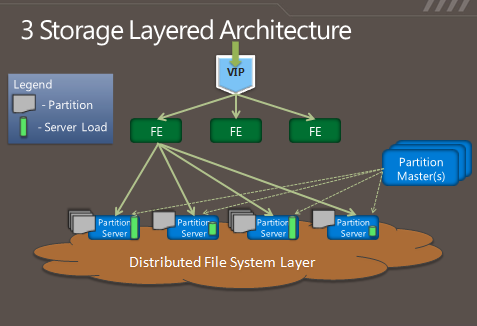
As Microsoft's Brad Calder describes in his overview of Azure's storage architecture, Azure uses a key system similar to that used in Dynamo to identify the location of data. But rather than having the application or service contact storage nodes directly, the request is routed through a front-end layer that keeps a map of data partitions in a role similar to that of HDFS's NameNode. Unlike HDFS, Azure uses multiple front-end servers, load balancing requests across them. The front-end server handles all of the requests from the client application authenticating the request, and handles communicating with the next layer down—the partition layer.
Each logical chunk of Azure's storage space is managed by a partition server, which tracks which extents within the underlying DFS hold the data. The partition server handles the reads and writes for its particular set of storage objects. The physical storage of those objects is spread across the DFS' extents, so all partition servers each have access to all of the extents in the DFS. In addition to buffering the DFS from the front-end servers's read and write requests, the partition servers also cache requested data in memory, so repeated requests can be responded to without having to hit the underlying file system. That boosts performance for small, frequent requests like those used to render a webpage.
All of the metadata for each partition is replicated back to a set of "partition master" servers, providing a backup of the information if a partition server fails—if one goes down, its partitions are passed off to other partition servers dynamically. The partition masters also monitor the workload on each partition server in the Azure storage cluster; if a particular partition server is becoming overloaded, the partition master can dynamically re-assign partitions.
Azure is unlike the other big DFS systems in that it more tightly enforces consistency of data writes. Replication of data happens when writes are sent to the DFS, but it's not the lazy sort of replication that is characteristic of GFS and HDFS. Each extent of storage is managed by a primary DFS server and replicated to multiple secondaries; one DFS server may be a primary for a subset of extents and a secondary server for others. When a partition server passes a write request to DFS, it contacts the primary server for the extent the data is being written to, and the primary passes the write to its secondaries. The write is only reported as successful when the data has been replicated successfully to three secondary servers.
As with the partition layer, Azure DFS uses load balancing on the physical layer in an attempt to prevent systems from getting jammed with too much I/O. Each partition server monitors the workload on the primary extent servers it accesses; when a primary DFS server starts to red-line, the partition server starts redirecting read requests to secondary servers, and redirecting writes to extents on other servers.
The next level of "distributed"
Distributed file systems are hardly a guarantee of perpetual uptime. In most cases, DFS's only replicate within the same data center because of the amount of bandwidth required to keep replicas in sync. But replication within the data center, for example doesn't help when the whole data center gets taken offline or a backup network switch fails to kick in when the primary fails. In August, Microsoft and Amazon both had data centers in Dublin taken offline by a transformer explosion—which created a spike that kept backup generators from starting.
Systems that are lazier about replication, such as GFS and Hadoop, can asynchronously handle replication between two data centers; for example, using "rack awareness," Hadoop clusters can be configured to point to a DataNode offsite, and metadata can be passed to a remote checkpoint or backup node (at least in theory). But for more dynamic data, that sort of replication can be difficult to manage.
That's one of the reasons Microsoft released a feature called "geo-replication" in September. Geo-replication is a feature that will sync customers' data between two data center locations hundred of miles apart. Rather than using the tightly coupled replication Microsoft uses within the data center, geo-replication happens asynchronously. Both of the Azure data centers have to be in the same region; for example, data for an application set up through the Azure Portal at the North Central US data center can be replicated to the South Central US.
In Amazon's case, the company does replication across availability zones at a service level rather than down in the Dynamo architecture. While Amazon hasn't published how it handles its own geo-replication, it provides customers with the ability to "snap shot" their EBS storage to a remote S3 data "bucket."
And that's the approach Amazon and Google have generally taken in evolving their distributed file systems: making the fixes in the services based on them, rather than in the underlying architecture. While Google has added a distributed master system to GFS and made other tweaks to accommodate its ever-growing data flows, the fundamental architecture of Google's system is still very much like it was in 2003.
But in the long term, the file systems themselves may become more focused on being an archive of data than something applications touch directly. In an interview with Ars, database pioneer (and founder of VoltDB) Michael Stonebraker said that as data volumes continue to go up for "big data" applications, server memory is becoming "the new disk" and file systems are becoming where the log for application activity gets stored—"the new tape." As the cloud giants push for more power efficiency and performance from their data centers, they have already moved increasingly toward solid-state drives and larger amounts of system memory.
Monday, January 23. 2012
Quantum physics enables perfectly secure cloud computing
Tuesday, December 20. 2011
OwnCloud: An open-source cloud to call your own
Via ZDNet
-----

Everyone likes personal cloud services, like Apple’s iCloud, Google Music, and Dropbox. But, many of aren’t crazy about the fact that our files, music, and whatever are sitting on someone else’s servers without our control. That’s where ownCloud comes in.
OwnCloud is an open-source cloud program. You use it to set up your own cloud server for file-sharing, music-streaming, and calendar, contact, and bookmark sharing project. As a server program it’s not that easy to set up. OpenSUSE, with its Mirall installation program and desktop client makes it easier to set up your own personal ownCloud, but it’s still not a simple operation. That’s going to change.
According to ownCloud’s business crew, “OwnCloud offers the ease-of-use and cost effectiveness of Dropbox and box.net with a more secure, better managed offering that, because it’s open source, offers greater flexibility and no vendor lock in. This makes it perfect for business use. OwnCloud users can run file sync and share services on their own hardware and storage or use popular public hosting and storage offerings.” I’ve tried it myself and while setting it up is still mildly painful, once up ownCloud works well.
OwnCloud enables universal access to files through a Web browser or WebDAV. It also provides a platform to easily view and sync contacts, calendars and bookmarks across all devices and enables basic editing right on the Web. Programmers will be able to add features to it via its open application programming interface (API).
OwnCloud is going to become an easy to run and use personal, private cloud thanks to a new commercial company that’s going to take ownCloud from interesting open-source project to end-user friendly program. This new company will be headed by former SUSE/Novell executive Markus Rex. Rex, who I’ve known for years and is both a business and technology wizard, will serve as both CEO and CTO. Frank Karlitschek, founder of the ownCloud project, will be staying.
To make this happen, this popular–350,000 users-program’s commercial side is being funded by Boston-based General Catalyst, a high-tech. venture capital firm. In the past, General Catalyst has helped fund such companies as online travel company Kayak and online video platform leader Brightcove.
General Catalyst came on board, said John Simon, Managing Director at General Catalyst in a statement, because, “With the explosion of unstructured data in the enterprise and increasingly mobile (and insecure) ways to access it, many companies have been forced to lock down their data–sometimes forcing employees to find less than secure means of access, or, if security is too restrictive, risk having all that unavailable When we saw the ease-of-use, security and flexibility of ownCloud, we were sold.”
“In a cloud-oriented world, ownCloud is the only tool based on a ubiquitous open-source platform,” said Rex, in a statement. “This differentiator enables businesses complete, transparent, compliant control over their data and data storage costs, while also allowing employees simple and easy data access from anywhere.”
As a Linux geek, I already liked ownCloud. At the company releases
mass-market ownCloud products and service in 2012, I think many of you
are going to like it as well. I’m really looking forward to seeing where
this program goes from here.
Quicksearch
Popular Entries
- The great Ars Android interface shootout (131719)
- Norton cyber crime study offers striking revenue loss statistics (102830)
- MeCam $49 flying camera concept follows you around, streams video to your phone (100747)
- Norton cyber crime study offers striking revenue loss statistics (59059)
- The PC inside your phone: A guide to the system-on-a-chip (58962)
Categories

Show tagged entries
Syndicate This Blog
Calendar

|
October '26 | |||||
| Mon | Tue | Wed | Thu | Fri | Sat | Sun |
| 1 | 2 | 3 | 4 | |||
| 5 | 6 | 7 | 8 | 9 | 10 | 11 |
| 12 | 13 | 14 | 15 | 16 | 17 | 18 |
| 19 | 20 | 21 | 22 | 23 | 24 | 25 |
| 26 | 27 | 28 | 29 | 30 | 31 | |