Can computers learn to read? We think so. "Read the Web" is a
research project that attempts to create a computer system that learns
over time to read the web. Since January 2010, our computer system
called NELL (Never-Ending Language Learner) has been running
continuously, attempting to perform two tasks each day:
First, it attempts to "read," or extract facts from text found in hundreds of millions of web pages (e.g., playsInstrument(George_Harrison, guitar)).
Second, it attempts to improve its reading competence, so that tomorrow it can extract more facts from the web, more accurately.
So far, NELL has accumulated over 50 million candidate beliefs by
reading the web, and it is considering these at different levels of
confidence. NELL has high confidence in 2,132,551 of these beliefs —
these are displayed on this website. It is not perfect, but NELL is
learning. You can track NELL's progress below or @cmunell on Twitter, browse and download its knowledge base, read more about our technical approach, or join the discussion group.
Chrome, Internet Explorer, and Firefox are vulnerable to
easy-to-execute techniques that allow unscrupulous websites to construct
detailed histories of sites visitors have previously viewed, an attack
that revives a long-standing privacy threat many people thought was
fixed.
Until a few years ago, history-sniffing attacks were accepted as an
unavoidable consequence of Web surfing, no matter what browser someone
used. By abusing a combination of features in JavaScript and cascading style sheets,
websites could probe a visitor's browser to check if it had visited one
or more sites. In 2010, researchers at the University of California at
San Diego caught YouPorn.com and 45 other sites using the technique to determine if visitors viewed other pornographic sites. Two years later, a widely used advertising network settled federal charges that it illegally exploited the weakness to infer if visitors were pregnant.
Until about four years ago, there was little users could do other
than delete browsing histories from their computers or use features such
as incognito or in-private browsing available in Google Chrome and
Microsoft Internet Explorer respectively. The privacy intrusion was
believed to be gradually foreclosed thanks to changes made in each
browser. To solve the problem, browser developers restricted the styles
that could be applied to visited links and tightened the ways JavaScript
could interact with them. That allowed visited links to show up in
purple and unvisited links to appear in blue without that information
being detectable to websites.
Now, a graduate student at Hasselt University in Belgium
said he has confirmed that Chrome, IE, and Firefox users are once again
susceptible to browsing-history sniffing. Borrowing from a browser-timing attack disclosed last year
by fellow researcher Paul Stone, student Aäron Thijs was able to
develop code that forced all three browsers to divulge browsing history
contents. He said other browsers, including Safari and Opera, may also
be vulnerable, although he has not tested them.
"The attack could be used to check if the victim visited certain
websites," Thijs wrote in an e-mail to Ars. "In my example attack
vectors I only check 'https://www.facebook.com'; however, it could be
modified to check large sets of websites. If the script is embedded into
a website that any browser user visits, it can run silently in the
background and a connection could be set up to report the results back
to the attacker."
The sniffing of his experimental attack code was relatively modest,
checking only the one site when the targeted computer wasn't under heavy
load. By contrast, more established exploits from a few years ago were
capable of checking, depending on the browser, about 20 URLs per second.
Thijs said it's possible that his attack might work less effectively if
the targeted computer was under heavy load. Then again, he said it
might be possible to make his attack more efficient by improving his
URL-checking algorithm.
I know what sites you viewed last summer
The browser timing attack technique Thijs borrowed from fellow researcher Stone abuses a programming interface known as requestAnimationFrame,
which is designed to make animations smoother. It can be used to time
the browser's rendering, which is the time it takes for the browser to
display a given webpage. By measuring variations in the time it takes
links to be displayed, attackers can infer if a particular website has
been visited. In addition to browsing history, earlier attacks that
exploited the JavaScript feature were able to sniff out telephone
numbers and other details designated as private in a Google Plus
profile. Those vulnerabilities have been fixed in Chrome and Firefox,
the two browsers that were susceptible to the attack, Thijs said. Stone unveiled the attack at last year's Black Hat security conference in Las Vegas.
The resurrection of viable sniffing history attacks underscores a key
dynamic in security. When defenders close a hole, attackers will often
find creative ways to reopen it. For the time being, users should assume
that any website they visit is able to obtain at least a partial
snapshot of other sites indexed in their browser history. As mentioned
earlier, privacy-conscious people should regularly flush their history
or use private browsing options to conceal visits to sensitive sites.
Cards are fast becoming the best design pattern for mobile devices.
We are currently witnessing a re-architecture of the web, away from
pages and destinations, towards completely personalised experiences
built on an aggregation of many individual pieces of content. Content
being broken down into individual components and re-aggregated is the
result of the rise of mobile technologies, billions of screens of all
shapes and sizes, and unprecedented access to data from all kinds of
sources through APIs and SDKs. This is driving the web away from many
pages of content linked together, towards individual pieces of content
aggregated together into one experience.
The aggregation depends on:
The person consuming the content and their interests, preferences, behaviour.
Their location and environmental context.
Their friends’ interests, preferences and behaviour.
The targeting advertising eco-system.
If the predominant medium of our time is set to be the portable
screen (think phones and tablets), then the predominant design pattern
is set to be cards. The signs are already here…
Twitter is moving to cards
Twitter recently launched Cards,
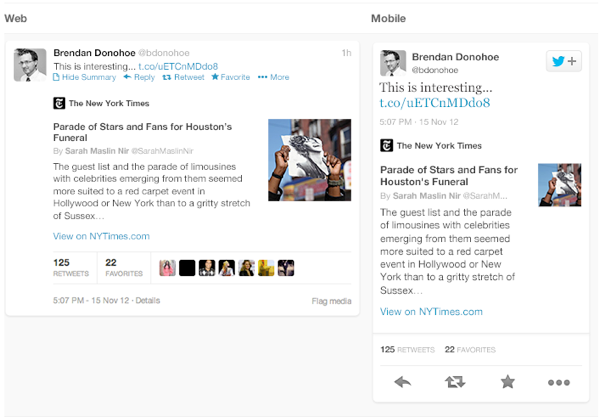
a way to attached multimedia inline with tweets. Now the NYT should
care more about how their story appears on the Twitter card (right hand
in image above) than on their own web properties, because the likelihood
is that the content will be seen more often in card format.
Google is moving to cards
With Google Now,
Google is rethinking information distribution, away from search, to
personalised information pushed to mobile devices. Their design pattern
for this is cards.
Everyone is moving to cards
Pinterest (above left) is built around cards. The new Discover feature on Spotify
(above right) is built around cards. Much of Facebook now represents
cards. Many parts of iOS7 are now card based, for example the app
switcher and Airdrop.
The list goes on. The most exciting thing is that despite these many
early card based designs, I think we’re only getting started. Cards are
an incredible design pattern, and they have been around for a long time.
Cards give bursts of information
Cards as an information dissemination medium have been around for a
very long time. Imperial China used them in the 9th century for
games. Trade cards in 17th century London helped people find businesses.
In 18th century Europe footmen of aristocrats used cards to introduce
the impending arrival of the distinguished guest. For hundreds of years
people have handed around business cards.
We send birthday cards, greeting cards. My wallet is full of debit
cards, credit cards, my driving licence card. During my childhood, I was
surrounded by games with cards. Top Trumps, Pokemon, Panini sticker
albums and swapsies. Monopoly, Cluedo, Trivial Pursuit. Before computer
technology, air traffic controllers used cards to manage the planes in
the sky. Some still do.
Cards are a great medium for communicating quick stories. Indeed the
great (and terrible) films of our time are all storyboarded using a card
like format. Each card representing a scene. Card, Card, Card. Telling
the story. Think about flipping through printed photos, each photo
telling it’s own little tale. When we travelled we sent back postcards.
What about commerce? Cards are the predominant pattern for coupons.
Remember cutting out the corner of the breakfast cereal box? Or being
handed coupon cards as you walk through a shopping mall? Circulars, sent
out to hundreds of millions of people every week are a full page
aggregation of many individual cards. People cut them out and stick them
to their fridge for later.
Cards can be manipulated.
In addition to their reputable past as an information medium, the
most important thing about cards is that they are almost infinitely
manipulatable. See the simple example above from Samuel Couto
Think about cards in the physical world. They can be turned over to
reveal more, folded for a summary and expanded for more details, stacked
to save space, sorted, grouped, and spread out to survey more than one.
When designing for screens, we can take advantage of all these
things. In addition, we can take advantage of animation and movement. We
can hint at what is on the reverse, or that the card can be folded out.
We can embed multimedia content, photos, videos, music. There are so
many new things to invent here.
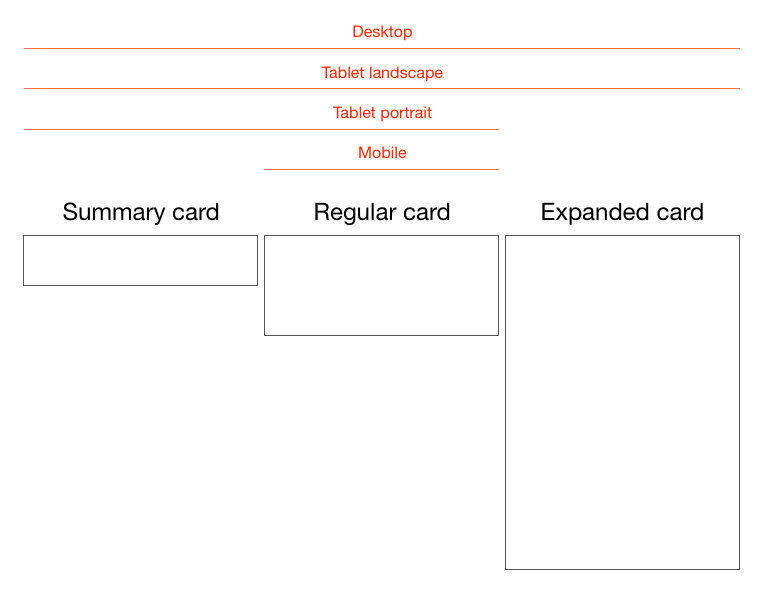
Cards are perfect for mobile devices and varying screen sizes.
Remember, mobile devices are the heart and soul of the future of your
business, no matter who you are and what you do. On mobile devices,
cards can be stacked vertically, like an activity stream on a phone.
They can be stacked horizontally, adding a column as a tablet is turned
90 degrees. They can be a fixed or variable height.
Cards are the new creative canvas
It’s already clear that product and interaction designers will
heavily use cards. I think the same is true for marketers and creatives
in advertising. As social media continues to rise, and continues to
fragment into many services, taking up more and more of our time,
marketing dollars will inevitably follow. The consistent thread through
these services, the predominant canvas for creativity, will be card
based. Content consumption on Facebook, Twitter, Pinterest, Instagram,
Line, you name it, is all built on the card design metaphor.
I think there is no getting away from it. Cards are the next big
thing in design and the creative arts. To me that’s incredibly exciting.
The Intel® HTML5 App Porter Tool - BETA is an application
that helps mobile application developers to port native iOS* code into
HTML5, by automatically translating portions of the original code into
HTML5. This tool is not a complete solution to automatically port 100%
of iOS* applications, but instead it speeds up the porting process by
translating as much code and artifacts as possible.
It helps in the translation of the following artifacts:
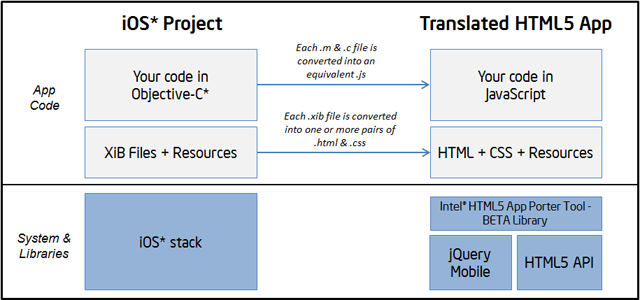
Objective-C* (and a subset of C) source code into JavaScript
iOS* API types and calls into JavaScript/HTML5 objects and calls
Layouts of views inside Xcode* Interface Builder (XIB) files into HTML + CSS files
Xcode* project files into Microsoft* Visual Studio* 2012 projects
This document provides a high-level explanation about how the
tool works and some details about supported features. This overview will
help you determine how to process the different parts of your project
and take the best advantage from the current capabilities.
How does it work?
The Intel® HTML5 App Porter Tool - BETA is essentially a
source-to-source translator that can handle a number of conversions from
Objective-C* into JavaScript/HTML5 including the translation of APIs
calls. A number of open source projects are used as foundation for the
conversion including a modified version of Clang front-end, LayerD framework and jQuery Mobile for widgets rendering in the translated source code.
Translation of Objective-C into JavaScript
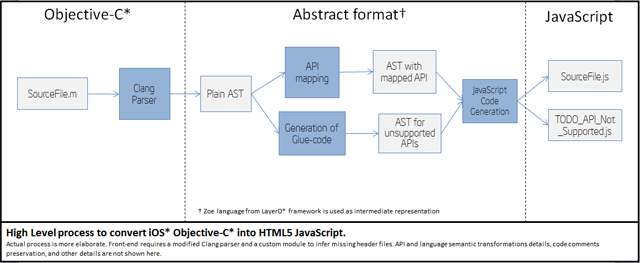
At a high level, the transformation pipeline looks like this:
This pipeline follows the following stages:
Parsing of Objective-C* files into an intermediate AST (Abstract Syntax Tree).
Mapping of supported iOS* API calls into equivalent JavaScript calls.
Generation of placeholder definitions for unsupported API calls.
Final generation of JavaScript and HTML5 files.
About coverage of API mappings
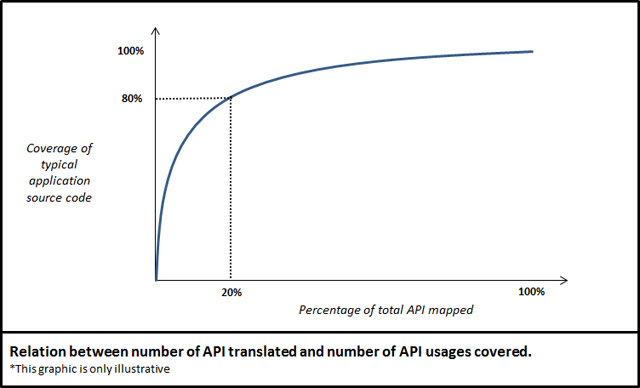
Mapping APIs from iOS* SDK into JavaScript is a task that involves a
good deal of effort. The iOS* APIs have thousands of methods and
hundreds of types. Fortunately, a rather small amount of those APIs are
in fact heavily used by most applications. The graph below conceptually
shows how many APIs need to be mapped in order to have certain level of
translation for API calls .
Currently, the Intel® HTML5 App Porter Tool - BETA supports the most used types and methods from:
UIKit framework
Foundation framework
Additionally, it supports a few classes of other frameworks such
as CoreGraphics. For further information on supported APIs refer to the
list of supported APIs.
Generation of placeholder definitions and TODO JavaScript files
For the APIs that the Intel® HTML5 App Porter Tool - BETA
cannot translate, the tool generates placeholder functions in "TODO"
files. In the translated application, you will find one TODO file for
each type that is used in the original application and which has API
methods not supported by the current version. For example, in the
following portion of code:
If property setter for showsTouchWhenHighligthed is not supported by the tool, it will generate the following placeholder for you to provide its implementation:
These placeholders are created for methods, constants, and types that
the tool does not support. Additionally, these placeholders may be
generated for APIs other than the iOS* SDK APIs. If some files from the
original application (containing class or function definitions) are not
included in the translation process, the tool may also generate
placeholders for the definitions in those missing files.
In each TODO file, you will find details about where those types,
methods, or constants are used in the original code. Moreover, for each
function or method the TODO file includes information about the type of
the arguments that were inferred by the tool. Using these TODO files,
you can complete the translation process by the providing the
placeholders with your own implementation for that API.
Translation of XIB files into HTML/CSS code
The Intel® HTML5 App Porter Tool - BETA translates most of the definitions in the Xcode* Interface Builder files (i.e.,
XIB files) into equivalent HTML/CSS code. These HTML files use JQuery*
markup to define layouts equivalent to the views in the original XIB
files. That markup is defined based on the translated version of the
view classes and can be accessed programmatically. Moreover, most
of the events that are linked with handlers in the original application
code are also linked with their respective handles in the translated
version. All the view controller objects, connection logic between
objects and event handlers from all translated XIB files are included in
the XibBoilerplateCode.js. Only one XibBoilerplateCode.js file is created per application.
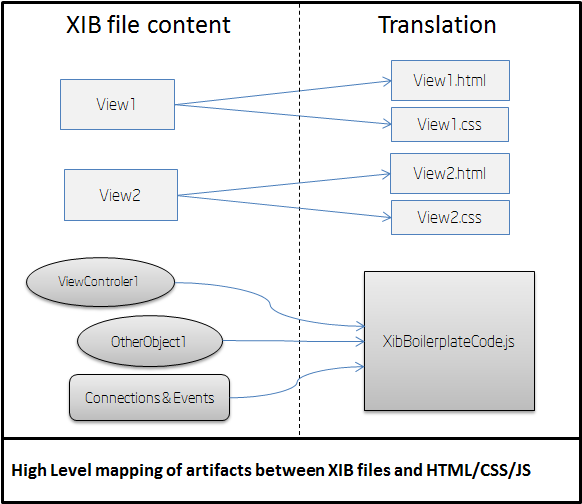
The figure below shows how the different components of each XIB file are translated.
This is a summary of the artifacts generated from XIB files:
For each view inside an XIB file, a pair of HTML+CSS files is generated.
Objects inside XIB files, such as Controllers and Delegates, and instantiation code are generated in the XibBoilerplateCode.js file.
Connections between objects and events handlers for views described
inside XIB files are also implemented by generated code in the XibBoilerplateCode.js file.
The translated application keeps the very same high level structure
as the original one. Constructs such as Objective-C* interfaces,
categories, C structs, functions, variables, and statements are kept
without significant changes in the translated code but expressed in
JavaScript.
The execution of the Intel® HTML5 App Porter Tool – BETA produces a set of files that can be divided in four groups:
The translated app code: These are the JavaScript files that were created as a translation from the original app Objective-C* files.
For each translated module (i.e. each .m file) there should be a .js file with a matching name.
The default.html file is the entry point for the HTML5 app, where all the other .js files are included.
Additionally, there are some JavaScript files included in the \lib folder that corresponds to some 3rd party libraries and Intel® HTML5 App Porter Tool – BETA library which implements most of the functionality that is not available in HTML5.
Translated .xib files (if any): For each translated .xib file there should be .html and .css files with matching names. These files correspond to their HTML5 version.
“ToDo” JavaScript files: As the translation of some of the
APIs in the original app may not be supported by the current version,
empty definitions as placeholders for those not-mapped APIs are
generated in the translated HTML5 app. This “ToDo” files contain those
placeholders and are named after the class of the not-mapped APIs. For
instance, the placeholders for not-mapped methods of the NSData class, would be located in a file named something like todo_api_js_apt_data.js or todo_js_nsdata.js.
Resources: All the resources from the original iOS* project will be copied to the root folder of the translated HTML5 app.
The generated JavaScript files have names which are practically the
same as the original ones. For example, if you have a file called AppDelegate.m in the original application, you will end up with a file called AppDelegate.js
in the translated output. Likewise, the names of interfaces, functions,
fields, or variables are not changed, unless the differences between
Objective-C* and JavaScript require the tool to do so.
In short, the high level structure of the translated application is
practically the same as the original one. Therefore, the design and
structure of the original application will remain the same in the
translated version.
About target HTML5 APIs and libraries
The Intel® HTML5 App Porter Tool - BETA both translates the
syntax and semantics of the source language (Objective-C*) into
JavaScript and maps the iOS* SDK API calls into an equivalent
functionality in HTML5. In order to map iOS* API types and calls into
HTML5, we use the following libraries and APIs:
The standard HTML5 API: The tool maps iOS*
types and calls into plain standard objects and functions of HTML5 API
as its main target. Most notably, considerable portions of supported
Foundation framework APIs are mapped directly into standard HTML5. When
that is not possible, the tool provides a small adaptation layer as part
of its library.
The jQuery Mobile library: Most of the UIKit
widgets are mapped jQuery Mobile widgets or a composite of them and
standard HTML5 markup. Layouts from XIB files are also mapped to jQuery
Mobile widgets or other standard HTML5 markup.
The Intel® HTML5 App Porter Tool - BETA library:
This is a 'thin-layer' library build on top of jQuery Mobile and HTML5
APIs and implements functionality that is no directly available in those
libraries, including Controller objects, Delegates, and logic to
encapsulate jQuery Mobile widgets. The library provides a facade very
similar to the original APIs that should be familiar to iOS* developers.
This library is distributed with the tool and included as part of the
translated code in the lib folder.
You should expect that future versions of the tool will incrementally
add more support for API mapping, based on further statistical analysis
and user feedback.
Translated identifier names
In Objective-C*, methods names can be composed by several parts
separated with colons (:) and the methods calls interleaved these parts
with the actual arguments. Since that peculiar syntactic construct is
not available in JavaScript, those methods names are translated by
combining all the methods parts replacing the colons (:) with
underscores (_). For example, a function called initWithColor:AndBackground: is translated to use the name initWithColor_AndBackground
Identifier names, in general, may also be changed in the translation
if there are any conflicts in JavaScript scope. For example, if you have
duplicated names for interfaces and protocol, or one instance method
and one class method that share the same name in the same interface.
Because identifier scoping rules are different in JavaScript, you cannot
share names between fields, methods, and interfaces. In any of those
cases, the tool renames one of the clashing identifiers by prepending an
underscore (_) to the original name.
Additional tips to get the most out of the Intel® HTML5 App Porter Tool – BETA
Here is a list of recommendations to make the most of the tool.
Keep your code modular Having a
well-designed and architected source code may help you to take the most
advantage of the translation performed by tool. If the modules of the
original source code can be easily decoupled, tested, and refactored the
same will be true for the translated code. Having loosely coupled
modules in your original application allows you to isolate the modules
that are not translated well into JavaScript. In this way, you should be
able to simply skip those modules and only select the ones suitable for
translation.
Avoid translating third party libraries source code with equivalents in JavaScript
For some iOS* libraries you can find replacement libraries or APIs in
JavaScript. Common examples are libraries to parse JSON, libraries to
interact with social networks, or utilities libraries such as Box2D* for
games development. If your project originally uses the source code of
third party library which has a replacement version in JavaScript, try
to use the replacement version instead of translated code, whenever it
is possible.
Isolate low level C or any C++ code behind Objective-C* interfaces:
The tool currently supports translating from Objective-C*, only. It
covers the translation of most of C language constructs, but it does not
support some low level features such as unions, pointers, or bit
fields. Moreover, the current version does not support C++ or
Objective-C++ code. Because of this limitation, it is advisable to
encapsulate that code behind Objective-C interfaces to facilitate any
additional editing, after running the tool.
In conclusion, having a well-designed application in the first place
will make your life a lot easier when porting your code, even in a
completely manual process.
Further technical information
This section provides additional information for developers and it is not required to effectively use Intel® HTML5 App Porter Tool - BETA. You can skip this section if you are not interested in implementation details of the tool.
Implementation of the translation steps
Here, you can find some high level details of how the different processing steps of the Intel® HTML5 App Porter Tool - BETA are implemented.
Objective-C* and C files parsing
To parse Objective-C* files, the tool uses a modified version of clang parser. A custom version of the parser is needed because:
iOS* SDK header files are not available.
clang is only used to parse the source files (not to compile them) and dump the AST to disk.
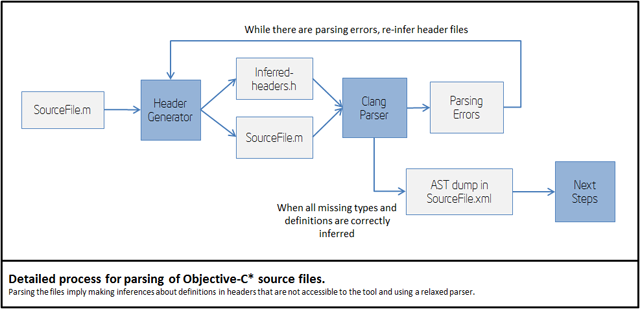
The following picture shows the actual detailed process for parsing .m and .c files:
Missing iOS* SDK headers are inferred as part of the parsing process.
The header inference process is heuristic, so you may get parsing
errors, in some cases. Thus, you can help the front-end of the tool by
providing forward declaration of types or other definitions in header
files that are accessible to the tool.
Also, you can try the "Header Generator" module in individual files
by using the command line. In the binary folder of the tool, you will
find an executable headergenerator.exe that rubs that process.
Objective-C* language transformation into JavaScript
The translation of Objective-C* language into JavaScript involves a
number of steps. We can divide the process in what happens in the
front-end and what is in the back-end.
Steps in the front-end:
Parsing .m and .c into an XML AST.
Parsing comments from .m, .c and .h files and dumping comments to disk.
Translating Clang AST into Zoe AST and re-appending the comments.
The output of the front-end is a Zoe program. Zoe is an
intermediate abstract language used by LayerD framework; the engine that
is used to apply most of the transformations.
The back-end is fully implemented in LayerD by using compile time
classes of Zoe language that apply a number of transformations in the
AST.
Steps in the back-end:
Handling some Objective-C* features such as properties getter/setter injection and merging of categories into Zoe classes.
Supported iOS* API conversion into target JavaScript API.
Injection of not supported API types, or types that were left outside of the translation by the user.
Injection of dummy methods for missing API transformations or any other code left outside of the translation by the user.
JavaScript code generation.
iOS* API mapping into JavaScript/HTML5
The tool supports a limited subset of iOS* API. That subset is
developed following statistical information about usage of each API.
Each release of the tool will include support for more APIs. If you miss
a particular kind of API your feedback about it will be very valuable
in our assessment of API support.
For some APIs such as Arrays and Strings the tool provides direct
mappings into native HTML5 objects and methods. The following table
shows a summary of the approach followed for each kind of currently
supported APIs.
Framework
Mapping design guideline
Foundation
Direct mapping to JavaScript when possible. If direct mapping is not possible, use a new class built over standard JavaScript.
Core Graphics
Direct mapping to Canvas and related HTML5 APIs when possible. If
direct mapping is not possible, use a new class built over standard
JavaScript.
UIKit Views
Provide a similar class in package APT, such as APT.View for UIView,
APT.Label for UILabel, etc. All views are implemented using jQuery
Mobile markup and library. When there are not equivalent jQuery widgets
we build new ones in the APT library.
UIKit Controllers and Delegates
Because HTML5 does not provide natively controllers or delegate
objects the tool provides an implementation of base classes for
controllers and delegates inside the APT package.
Direct mapping implies that the original code
will be transformed into plain JavaScript without any type of additional
layer. For example,
The entire API mapping happens in the back-end of the tool. This
process is implemented using compile time classes and other
infrastructure provided by the LayerD framework.
XIB files conversion into HTML/CSS
XIB files are converted in two steps:
XIB parsing and generation of intermediate XML files.
Intermediate XML files are converted into final HTML, CSS and JavaScript boilerplate code.
The first step generates one XML file - with extension .gld -
for each view inside the XIB file and one additional XML file with
information about other objects inside XIB files and connections between
objects and views such as outlets and event handling.
The second stage runs inside the Zoe compiler of LayerD to convert
intermediate XML files into final HTML/CSS and JavaScript boilerplate
code to duplicate all the functionality that XIB files provides in the
original project.
Generated HTML code is as similar as possible to static markup used
by jQuery Mobile library or standard HTML5 markup. For widgets that do
not have an equivalent in jQuery Mobile, HTML5, or behaves differently,
simple markup is generated and handled by classes in APT library.
Supported iOS SDK APIs for Translation
The following table details the APIs supported by the current version of the tool.
Notes:
Types refers to Interfaces, Protocols, Structs, Typedefs or Enums
Type 'C global' mean that it is not a type, but it is a supported global C function or constant
Colons in Objective-C names are replaced by underscores
Objective-C properties are detailed as a pair of getter/setter method names such as 'title' and 'setTitle'
Objective-C static members appear with a prefixed underscore like in '_dictionaryWithObjectsAndKeys'
Inherited members are not listed, but are supported. For example,
NSArray supports the 'count' method. The method 'count' is not listed in
NSMutableArray, but it is supported because it inherits from NSArray
How anonymous are you when browsing online? If you're not sure, head
to StayInvisible, where you'll get an immediate online privacy test
revealing what identifiable information is being collected in your
browser.
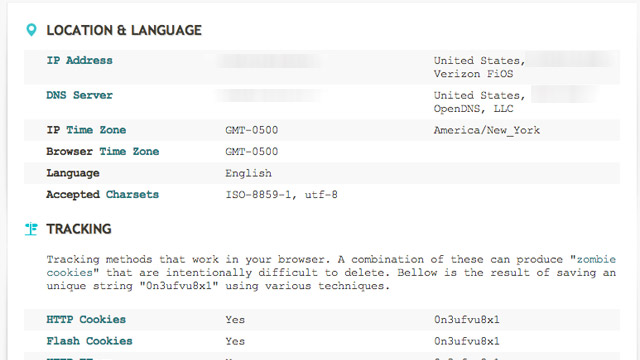
The site displays the location (via IP address) and
language collected, possible tracking cookies, and other browser
features that could create a unique fingerprint of your browser and session.
If you'd prefer your browsing to be private and anonymous, we have lotsof guidesfor that. Although StayInvisible no longer has the list of proxy tools we mentioned previously, the site is also still useful if you want to test your proxy or VPN server's effectiveness. (Could've come in handy too for a certain CIA director and his biographer.)
A screenshot of a system containing a
malicious backdoor that was snuck into the open-source phpMyAdmin
package. Researchers said the file date may be fraudulent.
Developers of phpMyAdmin warned users they may be running a
malicious version of the open-source software package after discovering
backdoor code was snuck into a package being distributed over the widely
used SourceForge repository.
The backdoor contains code that allows remote attackers to take
control of the underlying server running the modified phpMyAdmin, which
is a Web-based tool for managing MySQL databases. The PHP script is
found in a file named server_sync.php, and it reads PHP code embedded in
standard POST Web requests and then executes it. That allows anyone who
knows the backdoor is present to execute code of his choice. HD Moore,
CSO of Rapid7 and chief architect of the Metasploit exploit package for
penetration testers and hackers, told Ars a module has already been added that tests for the vulnerability.
The backdoor is concerning because it was distributed on one of the official mirrors for SourceForge,
which hosts more than 324,000 open-source projects, serves more than 46
million consumers, and handles more than four million downloads each
day. SourceForge officials are still investigating the breach, so
crucial questions remain unanswered. It's still unclear, for instance,
if the compromised server hosted other maliciously modified software
packages, if other official SourceForge mirror sites were also affected,
and if the central repository that feeds these mirror sites might also
have been attacked.
"If that one mirror was compromised, nearly every SourceForge package
on that mirror could have been backdoored, too," Moore said. "So you're
looking at not just phpMyAdmin, but 12,000 other projects. If that one
mirror was compromised and other projects were modified this isn't just
1,000 people. This is up to a couple hundred thousand."
An advisory posted Tuesday
on phpMyAdmin said: "One of the SourceForge.net mirrors, namely
cdnetworks-kr-1, was being used to distribute a modified archive of
phpMyAdmin, which includes a backdoor. This backdoor is located in file
server_sync.php and allows an attacker to remotely execute PHP code.
Another file, js/cross_framing_protection.js, has also been modified."
phpMyAdmin officials didn't respond to e-mails seeking to learn how long
the backdoored version had been available and how many people have
downloaded it.
Update: In a blog post,
SourceForge officials said they believe only the affected
phpMyAdmin-3.5.2.2-all-languages.zip package was the only modified file
on the cdnetworks mirror site, but they are continuing to investigate to
make sure. Logs indicate that about 400 people downloaded the malicious
package. The provider of the Korea-based mirror has confirmed the
breach, which is believe to have happened around September 22, and
indicated it was limited to that single mirror site. The machine has
been taken out of rotation.
"Downloaders are at risk only if a corrupt copy of this software was
obtained, installed on a server, and serving was enabled," the
SourceForge post said. "Examination of web logs and other server data
should help confirm whether this backdoor was accessed."
It's not the first time a widely used open-source project has been
hit by a breach affecting the security of its many downstream users. In
June of last year, WordPress required all account holders on
WordPress.org to change their passwords following the discovery that hackers contaminated it with malicious software.
Three months earlier, maintainers of the PHP programming language spent
several days scouring their source code for malicious modifications
after discovering the security of one of their servers had been breached.
A three-day security breach in 2010 on ProFTP
caused users who downloaded the package during that time to be infected
with a malicious backdoor. The main source-code repository for the Free
Software Foundation was briefly shuttered that same year following the
discovery of an attack that compromised some of the website's account passwords
and may have allowed unfettered administrative access. And last August,
multiple servers used to maintain and distribute the Linux operating
system were infected with malware that gained root system access, although maintainers said the repository was unaffected.
At today’s hearing
of the Subcommittee on Intellectual Property, Competition and the
Internet of the House Judiciary Committee, I referred to an attempt to
“sabotage” the forthcoming Do Not Track standard. My written testimony
discussed a number of other issues as well, but Do Not Track was
clearly on the Representatives’ minds: I received multiple questions on
the subject. Because of the time constraints, oral answers at a
Congressional hearing are not the place for detail, so in this blog
post, I will expand on my answers this morning, and explain why I think
that word is appropriate to describe the current state of play.
Background
For years, advertising networks have offered the option to opt out
from their behavioral profiling. By visiting a special webpage provided
by the network, users can set a browser cookie saying, in effect, “This
user should not be tracked.” This system, while theoretically offering
consumers choice about tracking, suffers from a series of problems that
make it frequently ineffective in practice. For one thing, it relies
on repetitive opt-out: the user needs to visit multiple opt-out pages, a
daunting task given the large and constantly shifting list of
advertising companies, not all of which belong to industry groups with
coordinated opt-out pages. For another, because it relies on
cookies—the same vector used to track users in the first place—it is
surprisingly fragile. A user who deletes cookies to protect her privacy
will also delete the no-tracking cookie, thereby turning tracking back
on. The resulting system is a monkey’s paw: unless you ask for what you want in exactly the right way, you get nothing.
The idea of a Do Not Track header gradually emerged
in 2009 and 2010 as a simpler alternative. Every HTTP request by which
a user’s browser asks a server for a webpage contains a series of headers
with information about the webpage requested and the browser. Do Not
Track would be one more. Thus, the user’s browser would send, as part
of its request, the header:
DNT: 1
The presence of such a header would signal to the website that the
user requests not to be tracked. Privacy advocates and technologists
worked to flesh out the header; privacy officials in the United States
and Europe endorsed it. The World Wide Web Consortium (W3C) formed a
public Tracking Protection Working Group with a charter to design a technical standard for Do Not Track.
Significantly, a W3C standard is not law. The legal effect of Do Not
Track will come from somewhere else. In Europe, it may be enforced directly on websites under existing data protection law. In the United States, legislation has been introduced in the House and Senate
that would have the Federal Trade Commission promulgate Do Not Track
regulations. Without legislative authority, the FTC could not require
use of Do Not Track, but would be able to treat a website’s false claims
to honor Do Not Track as a deceptive trade practice. Since most online
advertising companies find it important from a public relations point
of view to be able to say that they support consumer choice, this last
option may be significant in practice. And finally, in an important recent paper,
Joshua Fairfield argues that use of the Do Not Track header itself
creates an enforceable contract prohibiting tracking under United States
law.
In all of these cases, the details of the Do Not Track standard will
be highly significant. Websites’ legal duties are likely to depend on
the technical duties specified in the standard, or at least be strongly
influenced by them. For example, a company that promises to be Do Not
Track compliant thereby promises to do what is required to comply with
the standard. If the standard ultimately allows for limited forms of
tracking for click-fraud prevention, the company can engage in those
forms of tracking even if the user sets the header. If not, it cannot.
Thus, there is a lot at stake in the Working Group’s discussions.
Internet Explorer and Defaults
On May 31, Microsoft announced that Do Not Track would be on by default
in Internet Explorer 10. This is a valuable feature, regardless of how
you feel about behavioral ad targeting itself. A recurring theme of
the online privacy wars is that unusably complicated privacy interfaces
confuse users in ways that cause them to make mistakes and undercut
their privacy. A default is the ultimate easy-to-use privacy control.
Users who care about what websites know about them do not need to
understand the details to take a simple step to protect themselves.
Using Internet Explorer would suffice by itself to prevent tracking from
a significant number of websites.
This is an important principle. Technology can empower users to
protect their privacy. It is impractical, indeed impossible, for users
to make detailed privacy choices about every last detail of their online
activities. The task of getting your privacy right is profoundly
easier if you have access to good tools to manage the details.
Antivirus companies compete vigorously to manage the details of malware
prevention for users. So too with privacy: we need thriving markets in
tools under the control of users to manage the details.
There is immense value if users can delegate some of their privacy
decisions to software agents. These delegation decisions should be dead
simple wherever possible. I use Ghostery
to block cookies. As tools go, it is incredibly easy to use—but it
still is not easy enough. The choice of browser is a simple choice, one
that every user makes. That choice alone should be enough to count as
an indication of a desire for privacy. Setting Do Not Track by default
is Microsoft’s offer to users. If they dislike the setting, they can
change it, or use a different browser.
The Pushback
Microsoft’s move intersected with a long-simmering discussion on the
Tracking Protection Working Group’s mailing list. The question of Do
Not Track defaults had been one of the first issues the Working Group raised when it launched in September 2011. The draft text that emerged by the spring remains painfully ambiguous on the issue. Indeed, the group’s May 30 teleconference—the
day before Microsoft’s announcement—showed substantial disagreement
about defaults and what a server could do if it believed it was seeing a
default Do Not Track header, rather than one explicitly set by the
user. Antivirus software AVG includes a cookie-blocking tool
that sets the Do Not Track header, which sparked extensive discussion
about plugins, conflicting settings, and explicit consent. And the last
few weeks following Microsoft’s announcement have seen a renewed debate
over defaults.
Many industry participants object to Do Not Track by default.
Technology companies with advertising networks have pushed for a crucial
pair of positions:
User agents (i.e. browsers and apps) that turned on Do Not Track by default would be deemed non-compliant with the standard.
Websites that received a request from a noncompliant user agent would be free to disregard a DNT: 1 header.
This position has been endorsed by representatives the three
companies I mentioned in my testimony today: Yahoo!, Google, and Adobe.
Thus, here is an excerpt from an email to the list by Shane Wiley from Yahoo!:
If you know that an UA is non-compliant, it should be fair to NOT
honor the DNT signal from that non-compliant UA and message this back to
the user in the well-known URI or Response Header.
Here is an excerpt from an email to the list by Ian Fette from Google:
There’s other people in the working group, myself included, who feel that
since you are under no obligation to honor DNT in the first place (it is
voluntary and nothing is binding until you tell the user “Yes, I am
honoring your DNT request”) that you already have an option to reject a
DNT:1 request (for instance, by sending no DNT response headers). The
question in my mind is whether we should provide websites with a mechanism
to provide more information as to why they are rejecting your request, e.g.
“You’re using a user agent that sets a DNT setting by default and thus I
have no idea if this is actually your preference or merely another large
corporation’s preference being presented on your behalf.”
And here is an excerpt from an email to the list by Roy Fielding from Adobe:
The server would say that the non-compliant browser is broken and
thus incapable of transmitting a true signal of the user’s preferences.
Hence, it will ignore DNT from that browser, though it may provide
other means to control its own tracking. The user’s actions are
irrelevant until they choose a browser capable of communicating
correctly or make use of some means other than DNT.
Pause here to understand the practical implications of writing this
position into the standard. If Yahoo! decides that Internet Explorer 10
is noncompliant because it defaults on, then users who picked Internet
Explorer 10 to avoid being tracked … will be tracked. Yahoo! will claim
that it is in compliance with the standard and Internet Explorer 10 is
not. Indeed, there is very little that an Internet Explorer 10 user
could do to avoid being tracked. Because her user agent is now flagged
by Yahoo! as noncompliant, even if she manually sets the header herself,
it will still be ignored.
The Problem
A cynic might observe how effectively this tactic neutralizes the
most serious threat that Do Not Track poses to advertisers: that people
might actually use it. Manual opt-out cookies are tolerable
because almost no one uses them. Even Do Not Track headers that are off
by default are tolerable because very few people will use them.
Microsoft’s and AVG’s decisions raise the possibility that significant
numbers of web users would be removed from tracking. Pleasing user
agent noncompliance is a bit of jujitsu, a way of meeting the threat
where it is strongest. The very thing that would make Internet Explorer
10’s Do Not Track setting widely used would be the very thing to
“justify” ignoring it.
But once websites have an excuse to look beyond the header they
receive, Do Not Track is dead as a practical matter. A DNT:1 header is
binary: it is present or it is not. But second-guessing interface
decisions is a completely open-ended question. Was the check box to
enable Do Not Track worded clearly? Was it bundled with some other user
preference? Might the header have been set by a corporate network
rather than the user? These are the kind of process questions that can
be lawyered to death. Being able to question whether a user really meant her Do Not Track header is a license to ignore what she does mean.
Return to my point above about tools. I run a browser with multiple
plugins. At the end of the day, these pieces of software collaborate to
set a Do Not Track header, or not. This setting is under my control: I
can install or uninstall any of the software that was responsible for
it. The choice of header is strictly between me and my user agent. As far as the Do Not Track specification is concerned,
websites should adhere to a presumption of user competence: whatever
value the header has, it has with the tacit or explicit consent of the
user.
Websites are not helpless against misconfigured software. If they
really think the user has lost control over her own computer, they have a
straightforward, simple way of finding out. A website can display a
popup window or an overlay, asking the user whether she really wants to
enable Do Not Track, and explaining the benefits disabling it would
offer. Websites have every opportunity to press their case for
tracking; if that case is as persuasive as they claim, they should have
no fear of making it one-on-one to users.
This brings me to the bitterest irony of Do Not Track defaults. For
more than a decade, the online advertising industry has insisted that
notice and an opportunity to opt out is sufficient choice for consumers.
It has fought long and hard against any kind of heightened consent
requirement for any of its practices. Opt-out, in short, is good
enough. But for Do Not Track, there and there alone, consumers
allegedly do not understand the issues, so consent must be explicit—and opt-in only.
Now What?
It is time for the participants in the Tracking Protection Working
Group to take a long, hard look at where the process is going. It is
time for the rest of us to tell them, loudly, that the process is going
awry. It is true that Do Not Track, at least in the present regulatory
environment, is voluntary. But it does not follow that the standard
should allow “compliant” websites to pick and choose which pieces to
comply with. The job of the standard is to spell out how a user agent
states a Do Not Track request, and what behavior is required of websites
that choose to implement the standard when they receive such a request.
That is, the standard must be based around a simple principle:
A Do Not Track header expresses a meaning, not a process.
The meaning of “DNT: 1” is that the receiving website should not
track the user, as spelled out in the rest of the standard. It is not
the website’s concern how the header came to be set.
Microsoft has let it be known that their final release of the Internet Explorer 10
web browser software will have “Do Not Track” activated right out of
the box. This information has upset advertisers across the board as web
ad targeting – based on your online activities – is one of the current
mainstays of big-time advertiser profits. What Do Not Track, or DNT does
is to send out signal from your web browser, Internet Explorer 10 in
this case, to websites letting them know that the user refuses to be
seen in such a way.
A very similar Do Not Track feature currently exists on Mozilla’s Firefox browser
and is swiftly becoming ubiquitous around the web as a must-have
feature for web privacy. This will very likely bring about a large
change in the world of online advertising specifically as, again,
advertisers rely on invisible tracking methods so heavily. Tracking in
place today also exists on sites such as Google where your search
history will inform Google on what you’d like to see for search results, News posts, and advertisement content.
The Digital Advertising Aliance, or DAA, has countered Microsoft’s
announcement saying that the IE10 browser release would oppose
Microsoft’s agreement with the White House earlier this year. This
agreement had the DAA agreeing to recognize and obey the Do Not Track
signals from IE10 just so long as the option to have DNT activated was
not turned on by default. Microsoft Chief Privacy Officer Brendan Lynch
spoke up this week on the situation this week as well.
“In a world where consumers live a large part of their
lives online, it is critical that we build trust that their personal
information will be treated with respect, and that they will be given a
choice to have their information used for unexpected purposes.
While there is still work to do in agreeing on an industry-wide
definition of DNT, we believe turning on Do Not Track by default in IE10
on Windows 8 is an important step in this process of establishing
privacy by default, putting consumers in control and building trust
online.” – Lynch
The Internet is about (if it is not already a terminated task!) to become a pretty classical media. Country's boundaries were raised up on the net, making unavailable some contents depending on the world region you are browsing from (pretty weird, middle-age based concept of what the Internet must be)... We are now heavily targeted by many advertisements all around contents we are trying to access from the Web, pop-up blockers are now totally useless as advertisements took fairly advantage of HTML evolution. It is more and more difficult to ignore these advertisements, and even by closing them, one already produces/gives an information to Big Brother. There is less and less ways to escape, and by reading the following article, it looks like we are not supposed to escape... by the way.
The opportunity to set up an alternative network (satellite based?) may be the only way to get a new [commercially virgin] web... Let's call it The Veb... underlying the need of a step back from where we are nowadays.
Don’t you just hate it when you often need to
solve a captcha whenever you want to log in to select websites? You
know, those irritating slanted and jumbled group of letters and numbers,
where sometimes, you cannot even tell whether it is the letter ‘o’ or
the number ’0?, or if the particular letter is in the uppercase or not.
Captchas have been employed for some years already in order to verify
that the person behind the computer is made out of flesh and bone, and
is not an automated robot or program of any kind. Detroit-based tech
company Are You A Human
(interesting name) has come up with a different way of verifying the
authenticity of a user – not through captchas, but rather, the idea of a
simple game known as PlayThru.
PlayThru claims to prevent bots from spamming sites, as the game can
only be completed by an actual human being. Definitely sounds far more
fun in theory to “solve”, and if your less than informed boss walks by
your desk to see you play the latest game, just tell him or her that you
are solving a captcha replacement before you are able to start work.
To get a better idea on how PlayThru works, here is an example of
just one of the games. You will be presented with your fair share of
items, including a shoe, a football jersey, an olive and a piece of
bacon, where all of them will float right beside a pizza. Should you
drag the right ingredients over the pizza, then you would have “won”,
and so far, I do not think that anyone would like a topping of shoes on
their pizza.