Check out this infographic by [x]cubelabsshowing the history of Android version releases to date… even tossing in a factoid of when Android was officially started then acquired by Google. The graphic shows key feature highlights in each milestone and concludes with today’s snapshot, which shows most Android devices with Android 2.2 (Froyo). Have a look!
Back aroundJuly of last year, Qualcomm launched a software development kit for building Augmented Reality apps on Android. The idea was to allow Android developers to build all sorts of crazy AR stuff (like games and apps that render things in live 3D on top of a view pulled in through your device’s camera) without having to reinvent the wheel by coding up their own visual-recognition system. It is, for lack of a better word, awesome.
And now it’s available for iOS.
For those unfamiliar with Augmented Reality — or for those who just want to see something cool — check out this demo video I shot a year or so back:
Sometime in the past few hours, Qualcomm quietly rolled a beta release of the iOS-compatible SDK into theirdeveloper center. This came as abit of a shock; Qualcomm had previously expressed that, while an iOS port would come sooner or later, their main focus was building this platform for devices running their Snapdragon chips (read: not Apple devices).
And yet, here we are. This first release of the SDK supports the iPhone 4, iPad 2, and fourth generation iPod Touch — none of which have Snapdragon CPUs in them. Furthermore, this release supports Unity (a WYSIWYG-style rapid game development tool) right off the bat, whereas the Android release didn’t get Unity support until a few months. Developers can also work in straight in Xcode if they so choose.
This platform lowers the “You must be this crazy of a developer to ride this ride” bar considerably, so expect an onslaught of Augmented Reality apps in the App Store before too long.
If your organization allows remote access to systems via remote
desktop tools, there are a number of apps for the iPhone and for Android
devices that make it a breeze to work anytime from anywhere. In this
app roundup, I feature three remote desktop tools that work in slightly
different ways.
Splashtop Remote Desktop
Splashtop Remote
Desktop is a high-performance app that supports multiple monitors and
desktop-based video. The mobile device-based Splashtop Remote Desktop
app connects to a small client that is installed on your desktop PC,
which can be running Windows XP, Windows Vista, or Windows 7 or Mac OS X
10.6.
Perhaps the most significant downside to Splashtop Remote Desktop is
that connections are required to be made solely over Wi-Fi networks;
this limits, to a point, the locations from which the tool can be used.
However, most Wi-Fi connections are faster than 3G, so performance
should be good.
Splashtop Remote Desktop is available for the iPhone and for Android devices. At $1.99 for the iPhone version and $4.99 for the Android version, this app will certainly not break the bank.
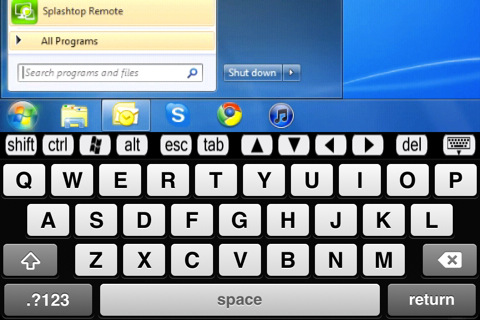
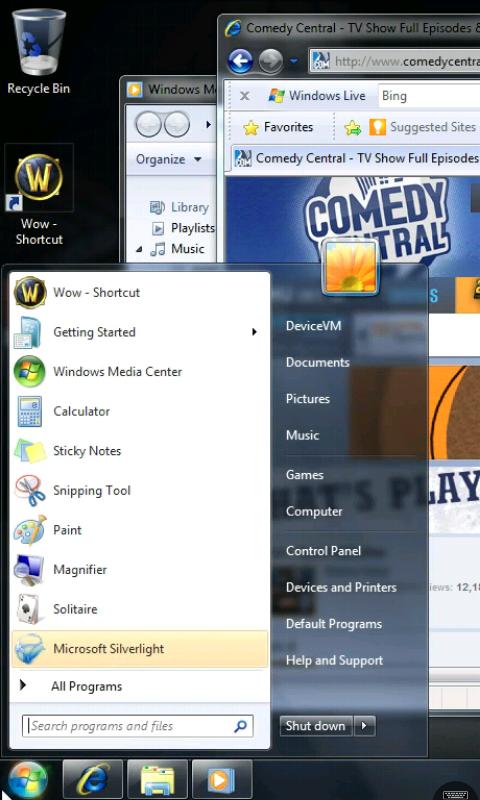
Figures A and B are screenshots of the app from iPhone and Android devices, respectively.
Figure A
Splashtop Remote Desktop for the iPhone
Figure B
The Android version of Splashtop Remote Desktop
LogMeIn Ignition
LogMeIn provides a robust, comprehensive remote desktop tool. LogMeIn Ignition requires you to install a client component on the desktop computer you wish to control.
LogMeIn Ignition supports 32-bit and 64-bit Windows 7, Windows Vista,
Windows XP, Windows Server 2003, Windows 2008 and 32-bit Windows 2000,
and Mac OS X 10.4, 10.5, and 10.6 (PPC and Intel processors are
supported). The Mac version is missing features such as drag and drop
file transfer, remote sound, and integration with LogMeIn’s centralized
reporting tool; although, for occasional remote access from a handheld
device, these features are probably not that critical.
LogMeIn Ignition is a client component that works on Android and Apple devices including the iPhone and the iPad.
At $29.99, you will need to be able to realize real value from the app
in order to justify the purchase. LogMeIn Ignition definitely isn’t a
“drive by download.”
LogMeIn Ignition is not intended to be a “one off” remote access tool;
it aggregates all of your remote connections into one view, making it
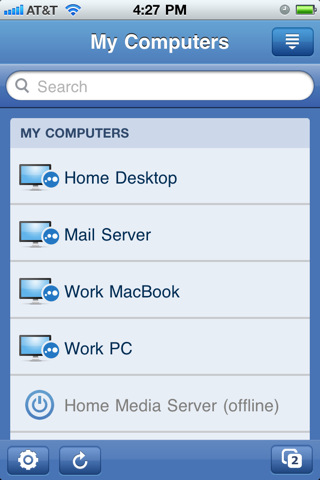
easier to manage a plethora of remote systems (Figure C). Again, each managed system must have the LogMeIn client installed.
Figure C
LogMeIn Ignition’s computer selection page
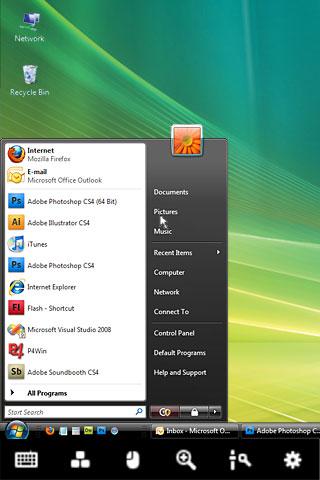
Figures D and E are screenshots of LogMeIn Ignition on an Android device and an iPhone, respectively.
Figure D
Android-based version of LogMeIn Ignition
Figure E
iPhone-based version of LogMeIn Ignition
WinAdmin
WinAdmin is another tool I have used for remote access. The app relies
on Microsoft’s standard RDP implementation and does not require the
installation of additional client software on managed computers, which
makes it a good solution for remote desktop access as well as remote
server desktop access. If you’re using WinAdmin to remotely access
servers, you’ll probably need some kind of VPN tunnel in place, or
you’ll need to be sitting behind your organization’s firewall in order
to allow the tool to work its magic.
WinAdmin is available for the iPhone, iPad, and iPod Touch;
there is no Android version. At $7.99, this app might be considered in
the moderately high price range for some, but if it’s being used to
support a server farm, it’s certainly affordable.
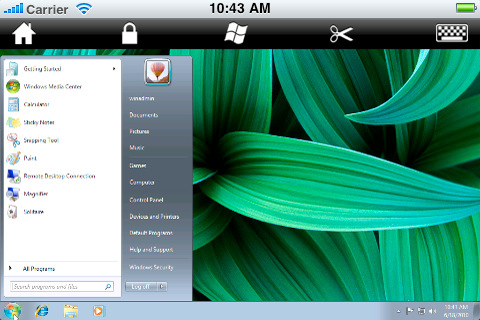
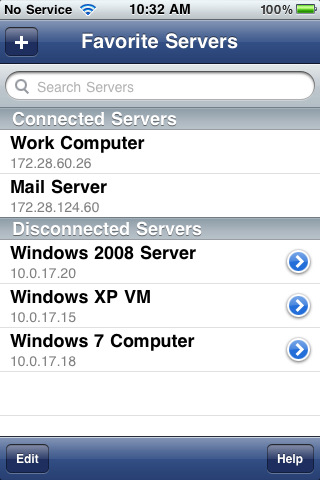
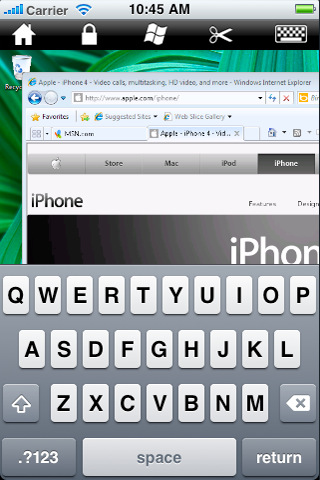
The screenshots in Figures F, G, and H give you a look at WinAdmin.
Figure F
WinAdmin’s landscape-mode view is more natural for most users.
Figure G
Store connection information for all of your remote systems… just lock your phone when not using WinAdmin.
Figure H
WinAdmin’s portrait mode shows the keyboard at the bottom and menu across the top of the display.
What remote desktop app do you recommend?
These are just three tools that are worthy of consideration for your organization’s remote access needs.
-----
Personal comments:
Remote access to desktops are not a 21th century innovation, as it almost exists since the first network was set up, but above solutions and Splashtop in particular bring to us one cross platform solution (streamer available on Mac and PC and remote clients available on all mobile platforms) that may help us to determine what can we seriously do with these tablets! :-)
Both Apple and Microsoft's new desktop operating systems borrow elements from mobile devices, in sometimes confusing ways.
Apple is widely expected to unveil a major update this week to OS X Lion, its operating system for desktop and laptop computers. Microsoft, meanwhile, is working on an even bigger overhaul of Windows, with a version called Windows 8.
Both new operating systems reflect a tectonic shift in personal computing. They incorporate elements from mobile operating systems alongside more conventional desktop features. But demos of both operating systems suggest that users could face a confusing mishmash of design ideas and interaction methods.
Windows 8 and OS X Lion include elements such as touch interaction and full-screen apps that will facilitate the kind of "unitasking" (as opposed to multitasking) that users have become accustomed to on mobile devices and tablets.
"The rise of the tablets, or at least the iPad, has suggested that there is a latent, unmet need for a new form of computing," says Peter Merholz, president of the user-experience and design firmAdaptive Path. However, he adds, "moving PCs in a tablet direction isn't necessarily sensible."
Cathy Shive, an independent software developer, would agree. She developed software for Mac desktop applications for six years before she switched and began developing for iOS (Apple's operating system for the iPhone and iPad). "When I first saw Steve Jobs's demo of Lion, I was really surprised—I was appalled, actually," she says.
Shive is surprised by the direction both Apple and Microsoft are taking. One fundamental dictate of usability design is that an interface should be tailored to the specific context—and hardware—in which it lives. A desktop PC is not the same thing as a tablet or a mobile device, yet in that initial demo, "It seemed like what [Jobs] was showing us was a giant iPad," says Shive.
A subsequentdemonstration of Windows 8by Microsoft vice president Julie Larson-Green confirmed that Redmond was also moving toward touch as a dominant interaction mechanism. One of the devices used in that demonstration, a "media tablet" from Taiwan-based ASUS, resembled an LCD monitor with no keyboard.
Not everyone is so skeptical about Apple and Microsoft's plans.Lukas Mathis, a programmer and usability expert, thinks that, on balance, this shift is a good thing. "If you watch casual PC users interact with their computers, you'll quickly notice that the mouse is a lot harder to use than we think," he says. "I'm glad to see finger-friendly, large user interface elements from phones and tablets make their way into desktop operating systems. This change was desperately needed, and I was very happy to see it."
Mathis argues that experienced PC users don't realize how crowded with "small buttons, unclear icons, and tiny text labels" typical desktop operating systems are.
Lion and Windows 8 solve these problems in slightly different ways. In Lion, file management is moving toward an iPhone/iPad-style model, where users launch applications from a "Launchpad," and their files are accessible from within those applications. In Windows 8, files, along with applications, bookmarks, and just about anything else, can be made accessible from a customizable start screen.
Some have criticized Mission Control, Apple's new centralized app and window management interface, saying that itadds complexityrather than introducing the simplicity of a mobile interface. At the other extreme, Lion allows any app to be rendered full-screen, which blocks out distractions but also forces users to switch applications more often than necessary.
"The problem [with a desktop OS] is that it's hard to manage windows," says Mathis. "The solution isn't to just remove windows altogether; the solution is to fix window management so it's easier to use, but still allows you to, say, write an essay in one window, but at the same time look at a source for your essay in a different window."
Windows 8, meanwhile, attempts to solve this problem in a more elegant way, with a "Windows Snap," which allows apps to be viewed side-by-side while eliminating the need to manage their dimensions by dragging them from the corner.
A problem with moving toward a touch-centric interface is that the mouse is absolutely necessary for certain professional applications. "I can't imagine touch in Microsoft Excel," says Shive. "That's going to be terrible," she says.
The most significant difference between Apple's approach and Microsoft's is that Windows 8 will be the same OS no matter what device it's on, from a mobile phone to a desktop PC. To accommodate a range of devices, Microsoft has left intact the original Windows interface, which users can switch to from the full-screen start screen and full-screen apps option.
Merholz believes Microsoft's attempt to make its interface consistent across all devices may be a mistake. "Microsoft has a history of overemphasizing the value of 'Windows everywhere.' There's a fear they haven't learned appropriateness, given the device and its context," he says.
Shive believes the same could be said of Apple. "Apple has been seduced by their own success, and they're jumping to translate that over to the desktop ... They think there's some kind of shortcut, where everyone is loving this interface on the mobile device, so they will love it on their desktop as well," she says.
In a sense, both Apple and Microsoft are about to embark on a beta test of what the PC should be like in an era when consumers are increasingly accustomed to post-PC modes of interaction. But it could be a bumpy process. "I think we can get there, but we've been using the desktop interface for 30 years now, and it's not going to happen overnight," says Shive.
-----
Personal Comments:
From my personal point of view and
based on my 30 years IT/Dev experience, I do not see the change of
desktop Look&Feel as a crisis but more as a simple and efficient aesthetic evolution.
Why? Because what was made for mobile
phone first and then for new coming mobile devices like tablets is
what some people were trying to do on laptop/desktop computer's GUI for
years: trying to make the GUI/desktop experience simple enough in
order to make computers accessible to anyone of us, even to the more
recusant to technology (see evolution of windows and Linux GUI). That
specific goal was successfully reached on mobile phones/devices in a very short time, pushing common people to
change of device every two years and making them enjoy new functionality/technology without having to read one single page of an
instruction manual (by the way, mobile phones are delivered without
any!).
It looks like technological constraints
and restrictions were needed in order to invent this kind of
interface. Touch screen only mobile phones were available since
years prior Apple produces its first iPhone (2007), remember the Sony-Ericsson P800
(2002) and its successor the P900 (2003), technically everything was here (they are close to the "classic" smartphone we are used to have in our pocket nowadays), but an efficient GUI and
in a more general way, an efficient OS was dramatically missing. What was done by
Apple with iOS, Google with Android and HTC with its UISense GUI on top of Android brings out and demonstrates the obvious potential of these mobile devices.
The adaptation of these GUI/OS on tablet (iOS,
Android 3.0), still with the touch-only constraint, rises up new
solutions for GUI while extending what can be done through few basic finger gestures. It sounds not surprising that classic
desktop/laptop computers are now trying to integrate the good of all this in
their own environment as they did not succeed in doing so on their own before. I would even say that this is an obvious
step forward as many ideas are adaptable to desktop computer world.
For example, making easier the installation of applications by making
available App store concept to desktop computers is an obvious step,
one does not have to think if the application is compatible with the local
hardware etc... the App store just focus on compatible applications,
seamlessly.
So more than entering a crisis/revolution, I would
say that desktop computer world will just exploit from the mobile
devices world what can be adapted in order to make the desktop
computer experience for the end-user as seamless as it is on mobile
devices... but for some basic tasks only.
You can embed a desktop OS in a very
nice and simple box making things looking very similar to mobile
device's simplicity, but this is just a kind of gift package which is
not valuable for all usages you can face on a desktop computer...
making this step forward looking like a set of cosmetic changes, and not more... because it just can not be more!
Today, one is used to glorious declaration each time a new OS is proposed to end-user, many so-called "new" features mentioned are not more than already existing ones that were re-design and pushed on the scene in order to obtain a kind of revolutionary OS impression: who can seriously consider full screen app or automatic save as new key features for a 21th century's new OS?
Let's go through some of the key new features announced by Apple in Mac OS X Lion:
- Multi-touch: this is not a new feature, it "just" adds some new functionality to map to already available multi-touch gestures.
- Full Screen management: it basically attached a virtual desktop to any application running in full screen. Thus, you can switch from/to full screen applications... the same way you were already able to do so by switching from one virtual desktop to another.
- LaunchPad: this is basically a graphical interface/shortcuts for the 'Applications' folder in the Finder. Ok it looks like the Apps grid on a tablet or a mobile phone... but as it was already presented as a list, the other option was... guess what... a grid!
- Mission Control: this is also an evolution of something that was already existing. The ability to see all your windows in addition to all your virtual desktops.
I'm pretty convinced that these new features are going to be really useful and pleasant to use, making the usage of the touchpad on MacBook even more primordial, but I do not see here a real revolution, neither a crisis, in the way we are going to work on desktop/laptop computers.
Android 3.2 isn't unheard; the OS was first introduced with the MediaPad
tablet a few weeks back, and a few days ago, the Motorola Xoom started
receiving the update. But it's been a mostly quiet release. Google
has just released new details on what exactly v3.2 adds to the
Honeycomb mix, and more importantly, they've released the updated SDK
tools for developers to start taking full advantage.
Google calls this an incremental update, which adds "several new
capabilities for users and developers," and the API is now up to level
13. Included in the new release? Optimizations for a wider range of
tablets, Compatibility zoom for fixed-sized apps, Media sync from SD card, and Extended screen support API.
With this out in the open, we suspect more and more tablets will see the
v3.2 update slide down shortly, and hopefully new app updates will be
taking advantage of it. Any devs out there given this a whirl?
HTML5 is a hot topic, which is a good thing. The problem is that
99% of what’s been written has been about HTML5 replacing Flash. Why is
that a problem? Because not only is it irrelevant, but also it prevents
you from seeing the big picture about interoperability.
But first things first. A few facts:
You do not build a web site in Flash. The only way to build a
website is to use HTML pages, and then to embed Flash elements in them.
Flash as been around for more than 12 years. It is a de facto
standard for the publishing industry. (No Flash = no advanced features
in banners).
HTML5 does not officially exist (yet). Rather, it’s a specification in working draft, scheduled for publication in 2014.
The video element in HTML5 is perfect for basic video
players, but Flash and Silverlight are much more suitable for advanced
video feature (streaming, caption, interactive features and
miscellaneous video effects).
These are not interpretations or opinions. These are facts. The truth is writing about the agony of Flash is an easy way to draw readers,
a much easier way than to adopt a nuanced stance. And this is why we
read so many garbage about HTML5 vs. Flash. (For an accurate
description, please read HTML5 fundamentals).
All this said, HTML5 will indeed replace Flash in certain circumstances, specifically Light interface enhancements.
To explain this, we must go back in time: HTML’s specifications evolved
over 10 years, thus web developers wishing to offer an enhanced
experience had no choice but Flash. In recent years, we began to see
Flash used for custom fonts and transitions. But HTML has at last
evolved into HTML5 (and CSS3), which allow web designers to use custom
fonts, gradients, rounded corners and transitions, among other uses. So
in this particular case (light interface enhancements), Flash is rapidly
losing ground to a much more legitimate HTML5.
So if HTML5 is more suitable for light interface enhancements, this
leaves rooms for Flash to do what it does best: heavy interface
enhancements, vector-based animations, advanced video and audio
features, and immersive environments.
To make a long story short: Flash has a 10 years advance over
HTML. This technology isn’t better but because it’s owned by a single
company has the entire control on its innovation rate. I have
no doubt that one day HTML will have the same capabilities as Flash
today, but in how many years? Don’t mistake me. Not every site needs
Flash or an equivalent RIA technology: Amazon, Ebay and Wikipedia built their audiences with classic HTML, as did millions of web sites.
So for the sake of precision: I am not an Adobe ambassador nor I am a
web standards’ ayatollah. I am just a web enthusiast enjoying what the
web best has to offer, whether powered by standard or proprietary
technologies. Moreover, standardization is not a simple process, because
what we refer to as standards (from MP3 and JPEG to h.264) are in fact
technologies owned by private companies or consortiums.
Then, there is the mobile argument. If iOS and Android provide users
with an HTML5 compliant browser, what about Blackberry? Symbian? WebOS?
Feature phones? Low cost tablets? If interoperability and wider reach are mandatory, then maybe the better way to achieve them will be to focus on APIs exploited by multiple interfaces, rather than on a miraculously adaptive HMTL5 front-end.
Of course, there are many technical arguments for one technology over the other. But the best and most important part is that you don’t have to choose between HTML5 and Flash because you can use both.
Maybe the best answer is to acknowledge that HTML5 and Flash have their
pros and cons and that you can use one or the other or both depending
on the experience you wish to provide, your ROI and SEO constraints, and
the human resources you access.
In short, it’s not a zero sum game. Rather, it’s a process of natural
evolution, where HTML is catching up while Flash is focusing on
advanced features (and narrowing, even as it consolidates, its market
share). Both are complementary. So please, stop comparing.
Mozilla has faced some backlash from IT administrators for its move to a rapid release cycle with the Firefox browser,
but you have to hand it to Mozilla for staying the course. For years,
Firefox saw upgrades arrive far less frequently than they arrove for
competitive browsers such as Google Chrome. Since announcing its new
rapid release cycle earlier this year,
Mozilla has released versions 4 and 5 of Firefox, and steadily gotten
better at ironing out short-term kinks, most of which have had to do
with extensions causing problems. Now, Firefox 8 is already being seen
in nightly builds, although it's not released in final form yet, and
early reports show it to be faster than current versions of Chrome
across many benchmarks.
Firefox 7 and 8 run a new graphics engine called Azure, which you can read more about here. And, in broad benchmark tests, ExtremeTech reports the following results:
"Firefox
8, which only just appeared on the Nightly channel, is already 20%
faster than Firefox 5 in almost every metric: start up, session
restore, first paint, JavaScript execution, and even 2D canvas and 3D
WebGL rendering. The memory footprint of Firefox 7 (and thus 8) has
also been drastically reduced, along with much-needed improvements to garbage collection."
Mozilla has already done extensive work on
how memory is handled in Firefox 7, and these issues are likely to be
addressed further with release 8. At this point, Chrome is Firefox's
biggest competition, and ExtremeTech also reports:
"While
comparison with other browsers has become a little passe in recent
months — they’re all so damn similar! — it’s worth noting that Firefox 8
is as fast or faster than the latest Dev Channel build of Chrome 14.
Chrome’s WebGL implementation is still faster, but with Azure,
Firefox’s 2D performance is actually better than Chrome. JavaScript performance is also virtually identical."
I
use Firefox and Chrome, but my primary reason for using Chrome is that
it has been faster. With the early glimpse of Firefox 8, the performance
gap stands a chance of being closed, and it looks like these two open
source browsers have never competed more closely than they do now.
I use Android every day both on my Droid II smartphone and my Barnes & Noble Nook Color e-reader/tablet. I like it a lot. But, I also have concerns about how it’s being developed and being presented to customers.
Before
jumping into why I think Android faces trouble in the long run, let me
mention one problem I don’t see as standing in Android’s way: The Oracle lawsuits Yes, Oracle claims that Google owes them billions in damages for using unlicensed Java technology in Android’s core Dalvik virtual machine.
I
follow patent lawsuits and here’s what going to happen with this one.
It will take years and millions of dollars in legal fees, but eventually
Google will either beat Oracle’s claims or pay them hefty licensing
fees. So, yes, one way or the other Google, and to a lesser extent
Oracle, will spend hundreds of millions on this matter before it’s done.
But, so what?
The
end-result of all this, besides lining the pockets of lawyers, is that
we’re all going to have pay more for our tablets and smartphones. It
doesn’t matter who wins or who loses. Thanks to the U.S.’s fouled up patent system, everyone who’s a customer, everyone who’s a developer, and everyone’s who in business to make something useful is the loser.
That said, here’s where Android is getting it wrong.
1. Too many developer versions
When Google first forked Android into two versions–The 2.x branch for smartphones and the 3.x for tablets–I didn’t like the idea. I like it even less now.
According to the Android Developers site, there are eight (8!) different versions of Android with market presence.
If we ignore the out-dated Android 1.5 and 1.6, that still leaves us
with six shipping versions that a developer needs to keep in mind when
he or she is creating or updating a program. In the case of the 2.x and
3.x lines that’s a lot of work. Oh, and yes there are now two versions
of 3.x: 3.0 and 3.1.
Currently used versions of Android.
Who can keep up with this? I couldn’t. But, wait there’s more!
2. Too many OEM versions
You’d
think that Android 2.2 on a Droid II would be the same on the Samsung
Galaxy Pro. You’d think wrong. Every original equipment manufacturer
(OEM) insists on tweaking the software and adding their own particular
programs to each phone. Sometimes, as James Kendrick points out, the same hardware doesn’t even work with Android on the exact same model.
Here’s
a history lesson for Google and the rest of the movers and shakers of
Android. I’ve seen a “common” operating system used in this way before
during a technology boom. Once, it was with the pre-PC microcomputers.
They all ran CP/M-80, but every vendor had their own little tricks they
added to make their computers “better.” Then along came PC-DOS, soon to
be followed by MS-DOS, and all those companies-KayPro, Osborne, and
IMSAI-became answers in computer trivia games.
How did Microsoft
make its first step to becoming the Evil Empire? By delivering the same
blasted operating system on every PC. If users can’t count on using the
same programs and the same hardware accessories, like microSD cards, on
Android, they’re not going to stick with Android devices. If things
don’t get better with Android, who knows, maybe Windows 8 will have a shot on tablets after all!
I’m not talking about playing fast and loose with open-source
licenses or ethics-so Google really stuck its foot into a mess with this
move. No, I’m saying this is dumb because the whole practical point of
open source make development easier by sharing the code. Honeycomb’s
development depends now on a small number of Google and big OEM
developers. Of them, the OEM staffers will be spending their time making
Honeycomb, Android 3.0, work better with their specific hardware or
carrier. That doesn’t help anyone else.
4. Security Holes
This one really ticks me off. There is no reason for Android to be
insecure. In fact, in some ways it’s Not insecure. So why do you keep
reading about Android malware?
Here’s how it works. Or, rather, how it doesn’t work. Android itself,
based on Linux, is relatively secure. But, if you voluntary, albeit
unknowingly, install malware from the Android Market, your Android tablet or smartphone can’t stop you. Google must start checking “official” Android apps for malware.
So until things get better, if you’re going to download Android
programs by unknown developers, get an Android anti-virus program like Lookout. Heck, get it anyway; it’s only a matter of time until someone finds a way to add malware to brand-name programs.
5. Pricing
Seriously. What’s with Android tablet pricing?
Apple owns the high-end of tablets. If someone has the money, they’re
going to get an iPad 2. Deal with it. Apple’s the luxury brand.
Android’s hope is to be the affordable brand. So long as OEMs price
Android’s tablets at $500 and up, they’re not going to move. People will
buy a good $250 Android tablet, which is one reason why the Nook is selling well. They’re not buying $500 Android tablets.
Here’s what I see happening. Android will still prosper… right up to
the point where some other company comes out with an affordable platform
and a broad selection of compatible software and hardware. Maybe that
will be webOS, if HP drops the price on its TouchPads. Maybe it will be MeeGo.
Heck, it could even be Windows 8. What it won’t be though in the long
run, unless Android gets its act together, will be Android.
-----
Personal Comments:
In order to counteract a bit what is a kind of severe or pessimistic
view for Android's future, I would like to underline that Android has
to face major hardware evolution in a very short time. Duplicity of
hardware constructors that have jumped in the Android adventure has also
participated to version split. But as far as I have seen, it seems to
me that constructors are pretty fast in proposing to their customers upgrades
of their in-house Android versions, in order to stick to the very last
'official' Android version (the only one that all consumers expect to
have on their mobile device). For example, HTC has nicely managed this
while adding a very impressive GUI on the top of Android, that kind of
GUI that has hardly suggested that Android can be a real competitor to
iOS. So I do not see multiple Android versions as a negative point but
more as a rewarding one.
In
the same time Apple pushes users to upgrade their devices to the very
last iOS version without that much concern about user's wishes. When
compiling a program dedicated to Apple devices, you have to declare if
it is targeting iPhone/iPod and/or iPad with specifying a minimum
compatible version (because of core libraries evolution), which seems
very similar to me to handle kind of distinct versions of a similar
OS... thus being similar to what's occur at the Android OS level, but
may be in less 'democratic' way for the Apple's OS.
About
the points 3 and 4, I think this concerns absolutely every mobile OS,
and for some of them we may even not being aware about existing problems
or privacy issues (refer to GPS tracking issue on iPhone etc...).
Concerning the pricing, the ASUS eee Pad Transformer
is an excellent example to what we can expect about (affordable) prices
for mobile device based on Android OS. New mobile phones/tablets models are pretty expensive
mainly because they include very last chips (Tegra 2, Tegra 3, dual-core
CPU etc...). 6 months later the same 'top-level' device can be acquire
for one buck just by renewing a mobile network subscription.
Android OS is moving pretty fast in comparison to its direct competitors (on-screen widgets are typically something that is missing in the iOS), and MeeGo or Bada seems like just born dead OS. It sounds pretty clear that a ready to use and effective mobile OS
is much more easier to adopt for a hardware constructor than a brand
new one built in-house. It looks like much more an optimal solution to
invest effort in customizing Android OS like HTC did in a pretty
effective way than re-inventing the wheel.
The strength of Android is its community, which is just growing fast... very fast!
![The History of Android Version Releases [Infographic]](http://blog.computedby.com/cby/images/46_1313483255_0.jpg)


 Mozilla has faced some backlash from IT administrators for its move to a rapid release cycle with the Firefox browser,
but you have to hand it to Mozilla for staying the course. For years,
Firefox saw upgrades arrive far less frequently than they arrove for
competitive browsers such as Google Chrome. Since announcing its new
rapid release cycle earlier this year,
Mozilla has released versions 4 and 5 of Firefox, and steadily gotten
better at ironing out short-term kinks, most of which have had to do
with extensions causing problems. Now, Firefox 8 is already being seen
in nightly builds, although it's not released in final form yet, and
early reports show it to be faster than current versions of Chrome
across many benchmarks.
Mozilla has faced some backlash from IT administrators for its move to a rapid release cycle with the Firefox browser,
but you have to hand it to Mozilla for staying the course. For years,
Firefox saw upgrades arrive far less frequently than they arrove for
competitive browsers such as Google Chrome. Since announcing its new
rapid release cycle earlier this year,
Mozilla has released versions 4 and 5 of Firefox, and steadily gotten
better at ironing out short-term kinks, most of which have had to do
with extensions causing problems. Now, Firefox 8 is already being seen
in nightly builds, although it's not released in final form yet, and
early reports show it to be faster than current versions of Chrome
across many benchmarks.
 I use
I use 


