Tuesday, September 25. 2012
Power, Pollution and the Internet
Via New York Times
-----
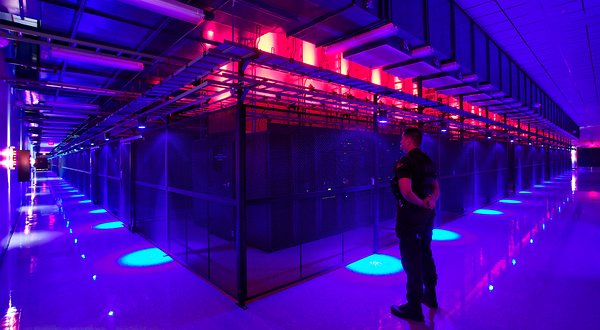
SANTA CLARA, Calif. — Jeff Rothschild’s machines at Facebook had a problem he knew he had to solve immediately. They were about to melt.
The company had been packing a 40-by-60-foot rental space here with racks of computer servers that were needed to store and process information from members’ accounts. The electricity pouring into the computers was overheating Ethernet sockets and other crucial components.
Thinking fast, Mr. Rothschild, the company’s engineering chief, took some employees on an expedition to buy every fan they could find — “We cleaned out all of the Walgreens in the area,” he said — to blast cool air at the equipment and prevent the Web site from going down.
That was in early 2006, when Facebook had a quaint 10 million or so users and the one main server site. Today, the information generated by nearly one billion people requires outsize versions of these facilities, called data centers, with rows and rows of servers spread over hundreds of thousands of square feet, and all with industrial cooling systems.
They are a mere fraction of the tens of thousands of data centers that now exist to support the overall explosion of digital information. Stupendous amounts of data are set in motion each day as, with an innocuous click or tap, people download movies on iTunes, check credit card balances through Visa’s Web site, send Yahoo e-mail with files attached, buy products on Amazon, post on Twitter or read newspapers online.
A yearlong examination by The New York Times has revealed that this foundation of the information industry is sharply at odds with its image of sleek efficiency and environmental friendliness.
Most data centers, by design, consume vast amounts of energy in an incongruously wasteful manner, interviews and documents show. Online companies typically run their facilities at maximum capacity around the clock, whatever the demand. As a result, data centers can waste 90 percent or more of the electricity they pull off the grid, The Times found.
To guard against a power failure, they further rely on banks of generators that emit diesel exhaust. The pollution from data centers has increasingly been cited by the authorities for violating clean air regulations, documents show. In Silicon Valley, many data centers appear on the state government’s Toxic Air Contaminant Inventory, a roster of the area’s top stationary diesel polluters.
Worldwide, the digital warehouses use about 30 billion watts of electricity, roughly equivalent to the output of 30 nuclear power plants, according to estimates industry experts compiled for The Times. Data centers in the United States account for one-quarter to one-third of that load, the estimates show.
“It’s staggering for most people, even people in the industry, to understand the numbers, the sheer size of these systems,” said Peter Gross, who helped design hundreds of data centers. “A single data center can take more power than a medium-size town.”
Energy efficiency varies widely from company to company. But at the request of The Times, the consulting firm McKinsey & Company analyzed energy use by data centers and found that, on average, they were using only 6 percent to 12 percent of the electricity powering their servers to perform computations. The rest was essentially used to keep servers idling and ready in case of a surge in activity that could slow or crash their operations.
A server is a sort of bulked-up desktop computer, minus a screen and keyboard, that contains chips to process data. The study sampled about 20,000 servers in about 70 large data centers spanning the commercial gamut: drug companies, military contractors, banks, media companies and government agencies.
“This is an industry dirty secret, and no one wants to be the first to say mea culpa,” said a senior industry executive who asked not to be identified to protect his company’s reputation. “If we were a manufacturing industry, we’d be out of business straightaway.”
These physical realities of data are far from the mythology of the Internet: where lives are lived in the “virtual” world and all manner of memory is stored in “the cloud.”
The inefficient use of power is largely driven by a symbiotic relationship between users who demand an instantaneous response to the click of a mouse and companies that put their business at risk if they fail to meet that expectation.
Even running electricity at full throttle has not been enough to satisfy the industry. In addition to generators, most large data centers contain banks of huge, spinning flywheels or thousands of lead-acid batteries — many of them similar to automobile batteries — to power the computers in case of a grid failure as brief as a few hundredths of a second, an interruption that could crash the servers.
“It’s a waste,” said Dennis P. Symanski, a senior researcher at the Electric Power Research Institute, a nonprofit industry group. “It’s too many insurance policies.”
Monday, September 24. 2012
Get ready for 'laptabs' to proliferate in a Windows 8 world
Via DVICE
-----
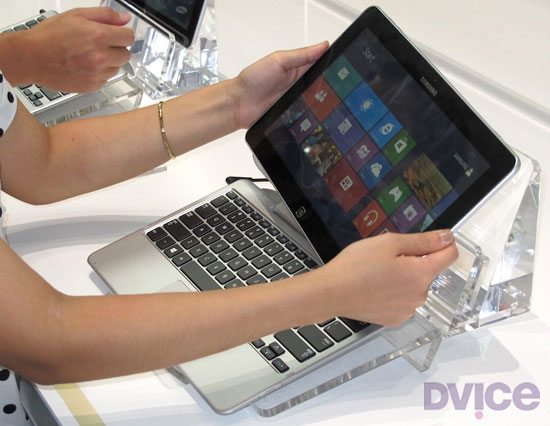
Image Credit: Stewart Wolpin/DVICE
A few months after the iPad came out, computer makers who had made convertible laptops started phasing them out, believing the iPad usurped their need. What's old is new again: several computer makers are planning to introduce new Windows 8 convertible laptops soon after Microsoft makes the OS official on October 26.
I agree with the assessment that the iPad stymied the need for convertible laptops; if you need a keyboard with the lighter-than-a-convertible iPad, or even an Android tablet, you could buy an auxiliary Bluetooth QWERTY keypad. In fact, your bag would probably be lighter with an iPad and an ultrabook both contained therein, as opposed to a single convertible laptop.
But if these new hybrids succeed, we can't keep calling them "convertible laptops" (for one thing, it takes too long to type). So, I'm inventing a new name for these sometimes-a-laptop, sometimes-a-tablet combo computers.
"Laptabs!"
It's a name I'd trademark if I could (I wish I'd made up "phablet," for instance). Please cite me if you use it. (And don't get dyslexically clever and start calling them "tablaps" — I'm claiming that portmanteau, too.)
Here's the convertible rundown on the five laptabs I found during last months IFA electronics showcase in Berlin, Germany — some have sliding tops and some have detachable tabs, but they're all proper laptabs.
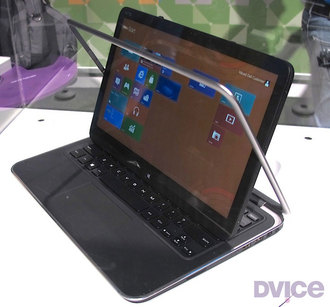
1. Dell XPS Duo 12 It looks like a regular clamshell at first glance, but the 12.5-inch screen pops out and swivels 360 degrees on its central horizontal axis inside the machined aluminum frame, then lies back-to-front over the keyboard to create one fat tablet. The idea isn't exactly original — the company put out a 10.1-inch Inspiron Duo netbook a few years back with the same swinging configuration, but was discontinued when the iPad also killed the netbook.
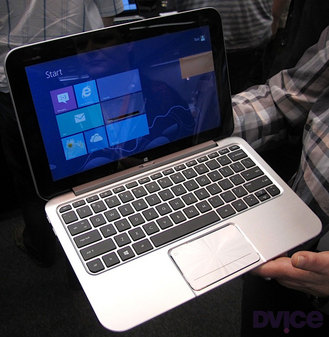
2. HP Envy X2 Here's a detachable tablet laptab with an 11.6-inch snap-off screen. Combined with its keyboard, the X2 weighs a whopping 3.1 pounds; the separated screen/tablet tips the scales at just 1.5 pounds. Its heavier-than-thou nature stems from HP building a battery into both the X2's keyboard and the screen/tablet. HP didn't have a battery life rating, only saying the dual configuration meant it will be naturally massive.

3. Samsung ATIV Smart PC/Smart PC Pro Like the HP, Samsung's offering has an 11.6-inch screen that pops off the QWERTY keypad. The Pro sports an Intel Core i5 processor, measures 11.9 mm thick when closed and will run for eight hours on a single charge, while its sibling is endowed with an Intel Core i3 chip, measures a relatively svelte 9.9mm thin and operates for a healthy 13.5 hours on its battery.
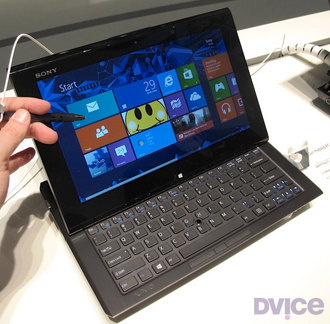
4. Sony VAIO Duo 11 Isn't it odd that Sony and Dell came up with similar laptab appellations? Or maybe not. The VAIO Duo 11 is equipped with an 11.1-inch touchscreen that slides flat-then-back-to-front so it lies back-down on top of the keypad. You also get a digitizer stylus. Sony's Duo doesn't offer any weight advantages compared to an ultrabook, though, which I think poses a problem for most of these laptabs. For instance, both the Intel i3 and i5 Duo 11 editions weigh in nearly a half pound more than Apple's 11-inch Mac Book Air, and at 2.86 pounds, just 0.1 pounds lighter than the 13-inch MacBook Air.
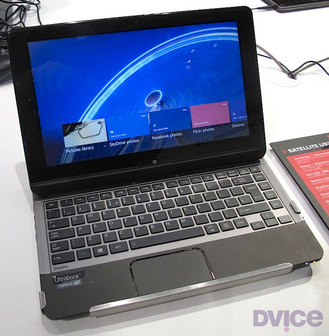
5. Toshiba Satellite U920t Like the Sony Duo, the Satellite U920t is a back-to-front slider, but lacks the seemingly overly complex mechanism of its sliding laptab competitor. Instead, you lay the U920t's 12.5-inch screen flat, then slide it over the keyboard. While easier to slide, it's a bit thick at 19.9 mm compared to Duo 11's 17.8 mm depth, and weighs a heftier 3.2 pounds.
Choices, Choices And More Choices
So: a light ultrabook, or a heavier laptab? And once you pop the tab top off the HP and Samsung when mobile, your bag continues to be weighed down by the keyboard, obviating the whole advantage of carrying a tablet.
In other words, laptabs carry all the disadvantages of a heavier laptop with none of the weight advantages of a tablet. Perhaps there are some functionality advantages by having both; I just don't see these worth a sore back.
Check out the gallery below for a closer look at each laptab written about here.
All images above by Stewart Wolpin for DVICE.
MakerBot shows off next-gen Replicator 2 'desktop' 3D printer
Via DVICE
-----
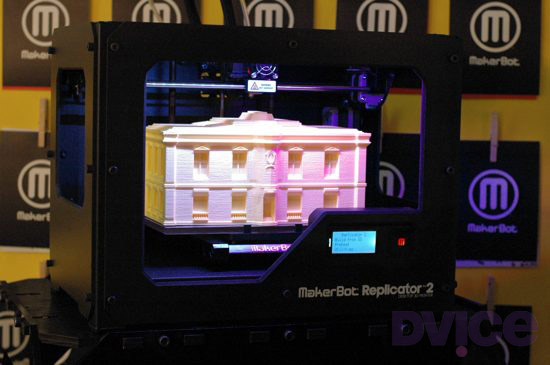
The MakerBot Replicator 2 Desktop 3D Printer. (Image Credit: Kevin Hall/DVICE)
The new Replicator 2 looks good on a shelf, but also boasts two notable upgrades: it's insanely accurate with a 100-micron resolution, and can build objects 37 percent larger than its predecessor without adding roughly any bulk to its size.
In a small eatery in Brooklyn, New York, MakerBot CEO Bre Pettis unveiled the next generation Replicator 2, which he presented in terms of Apple-like evolution in design. From the memory of its own Apple IIe in much smaller DIY 3D printing kits comes the all-steel Replicator 2. The fourth generation MakerBot printer ditches the wood for a sleek hard-body chassis, and is "designed for the desktop of an engineer, researcher, creative professional, or anyone who loves to make things," according to the company.
Of course, MakerBot, which helps enable a robust community of 3D printing enthusiasts, is all about the idea of 3D printing at home. By calling them desktop 3D printers, MakerBot alludes to 1984's Apple Macintosh, the first computer designed to be affordable. The Macintosh was introduced at a fraction of the cost of the Lisa, which came before it and was the first computer with an easy-to-use graphical interface.
Each iteration of MakerBot's 3D printing technology has tried to find a sweet spot between utility and affordability. Usually, affordability comes at the cost of two things: micron-level layer resolutions (the first Replicator had a 270-micron layer resolution, nearly three times as thick) and enough area to build. The Replicator 2 prioritizes these things, and, while it only has a single-color extruder, can still be sold at an impressive $2,100.
Well, to really be a Macintosh, the Replicator 2 also needs a user-friendly GUI. To that end, MakerBot is announcing MakerWare, which will allow users to arrange shapes and resize them on the fly with a simple program. If you don't need precise sizes, you can just wing it and build a shape as large as you like in the Replicator 2's 410-cubic-inch build area. More advanced users can set out an array of parts with the tool across the build space, and print multiple smaller components at once:

Even with all that going for it, $2,100 isn't a very Macintosh price — the original Macintosh was far cheaper than the Lisa before it. MakerBot's 3D printers have gotten more expensive over the years: $750 Cupcake, $1,225 Thing-O-Matic, $1749 Replicator (which the company still sells), and now a $2,100 Replicator 2. With that in mind, maybe it's not price that will determine 3D printers finding a spot in every home, but the layer resolution.
Printing with a 100-micron layer resolution, the amount of material the Replicator 2 puts down to build an object is impressive. To illustrate, each layer is 100 microns, or 0.1 millimeters, thick. A six-inch-tall object, which the printer can manage, would be made of at least 1,500 layers.
Most importantly, at 100 microns, the objects printed feel smooth, where the previous generation of home printers created objects that had rough wavy edges. The Replicator 2 uses a special-to-MakerBot bioplastic that's made from corn (to quote Pettis: "It smells good, too"), and the 3D-printed sample MakerBot gave us definitely felt smooth with a barely detectable grain.
The MakerBot Replicator 2 appears on the October (2012, if you're from the future) issue of Wired magazine with the words, "This machine will change the world." Does that mean 3D printing affordable, useable, accurate and space-efficient, yet? If the answer is yes, you can get your own MakerBot Replicator 2 from MakerBot
(One last thing, Pettis urged us all to check out the the brochure as the MakerBot team "worked really hard on it" to make it the "best brochure in the universe." Straight from my notes to your screen.)
Tuesday, September 18. 2012
Stretchable, Tattoo-Like Electronics Are Here to Check Your Health
Via Motherboard
-----

Wearable computing is all the rage this year as Google pulls back the curtain on their Glass technology, but some scientists want to take the idea a stage further. The emerging field of stretchable electronics is taking advantage of new polymers that allow you to not just wear your computer but actually become a part of the circuitry. By embedding the wiring into a stretchable polymer, these cutting edge devices resemble human skin more than they do circuit boards. And with a whole host of possible medical uses, that’s kind of the point.
A Cambridge, Massachusetts startup called MC10 is leading the way in stretchable electronics. So far, their products are fairly simple. There’s a patch that’s meant to be installed right on the skin like a temporary tattoo that can sense whether or not the user is hydrated as well as an inflatable balloon catheter that can measure the electronic signals of the user’s heartbeat to search for irregularities like arrythmias. Later this year, they’re launching a mysterious product with Reebok that’s expected to take advantage of the technology’s ability to detect not only heartbeat but also respiration, body temperature, blood oxygenation and so forth.
The joy of stretchable electronics is that the manufacturing process is not unlike that of regular electronics. Just like with a normal microchip, gold electrodes and wires are deposited on to thin silicone wafers, but they’re also embedded in the stretchable polymer substrate. When everything’s in place, the polymer substrate with embedded circuitry can be peeled off and later installed on a new surface. The components that can be added to stretchable surface include sensors, LEDs, transistors, wireless antennas and solar cells for power.
For now, the technology is still the nascent stages, but scientists have high hopes. In the future, you could wear a temporary tattoo that would monitor your vital signs, or doctors might install stretchable electronics on your organs to keep track of their behavior. Stretchable electronics could also be integrated into clothing or paired with a smartphone. Of course, if all else fails, it’ll probably make for some great children’s toys.
Wednesday, September 05. 2012
IBM produces first working chips modeled on the human brain
Via Venture Beat
-----
IBM has been shipping computers for more than 65 years, and it is finally on the verge of creating a true electronic brain.
Big Blue is announcing today that it, along with four universities and the Defense Advanced Research Projects Agency (DARPA), have created the basic design of an experimental computer chip that emulates the way the brain processes information.
IBM’s so-called cognitive computing chips could one day simulate and emulate the brain’s ability to sense, perceive, interact and recognize — all tasks that humans can currently do much better than computers can.
Dharmendra Modha (pictured below right) is the principal investigator of the DARPA project, called Synapse (Systems of Neuromorphic Adaptive Plastic Scalable Electronics, or SyNAPSE). He is also a researcher at the IBM Almaden Research Center in San Jose, Calif.
“This is the seed for a new generation of computers, using a combination of supercomputing, neuroscience, and nanotechnology,” Modha said in an interview with VentureBeat. ”The computers we have today are more like calculators. We want to make something like the brain. It is a sharp departure from the past.”
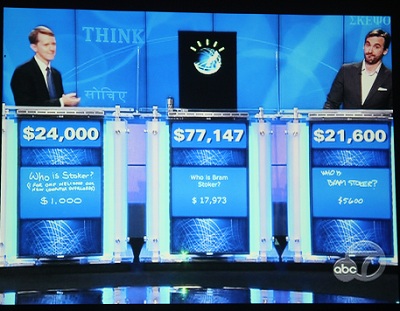
If it eventually leads to commercial brain-like chips, the project could turn computing on its head, overturning the conventional style of computing that has ruled since the dawn of the information age and replacing it with something that is much more like a thinking artificial brain. The eventual applications could have a huge impact on business, science and government. The idea is to create computers that are better at handling real-world sensory problems than today’s computers can. IBM could also build a better Watson, the computer that became the world champion at the game show Jeopardy earlier this year.

We wrote about the project when IBM announced the project in November, 2008 and again when it hit its first milestone in November, 2009. Now the researchers have completed phase one of the project, which was to design a fundamental computing unit that could be replicated over and over to form the building blocks of an actual brain-like computer.
Richard Doherty, an analyst at the Envisioneering Group, has been briefed on the project and he said there is “nothing even close” to the level of sophistication in cognitive computing as this project.
This new computing unit, or core, is analogous to the brain. It has “neurons,” or digital processors that compute information. It has “synapses” which are the foundation of learning and memory. And it has “axons,” or data pathways that connect the tissue of the computer.
 While it sounds simple enough, the computing unit is radically different from the way most computers operate today. Modern computers are based on the von Neumann architecture, named after computing pioneer John von Neumann and his work from the 1940s.
In von Neumann machines, memory and processor are separated and linked via a data pathway known as a bus. Over the past 65 years, von Neumann machines have gotten faster by sending more and more data at higher speeds across the bus, as processor and memory interact. But the speed of a computer is often limited by the capacity of that bus, leading some computer scientists to call it the “von Neumann bottleneck.”
With the human brain, the memory is located with the processor (at least, that’s how it appears, based on our current understanding of what is admittedly a still-mysterious three pounds of meat in our heads).
The brain-like processors with integrated memory don’t operate fast at all, sending data at a mere 10 hertz, or far slower than the 5 gigahertz computer processors of today. But the human brain does an awful lot of work in parallel, sending signals out in all directions and getting the brain’s neurons to work simultaneously. Because the brain has more than 10 billion neuron and 10 trillion connections (synapses) between those neurons, that amounts to an enormous amount of computing power.
IBM wants to emulate that architecture with its new chips.
“We are now doing a new architecture,” Modha said. “It departs from von Neumann in variety of ways.”
 The research team has built its first brain-like computing units, with 256 neurons, an array of 256 by 256 (or a total of 65,536) synapses, and 256 axons. (A second chip had 262,144 synapses) In other words, it has the basic building block of processor, memory, and communications. This unit, or core, can be built with just a few million transistors (some of today’s fastest microchips can be built with billions of transistors).
Modha said that this new kind of computing will likely complement, rather than replace, von Neumann machines, which have become good at solving problems involving math, serial processing, and business computations. The disadvantage is that those machines aren’t scaling up to handle big problems well any more. They are using too much power and are harder to program.
The more powerful a computer gets, the more power it consumes, and manufacturing requires extremely precise and expensive technologies. And the more components are crammed together onto a single chip, the more they “leak” power, even in stand-by mode. So they are not so easily turned off to save power.
The advantage of the human brain is that it operates on very low power and it can essentially turn off parts of the brain when they aren’t in use.
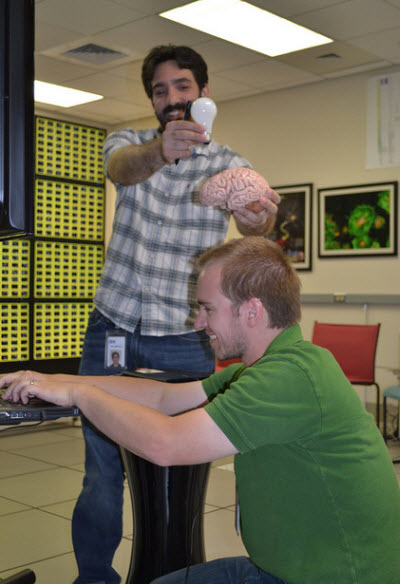 These new chips won’t be programmed in the traditional way. Cognitive computers are expected to learn through experiences, find correlations, create hypotheses, remember, and learn from the outcomes. They mimic the brain’s “structural and synaptic plasticity.” The processing is distributed and parallel, not centralized and serial.
With no set programming, the computing cores that the researchers have built can mimic the event-driven brain, which wakes up to perform a task.
Modha said the cognitive chips could get by with far less power consumption than conventional chips.
The so-called “neurosynaptic computing chips” recreate a phenomenon known in the brain as a “spiking” between neurons and synapses. The system can handle complex tasks such as playing a game of Pong, the original computer game from Atari, Modha said.
Two prototype chips have already been fabricated and are being tested. Now the researchers are about to embark on phase two, where they will build a computer. The goal is to create a computer that not only analyzes complex information from multiple senses at once, but also dynamically rewires itself as it interacts with the environment, learning from what happens around it.
The chips themselves have no actual biological pieces. They are fabricated from digital silicon circuits that are inspired by neurobiology. The technology uses 45-nanometer silicon-on-insulator complementary metal oxide semiconductors. In other words, it uses a very conventional chip manufacturing process. One of the cores contains 262,144 programmable synapses, while the other contains 65,536 learning synapses.
Besides playing Pong, the IBM team has tested the chip on solving problems related to navigation, machine vision, pattern recognition, associative memory (where you remember one thing that goes with another thing) and classification.
Eventually, IBM will combine the cores into a full integrated system of hardware and software. IBM wants to build a computer with 10 billion neurons and 100 trillion synapses, Modha said. That’s as powerful than the human brain. The complete system will consume one kilowatt of power and will occupy less than two liters of volume (the size of our brains), Modha predicts. By comparison, today’s fastest IBM supercomputer, Blue Gene, has 147,456 processors, more than 144 terabytes of memory, occupies a huge, air-conditioned cabinet, and consumes more than 2 megawatts of power.
As a hypothetical application, IBM said that a cognitive computer could monitor the world’s water supply via a network of sensors and tiny motors that constantly record and report data such as temperature, pressure, wave height, acoustics, and ocean tide. It could then issue tsunami warnings in case of an earthquake. Or, a grocer stocking shelves could use an instrumented glove that monitors sights, smells, texture and temperature to flag contaminated produce. Or a computer could absorb data and flag unsafe intersections that are prone to traffic accidents. Those tasks are too hard for traditional computers.
Synapse is funded with a $21 million grant from DARPA, and it involve six IBM labs, four universities (Cornell, the University of Wisconsin, University of California at Merced, and Columbia) and a number of government researchers.
For phase 2, IBM is working with a team of researchers that includes Columbia University; Cornell University; University of
California, Merced; and University of Wisconsin, Madison. While this project is new, IBM has been studying brain-like computing as far back as 1956, when it created the world’s first (512 neuron) brain simulation.
“If this works, this is not just a 5 percent leap,” Modha said. “This is a leap of orders of magnitude forward. We have already overcome huge conceptual roadblocks.”
[Photo credits: Dean Takahashi, IBM]
Monday, September 03. 2012
The History of the Floppy Disk
Via input output
-----
In the fall of 1977, I experimented with a newfangled PC, a Radio Shack TRS-80. For data storage it used—I kid you not—a cassette tape player. Tape had a long history with computing; I had used the IBM 2420 9-track tape system on IBM 360/370 mainframes to load software and to back-up data. Magnetic tape was common for storage in pre-personal computing days, but it had two main annoyances: it held tiny amounts of data, and it was slower than a slug on a cold spring morning. There had to be something better, for those of us excited about technology. And there was: the floppy disk.

Welcome to the floppy disk family: 8”, 5.25” and 3.5”
In the mid-70s I had heard about floppy drives, but they were expensive, exotic equipment. I didn't know that IBM had decided as early as 1967 that tape-drives, while fine for back-ups, simply weren't good enough to load software on mainframes. So it was that Alan Shugart assigned David L. Noble to lead the development of “a reliable and inexpensive system for loading microcode into the IBM System/370 mainframes using a process called Initial Control Program Load (ICPL).” From this project came the first 8-inch floppy disk.
Oh yes, before the 5.25-inch drives you remember were the 8-inch floppy. By 1978 I was using them on mainframes; later I would use them on Online Computer Library Center (OCLC) dedicated cataloging PCs.
The 8-inch drive began to show up in 1971. Since they enabled developers and users to stop using the dreaded paper tape (which were easy to fold, spindle, and mutilate, not to mention to pirate) and the loathed IBM 5081 punch card. Everyone who had ever twisted a some tape or—the horror!—dropped a deck of Hollerith cards was happy to adopt 8-inch drives.

Before floppy drives, we often had to enter data using punch cards.
Besides, the early single-sided 8-inch floppy could hold the data of up to 3,000 punch cards, or 80K to you. I know that's nothing today — this article uses up 66K with the text alone – but then it was a big deal.
Some early model microcomputers, such as the Xerox 820 and Xerox Alto, used 8-inch drives, but these first generation floppies never broke through to the larger consumer market. That honor would go to the next generation of the floppy: the 5.25 inch model.
By 1972, Shugart had left IBM and founded his own company, Shugart Associates. In 1975, Wang, which at the time owned the then big-time dedicated word processor market, approached Shugart about creating a computer that would fit on top of a desk. To do that, Wang needed a smaller, cheaper floppy disk.
According to Don Massaro (PDF link), another IBMer who followed Shugart to the new business, Wang’s founder Charles Wang said, “I want to come out with a much lower-end word processor. It has to be much lower cost and I can't afford to pay you $200 for your 8" floppy; I need a $100 floppy.”
So, Shugart and company started working on it. According to Massaro, “We designed the 5 1/4" floppy drive in terms of the overall design, what it should look like, in a car driving up to Herkimer, New York to visit Mohawk Data Systems.” The design team stopped at a stationery store to buy cardboard while trying to figure out what size the diskette should be. “It's real simple, the reason why it was 5¼,” he said. “5 1/4 was the smallest diskette that you could make that would not fit in your pocket. We didn't want to put it in a pocket because we didn't want it bent, okay?”
Shugart also designed the diskette to be that size because an analysis of the cassette tape drives and their bays in microcomputers showed that a 5.25” drive was as big as you could fit into the PCs of the day.
According to another story from Jimmy Adkisson, a Shugart engineer, “Jim Adkisson and Don Massaro were discussing the proposed drive's size with Wang. The trio just happened to be doing their discussing at a bar. An Wang motioned to a drink napkin and stated 'about that size' which happened to be 5 1/4-inches wide.”
Wang wasn’t the most important element in the success of the 5.25-inch floppy. George Sollman, another Shugart engineer, took an early model of the 5.25” drive to a Home Brew Computer Club meeting. “The following Wednesday or so, Don came to my office and said, 'There's a bum in the lobby,’” Sollman says. “‘And, in marketing, you're in charge of cleaning up the lobby. Would you get the bum out of the lobby?’ So I went out to the lobby and this guy is sitting there with holes in both knees. He really needed a shower in a bad way but he had the most dark, intense eyes and he said, 'I've got this thing we can build.'”
The bum's name was Steve Jobs and the “thing” was the Apple II.
Apple had also used cassette drives for its first computers. Jobs knew his computers also needed a smaller, cheaper, and better portable data storage system. In late 1977, the Apple II was made available with optional 5.25” floppy drives manufactured by Shugart. One drive ordinarily held programs, while the other could be used to store your data. (Otherwise, you had to swap floppies back-and-forth when you needed to save a file.)

The PC that made floppy disks a success: 1977's Apple II
The floppy disk seems so simple now, but it changed everything. As IBM's history of the floppy disk states, this was a big advance in user-friendliness. “But perhaps the greatest impact of the floppy wasn’t on individuals, but on the nature and structure of the IT industry. Up until the late 1970s, most software applications for tasks such as word processing and accounting were written by the personal computer owners themselves. But thanks to the floppy, companies could write programs, put them on the disks, and sell them through the mail or in stores. 'It made it possible to have a software industry,' says Lee Felsenstein, a pioneer of the PC industry who designed the Osborne 1, the first mass-produced portable computer. Before networks became widely available for PCs, people used floppies to share programs and data with each other—calling it the 'sneakernet.'”
In short, it was the floppy disk that turned microcomputers into personal computers.

Which of these drives did you own?
The success of the Apple II made the 5.25” drive the industry standard. The vast majority of CP/M-80 PCs, from the late 70s to early 80s, used this size floppy drive. When the first IBM PC arrived in 1981 you had your choice of one or two 160 kilobyte (K – yes, just oneK) floppy drives.
Throughout the early 80s, the floppy drive became the portable storage format. (Tape quickly was relegated to business back-ups.) At first, the floppy disk drives were only built with one read/write head, but another set of heads were quickly incorporated. This meant that when the IBM XT PC arrived in 1983, double-sided floppies could hold up to 360K of data.
There were some bumps along the road to PC floppy drive compatibility. Some companies, such as DEC with its DEC Rainbow, introduced its own non-compatible 5.25” floppy drives. They were single-sided but with twice the density, and in 1983 a single box of 10 disks cost $45 – twice the price of the standard disks.
In the end, though, market forces kept the various non-compatible disk formats from splitting the PC market into separate blocks. (How the data was stored was another issue, however. Data stored on a CP/M system was unreadable on a PC-DOS drive, for examples, so dedicated applications like Media Master promised to convert data from one format to another.)
That left lots of room for innovation within the floppy drive mainstream. In 1984, IBM introduced the IBM Advanced Technology (AT) computer. This model came with a high-density 5.25-inch drive, which could handle disks that could up hold up to 1.2MB of data.
A variety of other floppy drives and disk formats were tried. These included 2.0, 2.5, 2.8, 3.0, 3.25, and 4.0 inch formats. Most quickly died off, but one, the 3.5” size – introduced by Sony in 1980 – proved to be a winner.
The 3.5 disk didn't really take off until 1982. Then, the Microfloppy Industry Committeeapproved a variation of the Sony design and the “new” 3.5” drive was quickly adopted by Apple for the Macintosh, by Commodore for the Amiga, and by Atari for its Atari ST PC. The mainstream PC market soon followed and by 1988, the more durable 3.5” disks outsold the 5.25” floppy disks. (During the transition, however, most of us configured our PCs to have both a 3.5” drive and a 5.25” drive, in addition to the by-now-ubiquitous hard disks. Still, most of us eventually ran into at least one situation in which we had a file on a 5.25” disk and no floppy drive to read it on.)
I

The one 3.5” diskette that everyone met at one time or another: An AOL install disk.
The first 3.5” disks could only hold 720K. But they soon became popular because of the more convenient pocket-size format and their somewhat-sturdier construction (if you rolled an office chair over one of these, you had a chance that the data might survive). Another variation of the drive, using Modified Frequency Modulation (MFM) encoding, pushed 3.5” diskettes storage up to 1.44Mbs in IBM's PS/2 and Apple's Mac IIx computers in the mid to late 1980s.
By then, though floppy drives would continue to evolve, other portable technologies began to surpass them.
In 1991, Jobs introduced the extended-density (ED) 3.5” floppy on his NeXT computer line. These could hold up to 2.8MBs. But it wasn't enough. A variety of other portable formats that could store more data came along, such as magneto-optical drives and Iomega's Zip drive, and they started pushing floppies out of business.
The real floppy killers, though, were read-writable CDs, DVDs, and, the final nail in the coffin: USB flash drives. Today, a 64GB flash drive can hold more data than every floppy disk I've ever owned all rolled together.
Apple prospered the most from the floppy drive but ironically was the first to abandon it as read-writable CDs and DVDs took over. The 1998 iMac was the first consumer computer to ship without any floppy drive.
However, the floppy drive took more than a decade to die. Sony, which at the end owned 70% of what was left of the market, announced in 2010 that it was stopping the manufacture of 3.5” diskettes.
Today, you can still buy new 1.44MB floppy drives and floppy disks, but for the other formats you need to look to eBay or yard sales. If you really want a new 3.5” drive or disks, I'd get them sooner than later. Their day is almost done.
But, as they disappear even from memory, we should strive to remember just how vitally important floppy disks were in their day. Without them, our current computer world simply could not exist. Before the Internet was open to the public, it was floppy disks that let us create and trade programs and files. They really were what put the personal in “personal computing.”
Quicksearch
Popular Entries
- The great Ars Android interface shootout (131713)
- Norton cyber crime study offers striking revenue loss statistics (102814)
- MeCam $49 flying camera concept follows you around, streams video to your phone (100739)
- Norton cyber crime study offers striking revenue loss statistics (59043)
- The PC inside your phone: A guide to the system-on-a-chip (58949)


