Monday, September 30. 2013
The $400 Deltaprintr Is A Cheap Way To Make Really Big 3D Prints
Via TechCrunch
-----

Another day, another 3D printer. This time we have a model that comes from SUNY Purchase College where they are working on a laser-cut, compact 3D printer that can make extra tall models simply by swapping out a few pieces.
The printer pumps out plastic at 100 microns, a more than acceptable resolution, and uses very few moving parts. You’ll notice that the print head rides up three rails. This would allow you to add longer bars or extensions to bring things bigger than the platform.
Created by students Shai Schechter, Andrey Kovalev, Yasick Nemenov and Eugene Sokolov, the project is currently in pre-beta and they aim to launch a crowdfunding campaign in November. You can sign up for updates here.
The team hopes to make the product completely open source and because it uses very few expensive parts they’re able to price it very aggressively. While I love projects like these, I’m anxious to see how they build their software – one of the most important parts of a 3D printing package. As long as it’s solid I’d totally be down with this cool rig.
Monday, September 23. 2013
Qualcomm joins Wireless Power Consortium board, sparks hope for A4WP and Qi unification
Via endgadget
-----
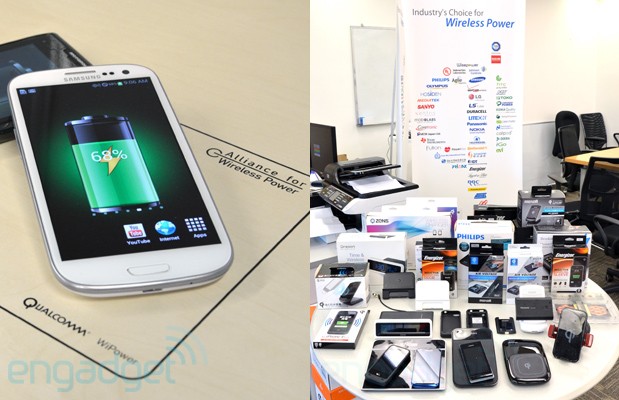
Qualcomm, the founding member of Alliance for Wireless Power (or A4WP in short), made a surprise move today by joining the management board of the rival Wireless Power Consortium (or WPC), the group behind the already commercially available Qi standard. This is quite an interesting development considering how both alliances have been openly critical of each other, and yet now there's a chance of seeing just one standard getting the best of both worlds. That is, of course, dependent on Qualcomm's real intentions behind joining the WPC.
While Qi is now a well-established ecosystem backed by 172 companies, its current "first-gen" inductive charging method is somewhat sensitive to the alignment of the devices on the charging mats (though there has been recent breakthrough). Another issue is Qi can currently provide just up to 5W of power (which is dependent on both the quality of the coil and the operating frequency), and this may not be sufficient for charging up large devices at a reasonable pace. For instance, even with the 10W USB adapter, the iPad takes hours to fully juice up, let alone with just half of that power.
Looking ahead, both the WPC and the 63-strong A4WP are already working on their own magnetic resonance implementations to enable longer range charging. Additionally, A4WP's standard has also been approved for up to 24W of output, whereas the WPC is already developing medium power (from 15W) Qi specification for the likes of laptops and power tools.
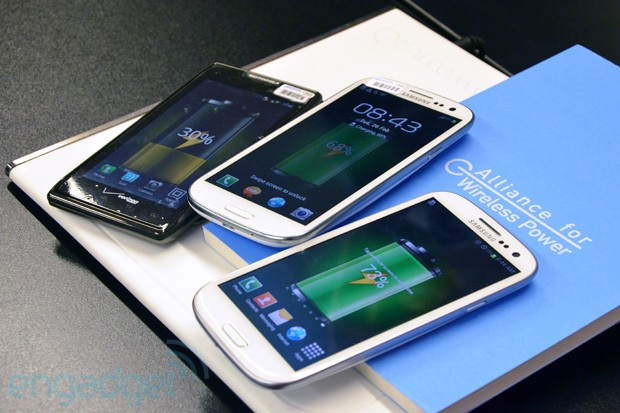
Here's where the two standards differentiate. A4WP's implementation allows simultaneous charging of devices that require different power requirement on the same pad, thus offering more spacial freedom. On the other hand, Qi follows a one-to-one control design to maximize efficiency -- as in the power transfer is totally dependent on how much juice the device needs, and it can even go completely off once the device is charged.
What remains unclear is whether Qualcomm has other motives behind its participation in the WPC's board of management. While the WPC folks "encourage competitors to join" for the sake of "open development of Qi," this could also hamper the development of their new standard. Late last year, we spoke to the WPC's co-chair Camille Tang (the name "Qi" was actually her idea; plus she's also the president and co-founder of Hong Kong-based Convenient Power), and she expressed concern over the potential disruption from the new wireless power groups.
"The question to ask is: why are all these groups now coming out and saying they're doing a standard? It's possible that some people might say they really are a standard, but they may actually not intend to put products out there," said Tang.
"For example, there's one company with their technology and one thing that's rolling out in infrastructure. They don't have any devices, it's not compatible with anything else, so you think: why do they do that?
"It's about money. Not just licensing money, but other types of money as well."
At least on the surface, Qualcomm is showing its keen side to get things going for everyone's best interest. In a statement we received from a spokesperson earlier, the company implied that joining the WPC's board is "the logical step to grow the wireless power industry beyond the current first generation products and towards next generation, loosely coupled technology." However, Qualcomm still "believes the A4WP represents the most mature and best implementation of resonant charging."
Saturday, September 21. 2013
Hackers are crowd-funding a bounty to hack the iPhone 5S fingerprint scanner
Via o.canada.com
-----

The 5S features a fingerprint sensor, has an upgraded camera, and contains an A7 chip Photo: Justin Sullivan/Getty Images
Hackers from around the world have put together more than $15,000 they hope will be enough to entice the smartest hackers to break into the new iPhone’s much-lauded fingerprint scanner.
The iPhone 5S, which was announced last week, features a fingerprint scanner to unlock the device and make purchases. Apple has said that an image of the fingerprint is not stored on the device, but only the data to recognize the fingerprint when it is pressed on the sensor.
Security experts quickly grew suspicious after the product was annouced, though. It is, after all, far easier to change a compromised password than a compromised fingerprint if the data were to get into the wrong hands.
To test Apple’s security claims, hackers are taking the challenge global.
The campaign is being run through IsTouchIdHackedYet.com, where individuals can put up their own money to reward the winner of the challenge.
The amount currently being offered is in excess of $15,000.
To win the prize, someone must be able to demonstrate that they:
- Can lift a fingerprint from the iPhone 5S
- Reproduces the fingerprint
- Use the reproduced fingerprint to unlock the iPhone 5S in fewer than 5 attempts
It’s no small challenge.
Apple says the information gathered by the phone is not an image of the fingerprint but an encrypted pile of data points that describe the fingerprint. They’ve also said that the information is stored deep within the phone and will be extremely difficult for anyone, including Apple, to access. They’ve also said that the fingerprint data will not be transmitted from the phone in any capacity.
This effectively means that winners of the prize will most likely try to dust the phone itself for fingerprints and try to replicate the finger by creating some kind of physical caste of the print to be used on the scanner.
The bounty is described in greater detail here.
If they succeed, it will be an enormous black eye for Apple, which is very proud of the security of its products.
If the hackers fail, it will be a feather in Apple’s cap that their flagship mobile device could not be foiled.
En-guard.
Friday, September 20. 2013
Kinect - Updated SDK, with HTML5, Kinect Fusion improvements, and more
Via Kinect Blog
-----
I am pleased to announce that we released the Kinect for Windows software development kit (SDK) 1.8 today. This is the fourth update to the SDK since we first released it commercially one and a half years ago. Since then, we’ve seen numerous companies using Kinect for Windows worldwide, and more than 700,000 downloads of our SDK.
We build each version of the SDK with our customers in mind—listening to what the developer community and business leaders tell us they want and traveling around the globe to see what these dedicated teams do, how they do it, and what they most need out of our software development kit.

The new background removal API is useful for advertising, augmented reality gaming, training
and simulation, and more.
Kinect for Windows SDK 1.8 includes some key features and samples that the community has been asking for, including:
- New background removal. An API removes the background behind the active user so that it can be replaced with an artificial background. This green-screening effect was one of the top requests we’re heard in recent months. It is especially useful for advertising, augmented reality gaming, training and simulation, and other immersive experiences that place the user in a different virtual environment.
- Realistic color capture with Kinect Fusion. A new Kinect Fusion API scans the color of the scene along with the depth information so that it can capture the color of the object along with its three-dimensional (3D) model. The API also produces a texture map for the mesh created from the scan. This feature provides a full fidelity 3D model of a scan, including color, which can be used for full color 3D printing or to create accurate 3D assets for games, CAD, and other applications.
- Improved tracking robustness with Kinect Fusion. This algorithm makes it easier to scan a scene. With this update, Kinect Fusion is better able to maintain its lock on the scene as the camera position moves, yielding a more reliable and consistent scanning.
- HTML interaction sample. This sample demonstrates implementing Kinect-enabled buttons, simple user engagement, and the use of a background removal stream in HTML5. It allows developers to use HTML5 and JavaScript to implement Kinect-enabled user interfaces, which was not possible previously—making it easier for developers to work in whatever programming languages they prefer and integrate Kinect for Windows into their existing solutions.
- Multiple-sensor Kinect Fusion sample. This sample shows developers how to use two sensors simultaneously to scan a person or object from both sides—making it possible to construct a 3D model without having to move the sensor or the object! It demonstrates the calibration between two Kinect for Windows sensors, and how to use Kinect Fusion APIs with multiple depth snapshots. It is ideal for retail experiences and other public kiosks that do not include having an attendant available to scan by hand.
- Adaptive UI sample. This sample demonstrates how to build an application that adapts itself depending on the distance between the user and the screen—from gesturing at a distance to touching a touchscreen. The algorithm in this sample uses the physical dimensions and positions of the screen and sensor to determine the best ergonomic position on the screen for touch controls as well as ways the UI can adapt as the user approaches the screen or moves further away from it. As a result, the touch interface and visual display adapt to the user’s position and height, which enables users to interact with large touch screen displays comfortably. The display can also be adapted for more than one user.
We also have updated our Human Interface Guidelines (HIG) with guidance to complement the new Adaptive UI sample, including the following:

Design a transition that reveals or hides additional information
without obscuring the anchor points in the overall UI.
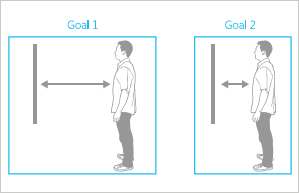
Design UI where users can accomplish all tasks for each goal
within a single range.
My team and I believe that communicating naturally with computers means being able to gesture and speak, just like you do when communicating with people. We believe this is important to the evolution of computing, and are committed to helping this future come faster by giving our customers the tools they need to build truly innovative solutions. There are many exciting applications being created with Kinect for Windows, and we hope these new features will make those applications better and easier to build. Keep up the great work, and keep us posted!
Bob Heddle, Director
Kinect for Windows
Key links
- Download Kinect for Windows SDK 1.8
- Download Kinect for Windows Toolkit 1.8
- Download Kinect for Windows Runtime 1.8
- Find out more about Kinect for Windows
- See what others are doing with Kinect for Windows
- Read what people are saying about Kinect for Windows
- Tell us about your solutions on Facebook and Twitter
- Kinect for Windows Human Interface Guidelines (PDF, 14.4 MB)
- FAQ
Thursday, September 05. 2013
MakerBot Digitizer 3D scanner arrives for reverse 3D printing
Via Slash Gear
-----
MakerBot is best known for its 3D printers, turning virtual products into real ones, but the company’s latest hardware to go on sale, the MakerBot Digitizer, takes things in the opposite direction. Announced back in March, and on sale from today for $1,400, the Digitizer takes a real-world object and, by spinning it on a rotating platform in front of a camera, maps out a digital model that can then be saved, shared, modified, and even 3D printed itself.
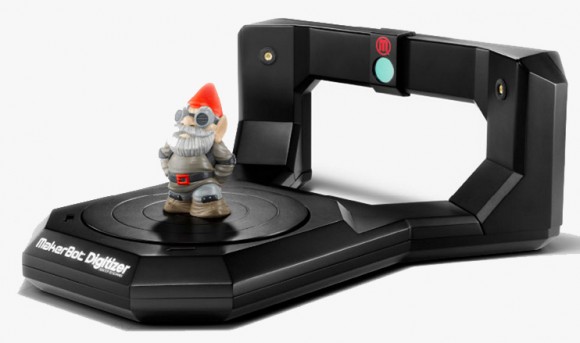
Although the process itself involves some complicated technology and data-crunching, MakerBot claims that users themselves should be able to scan in an object in just a couple of clicks. The company includes its own MakerWare for Digitizer software, which creates files suitable for both the firm’s own 3D printers and generic 3D files for other hardware.
Calibration is a matter of dropping the included glyph block on the rotating platter and having the camera run through some preconfigured tests. After that, you center the object you’re hoping to scan, selecting whether they’re lightly colored, medium, or dark, and then waiting until the process is done.
MakerBot Digitizer Desktop 3D Scanner overview:
That takes approximately twelve minutes per object, MakerBot says, so don’t think of this as the 3D scanner equivalent of a photocopier. The camera itself runs at 1.3-megapixels and is paired with two Class 1 lasers for mapping out objects, and the overall resolution is good for 0.5mm in terms of detail and +/- 2.0mm for dimensional accuracy. Maximum object size is up to 20.3cm in diameter and the same in height.
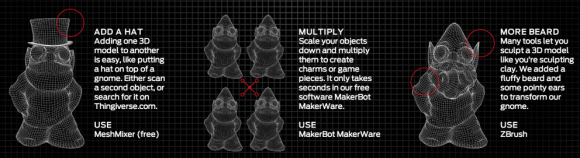
Once you’ve actually run something through the scanner, the core grid file can be shared directly from the app to Thingiverse.com, or edited and combined with other 3D files to make a new object altogether.
The MakerBot Digitizer Desktop Scanner is available for order now, priced at $1,400.
Microsoft hints that Kinect camera technology is coming to Windows Phone
Via The Inquirer
-----

GAMES CONSOLE AND PHONE MAKER Microsoft has hinted that it will bring its Xbox Kinect camera technology to its Windows Phone 8 mobile operating system following its acquisition of Nokia.
During a conference call on Tuesday, Microsoft operating systems group VP Terry Myerson hinted that the firm will work with Nokia to integrated Kinect camera technology into future Windows Phone devices.
Speaking about the Nokia buyout, Myerson said, "In the area of imaging, the Nokia Lumia 1020 has no equal. We are excited to bring this together with our Kinect camera technology to delight our customers."
Myerson didn't elaborate further, so it's unclear when Microsoft will introduce this technology and what it will be capable of doing.
However, this isn't the first we've heard about Kinect technology possibly coming to Windows Phone devices. Previous rumours had speculated that the integration will allow users of Windows Phone devices to control their handsets using both voice and gestures.
It's possible that the Kinect integration could also enable more immersive gaming on Windows Phone devices and facilitate deeper integration with Microsoft's Xbox One games console.
While all this sounds promising, Kinect integration could also be a bad thing for the Windows Phone ecosystem, with Microsoft having been accused of spying on its users with Kinect in the wake of recent NSA surveillance revelations.
Microsoft announced its acquisition of Nokia's devices business as well as licensing of the Finnish phone firm's patent portfolio for a cool £4.6bn on Tuesday morning. The buyout deal is expected to be completed in 2014.Quicksearch
Popular Entries
- The great Ars Android interface shootout (131711)
- Norton cyber crime study offers striking revenue loss statistics (102810)
- MeCam $49 flying camera concept follows you around, streams video to your phone (100738)
- Norton cyber crime study offers striking revenue loss statistics (59039)
- The PC inside your phone: A guide to the system-on-a-chip (58949)


