Monday, March 20. 2017
How Uber Deceives the Authorities Worldwide
Via New York Times (Mike Isaac)
-----

SAN FRANCISCO — Uber has for years engaged in a worldwide program to deceive the authorities in markets where its low-cost ride-hailing service was resisted by law enforcement or, in some instances, had been banned.
The program, involving a tool called Greyball, uses data collected from the Uber app and other techniques to identify and circumvent officials who were trying to clamp down on the ride-hailing service. Uber used these methods to evade the authorities in cities like Boston, Paris and Las Vegas, and in countries like Australia, China and South Korea.
Greyball was part of a program called VTOS, short for “violation of terms of service,” which Uber created to root out people it thought were using or targeting its service improperly. The program, including Greyball, began as early as 2014 and remains in use, predominantly outside the United States. Greyball was approved by Uber’s legal team.
Greyball and the VTOS program were described to The New York Times by four current and former Uber employees, who also provided documents. The four spoke on the condition of anonymity because the tools and their use are confidential and because of fear of retaliation by Uber.
Uber’s use of Greyball was recorded on video in late 2014, when Erich England, a code enforcement inspector in Portland, Ore., tried to hail an Uber car downtown in a sting operation against the company.
At the time, Uber had just started its ride-hailing service in Portland without seeking permission from the city, which later declared the service illegal. To build a case against the company, officers like Mr. England posed as riders, opening the Uber app to hail a car and watching as miniature vehicles on the screen made their way toward the potential fares.
But unknown to Mr. England and other authorities, some of the digital cars they saw in the app did not represent actual vehicles. And the Uber drivers they were able to hail also quickly canceled. That was because Uber had tagged Mr. England and his colleagues — essentially Greyballing them as city officials — based on data collected from the app and in other ways. The company then served up a fake version of the app, populated with ghost cars, to evade capture.
At a time when Uber is already under scrutiny for its boundary-pushing workplace culture, its use of the Greyball tool underscores the lengths to which the company will go to dominate its market. Uber has long flouted laws and regulations to gain an edge against entrenched transportation providers, a modus operandi that has helped propel it into more than 70 countries and to a valuation close to $70 billion.
Yet using its app to identify and sidestep the authorities where regulators said Uber was breaking the law goes further toward skirting ethical lines — and, potentially, legal ones. Some at Uber who knew of the VTOS program and how the Greyball tool was being used were troubled by it.
In a statement, Uber said, “This program denies ride requests to users who are violating our terms of service — whether that’s people aiming to physically harm drivers, competitors looking to disrupt our operations, or opponents who collude with officials on secret ‘stings’ meant to entrap drivers.”
The mayor of Portland, Ted Wheeler, said in a statement, “I am very concerned that Uber may have purposefully worked to thwart the city’s job to protect the public.”
Uber, which lets people hail rides using a smartphone app, operates multiple types of services, including a luxury Black Car offering in which drivers are commercially licensed. But an Uber service that many regulators have had problems with is the lower-cost version, known in the United States as UberX.
UberX essentially lets people who have passed a background check and vehicle inspection become Uber drivers quickly. In the past, many cities have banned the service and declared it illegal.
That is because the ability to summon a noncommercial driver — which is how UberX drivers using private vehicles are typically categorized — was often unregulated. In barreling into new markets, Uber capitalized on this lack of regulation to quickly enlist UberX drivers and put them to work before local regulators could stop them.
After the authorities caught on to what was happening, Uber and local officials often clashed. Uber has encountered legal problems over UberX in cities including Austin, Tex., Philadelphia and Tampa, Fla., as well as internationally. Eventually, agreements were reached under which regulators developed a legal framework for the low-cost service.
That approach has been costly. Law enforcement officials in some cities have impounded vehicles or issued tickets to UberX drivers, with Uber generally picking up those costs on the drivers’ behalf. The company has estimated thousands of dollars in lost revenue for every vehicle impounded and ticket received.
This is where the VTOS program and the use of the Greyball tool came in. When Uber moved into a new city, it appointed a general manager to lead the charge. This person, using various technologies and techniques, would try to spot enforcement officers.
One technique involved drawing a digital perimeter, or “geofence,” around the government offices on a digital map of a city that Uber was monitoring. The company watched which people were frequently opening and closing the app — a process known internally as eyeballing — near such locations as evidence that the users might be associated with city agencies.
Other techniques included looking at a user’s credit card information and determining whether the card was tied directly to an institution like a police credit union.
Enforcement officials involved in large-scale sting operations meant to catch Uber drivers would sometimes buy dozens of cellphones to create different accounts. To circumvent that tactic, Uber employees would go to local electronics stores to look up device numbers of the cheapest mobile phones for sale, which were often the ones bought by city officials working with budgets that were not large.
In all, there were at least a dozen or so signifiers in the VTOS program that Uber employees could use to assess whether users were regular new riders or probably city officials.
If such clues did not confirm a user’s identity, Uber employees would search social media profiles and other information available online. If users were identified as being linked to law enforcement, Uber Greyballed them by tagging them with a small piece of code that read “Greyball” followed by a string of numbers.
When someone tagged this way called a car, Uber could scramble a set of ghost cars in a fake version of the app for that person to see, or show that no cars were available. Occasionally, if a driver accidentally picked up someone tagged as an officer, Uber called the driver with instructions to end the ride.
Uber employees said the practices and tools were born in part out of safety measures meant to protect drivers in some countries. In France, India and Kenya, for instance, taxi companies and workers targeted and attacked new Uber drivers.
“They’re beating the cars with metal bats,” the singer Courtney Love posted on Twitter from an Uber car in Paris at a time of clashes between the company and taxi drivers in 2015. Ms. Love said that protesters had ambushed her Uber ride and had held her driver hostage. “This is France? I’m safer in Baghdad.”
Uber has said it was also at risk from tactics used by taxi and limousine companies in some markets. In Tampa, for instance, Uber cited collusion between the local transportation authority and taxi companies in fighting ride-hailing services.
In those areas, Greyballing started as a way to scramble the locations of UberX drivers to prevent competitors from finding them. Uber said that was still the tool’s primary use.
But as Uber moved into new markets, its engineers saw that the same methods could be used to evade law enforcement. Once the Greyball tool was put in place and tested, Uber engineers created a playbook with a list of tactics and distributed it to general managers in more than a dozen countries on five continents.
At least 50 people inside Uber knew about Greyball, and some had qualms about whether it was ethical or legal. Greyball was approved by Uber’s legal team, led by Salle Yoo, the company’s general counsel. Ryan Graves, an early hire who became senior vice president of global operations and a board member, was also aware of the program.
Ms. Yoo and Mr. Graves did not respond to requests for comment.
Outside legal specialists said they were uncertain about the legality of the program. Greyball could be considered a violation of the federal Computer Fraud and Abuse Act, or possibly intentional obstruction of justice, depending on local laws and jurisdictions, said Peter Henning, a law professor at Wayne State University who also writes for The New York Times.
“With any type of systematic thwarting of the law, you’re flirting with disaster,” Professor Henning said. “We all take our foot off the gas when we see the police car at the intersection up ahead, and there’s nothing wrong with that. But this goes far beyond avoiding a speed trap.”
On Friday, Marietje Schaake, a member of the European Parliament for the Dutch Democratic Party in the Netherlands, wrote that she had written to the European Commission asking, among other things, if it planned to investigate the legality of Greyball.
To date, Greyballing has been effective. In Portland on that day in late 2014, Mr. England, the enforcement officer, did not catch an Uber, according to local reports.
And two weeks after Uber began dispatching drivers in Portland, the company reached an agreement with local officials that said that after a three-month suspension, UberX would eventually be legally available in the city.
Monday, February 06. 2017
Everything You Need to Know About 5G
Via IEEE Spectrum
-----
Today’s mobile users want faster data speeds and more reliable service. The next generation of wireless networks—5G—promises to deliver that, and much more. With 5G, users should be able to download a high-definition film in under a second (a task that could take 10 minutes on 4G LTE). And wireless engineers say these networks will boost the development of other new technologies, too, such as autonomous vehicles, virtual reality, and the Internet of Things.
If all goes well, telecommunications companies hope to debut the first commercial 5G networks in the early 2020s. Right now, though, 5G is still in the planning stages, and companies and industry groups are working together to figure out exactly what it will be. But they all agree on one matter: As the number of mobile users and their demand for data rises, 5G must handle far more traffic at much higher speeds than the base stations that make up today’s cellular networks.
To achieve this, wireless engineers are designing a suite of brand-new technologies. Together, these technologies will deliver data with less than a millisecond of delay (compared to about 70 ms on today’s 4G networks) and bring peak download speeds of 20 gigabits per second (compared to 1 Gb/s on 4G) to users.
At the moment, it’s not yet clear which technologies will do the most for 5G in the long run, but a few early favorites have emerged. The front-runners include millimeter waves, small cells, massive MIMO, full duplex, and beamforming. To understand how 5G will differ from today’s 4G networks, it’s helpful to walk through these five technologies and consider what each will mean for wireless users.

Millimeter Waves
Today’s wireless networks have run into a problem: More people and devices are consuming more data than ever before, but it remains crammed on the same bands of the radio-frequency spectrum that mobile providers have always used. That means less bandwidth for everyone, causing slower service and more dropped connections.
One way to get around that problem is to simply transmit signals on a whole new swath of the spectrum, one that’s never been used for mobile service before. That’s why providers are experimenting with broadcasting on millimeter waves, which use higher frequencies than the radio waves that have long been used for mobile phones.
Millimeter waves are broadcast at frequencies between 30 and 300 gigahertz, compared to the bands below 6 GHz that were used for mobile devices in the past. They are called millimeter waves because they vary in length from 1 to 10 mm, compared to the radio waves that serve today’s smartphones, which measure tens of centimeters in length.
Until now, only operators of satellites and radar systems used millimeter waves for real-world applications. Now, some cellular providers have begun to use them to send data between stationary points, such as two base stations. But using millimeter waves to connect mobile users with a nearby base station is an entirely new approach.
There is one major drawback to millimeter waves, though—they can’t easily travel through buildings or obstacles and they can be absorbed by foliage and rain. That’s why 5G networks will likely augment traditional cellular towers with another new technology, called small cells.

Small Cells
Small cells are portable miniature base stations that require minimal power to operate and can be placed every 250 meters or so throughout cities. To prevent signals from being dropped, carriers could install thousands of these stations in a city to form a dense network that acts like a relay team, receiving signals from other base stations and sending data to users at any location.
While traditional cell networks have also come to rely on an increasing number of base stations, achieving 5G performance will require an even greater infrastructure. Luckily, antennas on small cells can be much smaller than traditional antennas if they are transmitting tiny millimeter waves. This size difference makes it even easier to stick cells on light poles and atop buildings.
This radically different network structure should provide more targeted and efficient use of spectrum. Having more stations means the frequencies that one station uses to connect with devices in one area can be reused by another station in a different area to serve another customer. There is a problem, though—the sheer number of small cells required to build a 5G network may make it hard to set up in rural areas.
In addition to broadcasting over millimeter waves, 5G base stations will also have many more antennas than the base stations of today’s cellular networks—to take advantage of another new technology: massive MIMO.

Massive MIMO
Today’s 4G base stations have a dozen ports for antennas that handle all cellular traffic: eight for transmitters and four for receivers. But 5G base stations can support about a hundred ports, which means many more antennas can fit on a single array. That capability means a base station could send and receive signals from many more users at once, increasing the capacity of mobile networks by a factor of 22 or greater.
This technology is called massive MIMO. It all starts with MIMO, which stands for multiple-input multiple-output. MIMO describes wireless systems that use two or more transmitters and receivers to send and receive more data at once. Massive MIMO takes this concept to a new level by featuring dozens of antennas on a single array.
MIMO is already found on some 4G base stations. But so far, massive MIMO has only been tested in labs and a few field trials. In early tests, it has set new records for spectrum efficiency, which is a measure of how many bits of data can be transmitted to a certain number of users per second.
Massive MIMO looks very promising for the future of 5G. However, installing so many more antennas to handle cellular traffic also causes more interference if those signals cross. That’s why 5G stations must incorporate beamforming.

Beamforming
Beamforming is a traffic-signaling system for cellular base stations that identifies the most efficient data-delivery route to a particular user, and it reduces interference for nearby users in the process. Depending on the situation and the technology, there are several ways for 5G networks to implement it.
Beamforming can help massive MIMO arrays make more efficient use of the spectrum around them. The primary challenge for massive MIMO is to reduce interference while transmitting more information from many more antennas at once. At massive MIMO base stations, signal-processing algorithms plot the best transmission route through the air to each user. Then they can send individual data packets in many different directions, bouncing them off buildings and other objects in a precisely coordinated pattern. By choreographing the packets’ movements and arrival time, beamforming allows many users and antennas on a massive MIMO array to exchange much more information at once.
For millimeter waves, beamforming is primarily used to address a different set of problems: Cellular signals are easily blocked by objects and tend to weaken over long distances. In this case, beamforming can help by focusing a signal in a concentrated beam that points only in the direction of a user, rather than broadcasting in many directions at once. This approach can strengthen the signal’s chances of arriving intact and reduce interference for everyone else.
Besides boosting data rates by broadcasting over millimeter waves and beefing up spectrum efficiency with massive MIMO, wireless engineers are also trying to achieve the high throughput and low latency required for 5G through a technology called full duplex, which modifies the way antennas deliver and receive data.

Full Duplex
Today's base stations and cellphones rely on transceivers that must take turns if transmitting and receiving information over the same frequency, or operate on different frequencies if a user wishes to transmit and receive information at the same time.
With 5G, a transceiver will be able to transmit and receive data at the same time, on the same frequency. This technology is known as full duplex, and it could double the capacity of wireless networks at their most fundamental physical layer: Picture two people talking at the same time but still able to understand one another—which means their conversation could take half as long and their next discussion could start sooner.
Some militaries already use full duplex technology that relies on bulky equipment. To achieve full duplex in personal devices, researchers must design a circuit that can route incoming and outgoing signals so they don’t collide while an antenna is transmitting and receiving data at the same time.
This is especially hard because of the tendency of radio waves to travel both forward and backward on the same frequency—a principle known as reciprocity. But recently, experts have assembled silicon transistors that act like high-speed switches to halt the backward roll of these waves, enabling them to transmit and receive signals on the same frequency at once.
One drawback to full duplex is that it also creates more signal interference, through a pesky echo. When a transmitter emits a signal, that signal is much closer to the device’s antenna and therefore more powerful than any signal it receives. Expecting an antenna to both speak and listen at the same time is possible only with special echo-canceling technology.
With these and other 5G technologies, engineers hope to build the wireless network that future smartphone users, VR gamers, and autonomous cars will rely on every day. Already, researchers and companies have set high expectations for 5G by promising ultralow latency and record-breaking data speeds for consumers. If they can solve the remaining challenges, and figure out how to make all these systems work together, ultrafast 5G service could reach consumers in the next five years.
Writing Credits:
- Amy Nordrum–Article Author & Voice Over
Produced By:
- Celia Gorman–Executive Producer
- Kristen Clark–Producer
Art Direction and Illustrations:
- Brandon Palacio–Art Director
- Mike Spector–Illustrator
- Ove Edfors–Expert & Illustrator
Tuesday, November 24. 2015
Google can unlock most Android phones remotely if the government requests it
Monday, February 23. 2015
Android to Become 'Workhorse' of Cybercrime
Via EE Times
-----
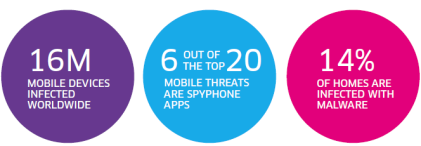
PARIS — As of the end of 2014, 16 million mobile devices worldwide have been infected by malicious software, estimated Alcatel-Lucent’s security arm, Motive Security Labs, in its latest security report released Thursday (Feb. 12).
Such malware is used by “cybercriminals for corporate and personal espionage, information theft, denial of service attacks on business and governments and banking and advertising scams,” the report warned.
Some of the key facts revealed in the report -- released two weeks in advance of the Mobile World Congress 2015 -- could dampen the mobile industry’s renewed enthusiasm for mobile payment systems such as Google Wallet and Apple Pay.
At risk is also the matter of privacy. How safe is your mobile device? Consumers have gotten used to trusting their smartphones, expecting their devices to know them well enough to accommodate their habits and preferences. So the last thing consumers expect them to do is to channel spyware into their lives, letting others monitor calls and track web browsing.
Cyber attacks
The latest in a drumbeat of data
hacking incidents is the massive database breach reported last week by
Anthem Inc., the second largest health insurer in the United States.
There was also the high profile corporate security attack on Sony in
late 2014.
Declaring that 2014 “will be remembered as the year of cyber-attacks,” Kevin McNamee, director, Alcatel-Lucent Motive Security Labs, noted in his latest blog other cases of hackers stealing millions of credit and debit card account numbers at retail points of sale. They include the security breach at Target in 2013 and similar breaches repeated in 2014 at Staples, Home Depot Sally Beauty Supply, Neiman Marcus, United Parcel Service, Michaels Stores and Albertsons, as well as the food chains Dairy Queen and P. F. Chang.
“But the combined number of these attacks pales in comparison to the malware attacks on mobile and residential devices,” McNamee insists. In his blog, he wrote, “Stealing personal information and data minutes from individual device users doesn’t tend to make the news, but it’s happening with increased frequency. And the consequences of losing one’s financial information, privacy, and personal identity to cyber criminals are no less important when it’s you.”
'Workhorse of cybercrime'
Indeed, malware
infections in mobile devices are on the rise. According to the Motive
Security Labs report, malware infections in mobile devices jumped by 25%
in 2014, compared to a 20% increase in 2013.
According to the report, in the mobile networks, “Android devices have now caught up to Windows laptops as the primary workhorse of cybercrime.” The infection rates between Android and Windows devices now split 50/50 in 2014, said the report.
This may be hardly a surprise to those familiar with Android security. There are three issues. First, the volume of Android devices shipped in 2014 is so huge that it makes a juicy target for cyber criminals. Second, Android is based on an open platform. Third, Android allows users to download apps from third-party stores where apps are not consistently verified and controlled.
In contrast, the report said that less than 1% of infections come from iPhone and Blackberry smartphones. The report, however, quickly added that this data doesn’t prove that iPhones are immune to malware.
The Motive Security Labs report cited findings by Palo Alto Networks in early November. The Networks discussed the discovery of WireLurker vulnerability that allows an infected Mac OS-X computer to install applications on any iPhone that connects to it via a USB connection. User permission is not required and the iPhone need not be jail-broken.
News stories reported the source of the infected Mac OS-X apps as an app store in China that apparently affected some 350,000 users through apps disguised as popular games. These infected the Mac computer, which in turn infected the iPhone. Once infected, the iPhone contacted a remote C&C server.
According to the Motive Security Labs report, a couple of weeks later, FireEye revealed Masque Attack vulnerability, which allows third-party apps to be replaced with a malicious app that can access all the data of the original app. In a demo, FireEye replaced the Gmail app on an iPhone, allowing the attacker complete access to the victim’s email and text messages.
Spyware on the rise
It’s important to note that
among varieties of malware, mobile spyware is definitely on the
increase. According to Motive Security Labs, “Six of the mobile malware
top 20 list are mobile spyware.” These are apps used to spy on the
phone’s owner. “They track the phone’s location, monitor ingoing and
outgoing calls and text messages, monitor email and track the victim’s
web browsing,” according to Motive Security Labs.
Impact on mobile payment
For consumers and mobile operators, the malware story hits home hardest
in how it may affect mobile payment. McNamee wrote in his blog:
The rise of mobile malware threats isn’t unexpected. But as Google Wallet, Apple Pay and others rush to bring us mobile payment systems, security has to be a top focus. And malware concerns become even more acute in the workplace where more than 90% of workers admit to using their personal smartphones for work purposes.
Fixed broadband networks
The Motive Security
Labs report didn’t stop at mobile security. It also looked at
residential fixed broadband networks. The report found the overall
monthly infection rate there is 13.6%, “substantially up from the 9%
seen in 2013,” said the report. The report attributed it to “an increase
in infections by moderate threat level adware.”
Why is this all happening?
The short answer to
why this is all happening today is that “a vast majority of mobile
device owners do not take proper device security precautions,” the
report said.
Noting that a recent Motive Security Labs survey found that 65 percent of subscribers expect their service provider to protect both their mobile and home devices, the report seems to suggest that the onus is on operators. “They are expected to take a proactive approach to this problem by providing services that alert subscribers to malware on their devices along with self-help instructions for removing it,” said Patrick Tan, General Manager of Network Intelligence at Alcatel-Lucent, in a statement.
Due to the large market share it holds within communication networks, Alcatel-Lucent says that it’s in a unique position to measure the impact of mobile and home device traffic moving over those networks to identify malicious and cyber-security threats. Motive Security Labs is an analytics arm of Motive Customer Experience Management.
According to Alcatel-Lucent, Motive Security Labs (formerly Kindsight Security Labs), processes more than 120,000 new malware samples per day and maintains a library of 30 million active samples.
In the following pages, we will share the hilights of data collected by Motive Security Labs.
Mobile infection rate since December 2012
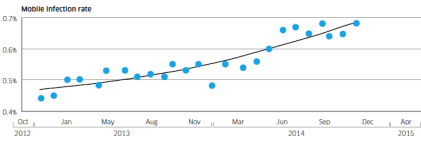
Alcatel-Lucent’s Motive Security Labs found 0.68% of mobile devices are infected with malware.
Using the ITU’s figure of 2.3 billion mobile broadband subscriptions, Motive Security Labs estimated that 16 million mobile devices had some sort of malware infection in December 2014.
The report called this global estimate “likely to be on the conservative side.” Motive Security Labs’ sensors do not have complete coverage in areas such as China and Russia, where mobile infection rates are known to be higher.
Mobile malware samples since June 2012
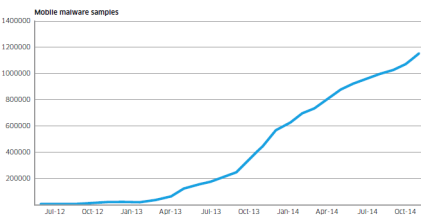
Motive Security Labs used the increase in the number of samples in its malware database to show Android malware growth.
The chart above shows numbers since June 2012. The number of samples grew by 161% in 2014.
In addition to the increase in raw numbers, the sophistication of Android malware also got better, according to Motive Security Labs. Researchers in 2014 started to see malware applications that had originally been developed for the Windows/PC platform migrate to the mobile space, bringing with them more sophisticated command and control and rootkit technologies.
Infected device types in 2013 and 2014
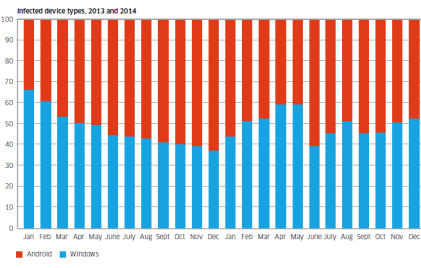
The chart shows the breakdown of infected device types that have been observed in 2013 and 2014. Shown in red is Android and shown in blue is Windows.
While the involvement of such a high proportion of Windows/PC devices may be a surprise to some, these Windows/PCs are connected to the mobile network via dongles and mobile Wi-Fi devices or simply tethered through smartphones.
They’re responsible for about 50% of the malware infections observed.
The report said, “This is because these devices are still the favorite of hardcore professional cybercriminals who have a huge investment in the Windows malware ecosystem. As the mobile network becomes the access network of choice for many Windows PCs, the malware moves with them.”
Android phones and tablets are responsible for about 50% of the malware infections observed.
Currently most mobile malware is distributed as “Trojanized” apps. Android offers the easiest target for this because of its open app environment, noted the report.
Tuesday, June 24. 2014
New open-source router firmware opens your Wi-Fi network to strangers
ComputedBy - The idea to share a WiFi access point is far to be a new one (it is obviously as old as the technology of the WiFi access point itself), but previous solutions were not addressing many issues (including the legal ones) that this proposal seems finally to consider seriously. This may really succeed in transforming a ridiculously endless utopia in something tangible!
Now, Internet providers (including mobile networks) may have a word to say about that. Just by changing their terms of service they can just make this practice illegal... as business does not rhyme with effectiveness (yes, I know, that is strange!!...) neither with objectivity. It took some time but geographical boundaries were raised up over the Internet (which is somehow a as impressive as ridiculous achievement when you think about it), so I'm pretty sure 'they' can find a work around to make this idea not possible or put their hands over it.
Via ars technica
-----
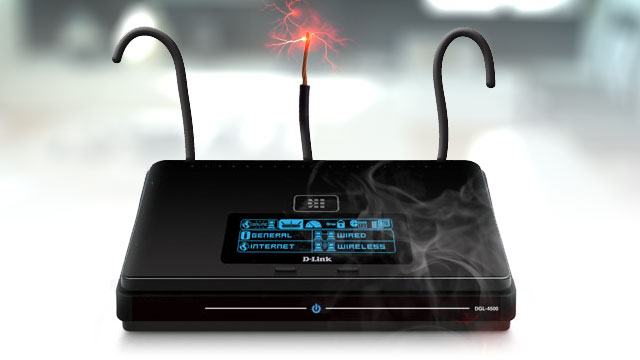
We’ve often heard security folks explain their belief that one of the best ways to protect Web privacy and security on one's home turf is to lock down one's private Wi-Fi network with a strong password. But a coalition of advocacy organizations is calling such conventional wisdom into question.
Members of the “Open Wireless Movement,” including the Electronic Frontier Foundation (EFF), Free Press, Mozilla, and Fight for the Future are advocating that we open up our Wi-Fi private networks (or at least a small slice of our available bandwidth) to strangers. They claim that such a random act of kindness can actually make us safer online while simultaneously facilitating a better allocation of finite broadband resources.
The OpenWireless.org website explains the group’s initiative. “We are aiming to build technologies that would make it easy for Internet subscribers to portion off their wireless networks for guests and the public while maintaining security, protecting privacy, and preserving quality of access," its mission statement reads. "And we are working to debunk myths (and confront truths) about open wireless while creating technologies and legal precedent to ensure it is safe, private, and legal to open your network.”
One such technology, which EFF plans to unveil at the Hackers on Planet Earth (HOPE X) conference next month, is open-sourced router firmware called Open Wireless Router. This firmware would enable individuals to share a portion of their Wi-Fi networks with anyone nearby, password-free, as Adi Kamdar, an EFF activist, told Ars on Friday.
Home network sharing tools are not new, and the EFF has been touting the benefits of open-sourcing Web connections for years, but Kamdar believes this new tool marks the second phase in the open wireless initiative. Unlike previous tools, he claims, EFF’s software will be free for all, will not require any sort of registration, and will actually make surfing the Web safer and more efficient.
Open Wi-Fi initiative members have argued that the act of providing wireless networks to others is a form of “basic politeness… like providing heat and electricity, or a hot cup of tea” to a neighbor, as security expert Bruce Schneier described it.
Walled off
Kamdar said that the new firmware utilizes smart technologies that prioritize the network owner's traffic over others', so good samaritans won't have to wait for Netflix to load because of strangers using their home networks. What's more, he said, "every connection is walled off from all other connections," so as to decrease the risk of unwanted snooping.
Additionally, EFF hopes that opening one’s Wi-Fi network will, in the long run, make it more difficult to tie an IP address to an individual.
“From a legal perspective, we have been trying to tackle this idea that law enforcement and certain bad plaintiffs have been pushing, that your IP address is tied to your identity. Your identity is not your IP address. You shouldn't be targeted by a copyright troll just because they know your IP address," said Kamdar.
This isn’t an abstract problem, either. Consider the case of the Californian who, after allowing a friend access to his home Wi-Fi network, found his home turned inside-out by police officers asking tough questions about child pornography. The man later learned that his houseguest had downloaded illicit materials, thus subjecting the homeowner to police interrogation. Should a critical mass begin to open private networks to strangers, the practice of correlating individuals with IP addresses would prove increasingly difficult and therefore might be reduced.
While the EFF firmware will initially be compatible with only one specific router, the organization would like to eventually make it compatible with other routers and even, perhaps, develop its own router. “We noticed that router software, in general, is pretty insecure and inefficient," Kamdar said. “There are a few major players in the router space. Even though various flaws have been exposed, there have not been many fixes.”
Sunday, June 01. 2014
The Moon is Now a Wi-Fi Hotspot
Via Discover
-----

Complimentary Wi-Fi is so commonplace that a business advertising its “hotspot” in the window seems somewhat passé. But a new hotspot location should impress even the most jaded among us: For the first time, scientists have demonstrated it’s possible to beam a wireless Internet signal across the 238,900 miles separating Earth from the moon.
The demonstration, done by researchers at NASA and MIT, means that
future moon explorers could theoretically check in at Mare Imbrium and
post lunar selfies with greater speed than you do from your home
network.
The team will present its findings June 9 at the CLEO laser technology conference in California.
Not Your Starbucks Wi-Fi
In order to bring broadband to the moon, scientists used four separate telescopes based in New Mexico to send an uplink signal to a receiver mounted on a satellite orbiting the moon. Each telescope is about 6 inches in diameter and is fed by a laser transmitter that beams information in coded pulses of infrared light.
Since our atmosphere bends the signal as it travels to the moon, the four telescopes transmit the light through different columns of air, each with different bending effects. This setup increases the chance that at least one of the laser beams will interact with the receiver, and establish a connection with the moon.
And if you’re fixing to binge on Netflix on the moon, the connection isn’t too bad, either. Scientists managed to send data from Earth to the moon at a rate of 19.44 megabits per second — on par with slower broadband speeds — and could download information from the moon at a rate of whopping 622 megabits per second. According to Wired UK, that’s over 4,000 times faster than current radio transmission speeds.
So, in light of all that, there’s really only question that remains… “What’s the password?”
Thursday, April 17. 2014
Apple Releases iBeacon Specifications Under Non-Disclosure Agreement
Via TechCrunch
-----
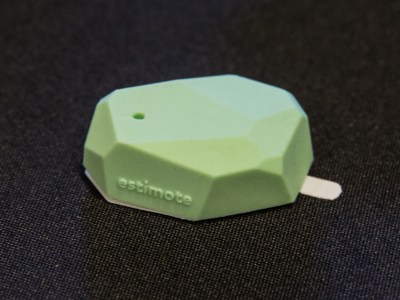
Apple has just released the iBeacon specifications for everyone who is a member of the MFi program, Apple’s program for hardware partners (“Made for iPhone program”, etc.). You’ll have to sign an NDA to read the specifications. BEEKn first spotted the news. The company also reiterates that you can’t use the iBeacon brand without prior consent. You have to register to the MFi program, submit a request and get approved by Apple. It’s free for now.
As a reminder, iBeacon is an indoor positioning system based on Bluetooth Low Energy. Many iOS and Android devices now come with Bluetooth Low Energy, so they are all theoretically compatible with iBeacon. iBeacon is particularly interesting for retailers. They can buy a beacon (such as the Estimote pictured above) and use it for proximity interactions.
For instance, merchants can send a push notification to smartphone users when they get close to a particular product. It can also be used for payment systems to detect who is in your store. There are countless of possibilities — it’s just the beginning.
iBeacon is just a particular implementation of Bluetooth Low Energy. Devices broadcast a Bluetooth LE signal, and iPhones download data when they are close to a beacon. It also works with Android phones, and Apple apparently doesn’t want to stop that.
Yet, iBeacon is a registered trademark and Apple can decide what to do. For now, developers who sign up to the MFi program, request to use the iBeacon name, and conform to the Apple standard can use the brand for free. iBeacon devices will mostly be B2B devices for shop owners, trade show staffs and more.
Think of it like the “Made for iPhone” brand. Dock manufacturers can build a speaker that works with Android and iOS phones. They put the little “Made for iPhone” stickers. It means that Apple certifies that it will work well with iPhones. The iBeacon brand works the same way for beacons.
Wednesday, April 16. 2014
Qualcomm is getting high on 64-bit chips
Via PCWorld
-----
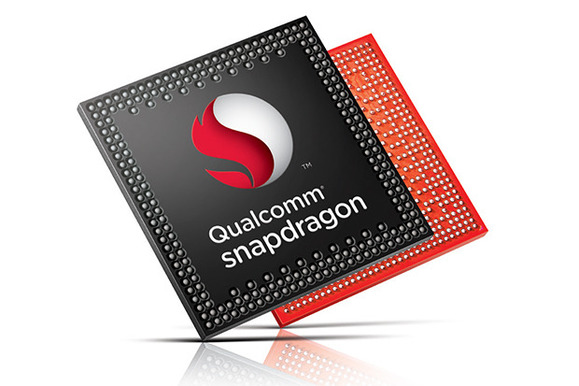
Qualcomm is getting high on 64-bit chips with its fastest ever Snapdragon processor, which will render 4K video, support LTE Advanced and could run the 64-bit Android OS.
The new Snapdragon 810 is the company’s “highest performing” mobile chip for smartphones and tablets, Qualcomm said in a statement. Mobile devices with the 64-bit chip will ship in the first half of next year, and be faster and more power-efficient. Snapdragon chips are used in handsets with Android and Windows Phone operating systems, which are not available in 64-bit form yet.
The Snapdragon 810 is loaded with the latest communication and graphics technologies from Qualcomm. The graphics processor can render 4K (3840 x 2160 pixel) video at 30 frames per second, and 1080p video at 120 frames per second. The chip also has an integrated modem that supports LTE and its successor, LTE-Advanced, which is emerging.
The 810 also is among the first mobile chips to support the latest low-power LPDDR4 memory, which will allow programs to run faster while consuming less power. This will be beneficial, especially for tablets, as 64-bit chips allow mobile devices to have more than 4GB of memory, which is the limit on current 32-bit chips.

The layout of the Snapdragon 810 chip. (Click to enlarge.)
The quad-core chip has a mix of high-power ARM Cortex-A57 CPU cores for demanding tasks and low-power A53 CPU cores for mundane tasks like taking calls, messaging and MP3 playback. The multiple cores ensure more power-efficient use of the chip, which helps extend battery life of mobile devices.
The company also introduced a Snapdragon 808 six-core 64-bit chip. The chips will be among the first made using the latest 20-nanometer manufacturing process, which is an advance from the 28-nm process used to make Snapdragon chips today.
Qualcomm now has to wait for Google to release a 64-bit version of Android for ARM-based mobile devices. Intel has already shown mobile devices running 64-bit Android with its Merrifield chip, but most mobile products today run on ARM processors. Qualcomm licenses Snapdragon processor architecture and designs from ARM.
Work for 64-bit Android is already underway, and applications like the Chrome browser are already being developed for the OS. Google has not officially commented on when 64-bit Android would be released, but industry observers believe it could be announced at the Google I/O conference in late June.
Qualcomm spokesman Jon Carvill declined to comment on support for 64-bit Android. But the chips are “further evidence of our commitment to deliver top-to-bottom mobile 64-bit leadership across product tiers for our customers,” Carvill said in an email.
Qualcomm’s chips are used in some of the world’s top smartphones, and will appear in Samsung’s Galaxy S5. A Qualcomm executive in October last year called Apple’s A7, the world’s first 64-bit mobile chip, a “marketing gimmick,” but the company has moved on and now has five 64-bit chips coming to medium-priced and premium smartphones and tablets. But no 64-bit Android smartphones are available yet, and Apple has a headstart and remains the only company selling a 64-bit smartphone with its iPhone 5S.
The 810 supports HDMI 1.4 for 4K video output, and the Adreno 430 graphics processor is 30 percent faster on graphics performance and 20 percent more power efficient than the older Adreno 420 GPU. The graphics processor will support 55-megapixel sensors, Qualcomm said. Other chip features include 802.11ac Wi-Fi with built-in technology for faster wireless data transfers, Bluetooth 4.1 and a processing core for location services.
The six-core Snapdragon 808 is a notch down on performance compared to the 810, and also has fewer features. The 808 supports LTE-Advanced, but can support displays with up to 2560 x 1600 pixels. It will support LPDDR3 memory. The chip has two Cortex-A57 CPUs and four Cortex-A53 cores.
The chips will ship out to device makers for testing in the second half of this year.
Monday, March 17. 2014
Google Project Tango: 200 phones with 3D sensors for room-scanning
Via Slash Gear
-----
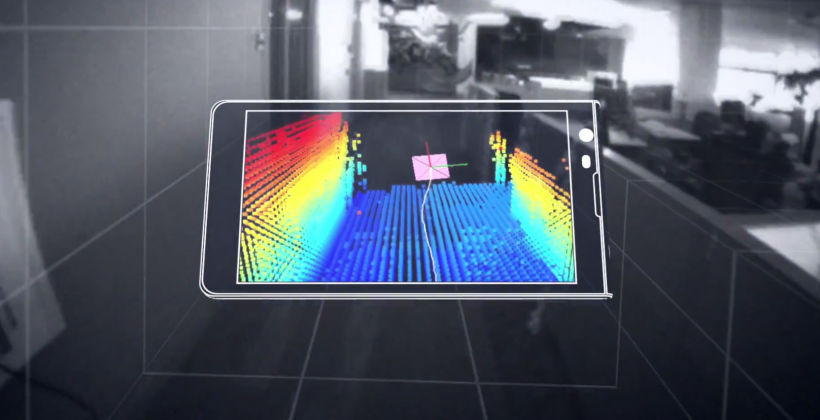
This week the experimental developer-aimed group known as Google ATAP - aka Advanced Technology and Projects (skunkworks) have announced Project Tango. They’ve suggested Project Tango will appear first as a phone with 3D sensors. These 3D sensors will be able to scan and build a map of the room they’re in, opening up a whole world of possibilities.
The device that Project Tango will release first will be just about as limited-edition as they come. Issued in an edition of 200, this device will be sent to developers only. This developer group will be hand-picked by Google’s ATAP - and sign-ups start today. (We’ll be publishing the sign-up link once active.)

Speaking on this skunkworks project this morning was Google user Johnny Lee. Mister Johnny Lee is ATAP’s technical program lead, and he’ll be heading this project for the public, as you’ll see it. This is the same group that brought you Motorola’s digital tattoos, if you’ll remember.
Monday, February 24. 2014
Qloudlab
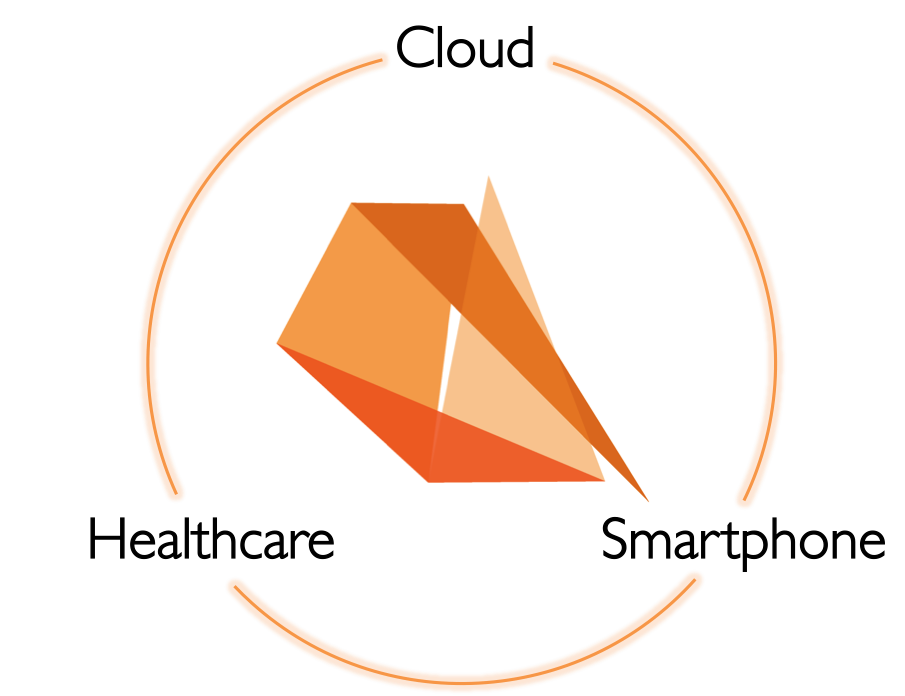
Qloudlab is the inventor and patent holder of the world’s first touchscreen-based biosensor. We are developing a cost-effective technology that is able to turn your smartphone touchscreen into a medical device for multiple blood diagnostics testing: no plug-in required with just a simple disposable. Our innovation is at the convergence of Smartphones, Healthcare, and Cloud solutions. The development is supported by EPFL (Pr. Philippe Renaud, Microsystems Laboratory) and by a major industrial player in cutting-edge touchscreen solutions for consumer, industrial and automotive products.
Quicksearch
Popular Entries
- The great Ars Android interface shootout (130085)
- MeCam $49 flying camera concept follows you around, streams video to your phone (99012)
- Norton cyber crime study offers striking revenue loss statistics (98622)
- The PC inside your phone: A guide to the system-on-a-chip (56387)
- Norton cyber crime study offers striking revenue loss statistics (54851)
Categories

Show tagged entries
Syndicate This Blog
Calendar

|
July '25 | |||||
| Mon | Tue | Wed | Thu | Fri | Sat | Sun |
| 1 | 2 | 3 | 4 | 5 | 6 | |
| 7 | 8 | 9 | 10 | 11 | 12 | 13 |
| 14 | 15 | 16 | 17 | 18 | 19 | 20 |
| 21 | 22 | 23 | 24 | 25 | 26 | 27 |
| 28 | 29 | 30 | 31 | |||