Monday, February 06. 2017
Everything You Need to Know About 5G
Via IEEE Spectrum
-----
Today’s mobile users want faster data speeds and more reliable service. The next generation of wireless networks—5G—promises to deliver that, and much more. With 5G, users should be able to download a high-definition film in under a second (a task that could take 10 minutes on 4G LTE). And wireless engineers say these networks will boost the development of other new technologies, too, such as autonomous vehicles, virtual reality, and the Internet of Things.
If all goes well, telecommunications companies hope to debut the first commercial 5G networks in the early 2020s. Right now, though, 5G is still in the planning stages, and companies and industry groups are working together to figure out exactly what it will be. But they all agree on one matter: As the number of mobile users and their demand for data rises, 5G must handle far more traffic at much higher speeds than the base stations that make up today’s cellular networks.
To achieve this, wireless engineers are designing a suite of brand-new technologies. Together, these technologies will deliver data with less than a millisecond of delay (compared to about 70 ms on today’s 4G networks) and bring peak download speeds of 20 gigabits per second (compared to 1 Gb/s on 4G) to users.
At the moment, it’s not yet clear which technologies will do the most for 5G in the long run, but a few early favorites have emerged. The front-runners include millimeter waves, small cells, massive MIMO, full duplex, and beamforming. To understand how 5G will differ from today’s 4G networks, it’s helpful to walk through these five technologies and consider what each will mean for wireless users.

Millimeter Waves
Today’s wireless networks have run into a problem: More people and devices are consuming more data than ever before, but it remains crammed on the same bands of the radio-frequency spectrum that mobile providers have always used. That means less bandwidth for everyone, causing slower service and more dropped connections.
One way to get around that problem is to simply transmit signals on a whole new swath of the spectrum, one that’s never been used for mobile service before. That’s why providers are experimenting with broadcasting on millimeter waves, which use higher frequencies than the radio waves that have long been used for mobile phones.
Millimeter waves are broadcast at frequencies between 30 and 300 gigahertz, compared to the bands below 6 GHz that were used for mobile devices in the past. They are called millimeter waves because they vary in length from 1 to 10 mm, compared to the radio waves that serve today’s smartphones, which measure tens of centimeters in length.
Until now, only operators of satellites and radar systems used millimeter waves for real-world applications. Now, some cellular providers have begun to use them to send data between stationary points, such as two base stations. But using millimeter waves to connect mobile users with a nearby base station is an entirely new approach.
There is one major drawback to millimeter waves, though—they can’t easily travel through buildings or obstacles and they can be absorbed by foliage and rain. That’s why 5G networks will likely augment traditional cellular towers with another new technology, called small cells.

Small Cells
Small cells are portable miniature base stations that require minimal power to operate and can be placed every 250 meters or so throughout cities. To prevent signals from being dropped, carriers could install thousands of these stations in a city to form a dense network that acts like a relay team, receiving signals from other base stations and sending data to users at any location.
While traditional cell networks have also come to rely on an increasing number of base stations, achieving 5G performance will require an even greater infrastructure. Luckily, antennas on small cells can be much smaller than traditional antennas if they are transmitting tiny millimeter waves. This size difference makes it even easier to stick cells on light poles and atop buildings.
This radically different network structure should provide more targeted and efficient use of spectrum. Having more stations means the frequencies that one station uses to connect with devices in one area can be reused by another station in a different area to serve another customer. There is a problem, though—the sheer number of small cells required to build a 5G network may make it hard to set up in rural areas.
In addition to broadcasting over millimeter waves, 5G base stations will also have many more antennas than the base stations of today’s cellular networks—to take advantage of another new technology: massive MIMO.

Massive MIMO
Today’s 4G base stations have a dozen ports for antennas that handle all cellular traffic: eight for transmitters and four for receivers. But 5G base stations can support about a hundred ports, which means many more antennas can fit on a single array. That capability means a base station could send and receive signals from many more users at once, increasing the capacity of mobile networks by a factor of 22 or greater.
This technology is called massive MIMO. It all starts with MIMO, which stands for multiple-input multiple-output. MIMO describes wireless systems that use two or more transmitters and receivers to send and receive more data at once. Massive MIMO takes this concept to a new level by featuring dozens of antennas on a single array.
MIMO is already found on some 4G base stations. But so far, massive MIMO has only been tested in labs and a few field trials. In early tests, it has set new records for spectrum efficiency, which is a measure of how many bits of data can be transmitted to a certain number of users per second.
Massive MIMO looks very promising for the future of 5G. However, installing so many more antennas to handle cellular traffic also causes more interference if those signals cross. That’s why 5G stations must incorporate beamforming.

Beamforming
Beamforming is a traffic-signaling system for cellular base stations that identifies the most efficient data-delivery route to a particular user, and it reduces interference for nearby users in the process. Depending on the situation and the technology, there are several ways for 5G networks to implement it.
Beamforming can help massive MIMO arrays make more efficient use of the spectrum around them. The primary challenge for massive MIMO is to reduce interference while transmitting more information from many more antennas at once. At massive MIMO base stations, signal-processing algorithms plot the best transmission route through the air to each user. Then they can send individual data packets in many different directions, bouncing them off buildings and other objects in a precisely coordinated pattern. By choreographing the packets’ movements and arrival time, beamforming allows many users and antennas on a massive MIMO array to exchange much more information at once.
For millimeter waves, beamforming is primarily used to address a different set of problems: Cellular signals are easily blocked by objects and tend to weaken over long distances. In this case, beamforming can help by focusing a signal in a concentrated beam that points only in the direction of a user, rather than broadcasting in many directions at once. This approach can strengthen the signal’s chances of arriving intact and reduce interference for everyone else.
Besides boosting data rates by broadcasting over millimeter waves and beefing up spectrum efficiency with massive MIMO, wireless engineers are also trying to achieve the high throughput and low latency required for 5G through a technology called full duplex, which modifies the way antennas deliver and receive data.

Full Duplex
Today's base stations and cellphones rely on transceivers that must take turns if transmitting and receiving information over the same frequency, or operate on different frequencies if a user wishes to transmit and receive information at the same time.
With 5G, a transceiver will be able to transmit and receive data at the same time, on the same frequency. This technology is known as full duplex, and it could double the capacity of wireless networks at their most fundamental physical layer: Picture two people talking at the same time but still able to understand one another—which means their conversation could take half as long and their next discussion could start sooner.
Some militaries already use full duplex technology that relies on bulky equipment. To achieve full duplex in personal devices, researchers must design a circuit that can route incoming and outgoing signals so they don’t collide while an antenna is transmitting and receiving data at the same time.
This is especially hard because of the tendency of radio waves to travel both forward and backward on the same frequency—a principle known as reciprocity. But recently, experts have assembled silicon transistors that act like high-speed switches to halt the backward roll of these waves, enabling them to transmit and receive signals on the same frequency at once.
One drawback to full duplex is that it also creates more signal interference, through a pesky echo. When a transmitter emits a signal, that signal is much closer to the device’s antenna and therefore more powerful than any signal it receives. Expecting an antenna to both speak and listen at the same time is possible only with special echo-canceling technology.
With these and other 5G technologies, engineers hope to build the wireless network that future smartphone users, VR gamers, and autonomous cars will rely on every day. Already, researchers and companies have set high expectations for 5G by promising ultralow latency and record-breaking data speeds for consumers. If they can solve the remaining challenges, and figure out how to make all these systems work together, ultrafast 5G service could reach consumers in the next five years.
Writing Credits:
- Amy Nordrum–Article Author & Voice Over
Produced By:
- Celia Gorman–Executive Producer
- Kristen Clark–Producer
Art Direction and Illustrations:
- Brandon Palacio–Art Director
- Mike Spector–Illustrator
- Ove Edfors–Expert & Illustrator
Wednesday, January 06. 2016
New internet error code identifies censored websites
Via Slash Gear

Everyone on the internet has come across at least couple error codes, the most well-known being 404, for page not found, while other common ones include 500, for internal server error, or 403, for a "forbidden" page. However, with latter, there's the growing issue of why a certain webpage has become forbidden, or who made it so. In an effort to address things like censorship or "legal obstacles," a new code has been published, to be used when legal demands require access to a page be blocked: error 451.
The number is a knowing reference Fahrenheit 451, the novel by Ray Bradbury that depicted a dystopian future where books are banned for spreading dissenting ideas, and in burned as a way censor the spread of information. The code itself was approved for use by the Internet Engineering Steering Group (IESG), which helps maintain internet standards.
The idea for code 451 originally came about around 3 years ago, when a UK court ruling required some websites to block The Pirate Bay. Most sites in turn used the 403 "forbidden" code, making it unclear to users about what the issue was. The goal of 451 is to eliminate some of the confusion around why sites may be blocked.
The use of the code is completely voluntary, however, and requires developers to begin adopting it. But if widely implemented, it should be able to communicate to users that some information has been taken down because of a legal demand, or is being censored by a national government.
Thursday, June 18. 2015
Google Pulls Back Curtain On Its Data Center Networking Setup
Via Tech Crunch
-----
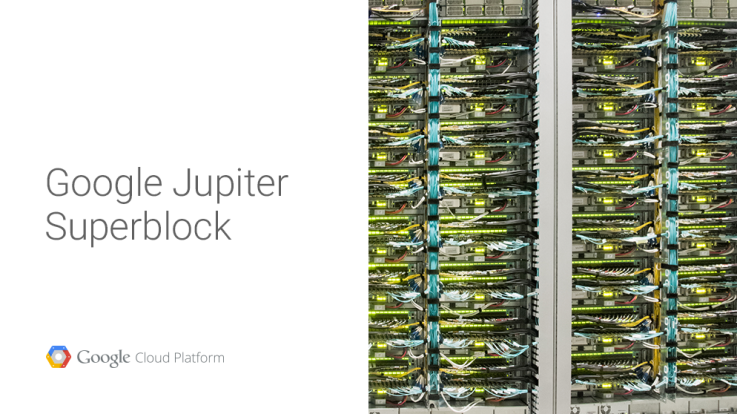
While companies like Facebook have been relatively open about their data center networking infrastructure, Google has generally kept pretty quiet about how it connects the thousands of servers inside its data centers to each other (with a few exceptions). Today, however, the company revealed a bit more about the technology that lets its servers talk to each other.
It’s no secret that Google often builds its own custom hardware for its data centers, but what’s probably less known is that Google uses custom networking protocols that have been tweaked for use in its data centers instead of relying on standard Internet protocols to power its networks.
Google says its current ‘Jupiter’ networking setup — which represents the fifth generation of the company’s efforts in this area — offers 100x the capacity of its first in-house data center network. The current generation delivers 1 Petabit per second of bisection bandwidth (that is, the bandwidth between two parts of the network). That’s enough to allow 100,000 servers to talk to each other at 10GB/s each.
Google’s technical lead for networking, Amin Vahdat, notes that the overall network control stack “has more in common with Google’s distributed computing architectures than traditional router-centric Internet protocols.”
Here is how he describes the three key principles behind the design of Google’s data center networks:
Sadly, there isn’t all that much detail here — especially compared to some of the information Facebook has shared in the past. Hopefully Google will release a bit more in the months to come. It would be especially interesting to see how its own networking protocols work and hopefully the company will publish a paper or two about this at some point.
Monday, April 13. 2015
BitTorrent launches its Maelstrom P2P Web Browser in a public beta
Via TheNextWeb
-----
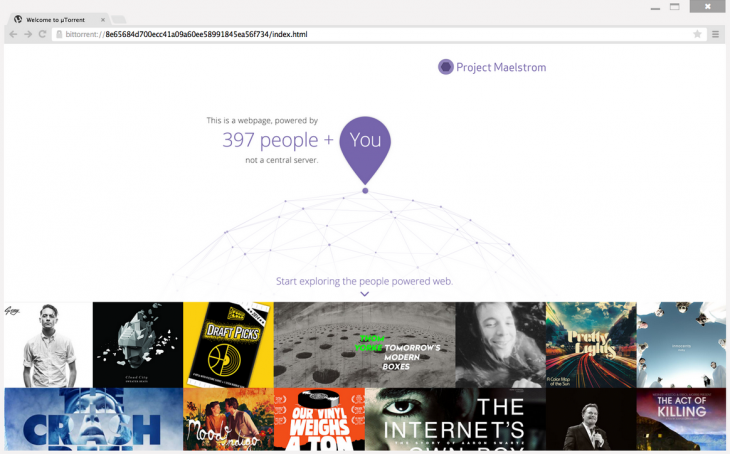
Back in December, we reported on the alpha for BitTorrent’s Maelstrom, a browser that uses BitTorrent’s P2P technology in order to place some control of the Web back in users’ hands by eliminating the need for centralized servers.
Maelstrom is now in beta, bring it one step closer to official release.
BitTorrent says more than 10,000 developers and 3,500 publishers signed
up for the alpha, and it’s using their insights to launch a more stable
public beta.
Along with the beta comes the first set of developer tools for the browser, helping publishers and programmers to build their websites around Maelstrom’s P2P technology. And they need to – Maelstrom can’t decentralize the Internet if there isn’t any native content for the platform.
It’s only available on Windows at the moment but if you’re interested and on Microsoft’s OS, you can download the beta from BitTorrent now.
? Project MaelstromWednesday, April 01. 2015
'Largest DDoS attack' in GitHub's history targets anticensorship projects
Via Network World
-----

GitHub has been hammered by a continuous DDoS attack for three days. It's the "largest DDoS attack in github.com's history." The attack is aimed at anti-censorship GreatFire and CN-NYTimes projects, but affected all of GitHub. The traffic is reportedly coming from China, as attackers are using the Chinese search engine Baidu for the purpose of "HTTP hijacking."
According to tweeted GitHub status messages, GitHub has been the victim of a Distributed Denial of Service (DDoS) attack since Thursday March 26. 24 hours later, GitHub said it had "all hands on deck" working to mitigate the continuous attack. After GitHub later deployed "volumetric attack defenses," the attack morphed to include GitHub pages and then "pages and assets." Today, GitHub said it was 71 hours into defending against the attack.
Friday, March 20. 2015
The Internet of Things invasion: Has it gone too far?
Via PC World
-----

Remember when the Internet was just that thing you accessed on your computer?
Today, connectivity is popping up in some surprising places: kitchen appliances, bathroom scales, door locks, clothes, water bottles… even toothbrushes.
That’s right, toothbrushes. The Oral-B SmartSeries is billed as the world’s first “interactive electric toothbrush” with built-in Bluetooth. Whatever your feelings on this level of connectivity, it’s undeniable that it’s a new frontier for data.
And let’s face it, we’re figuring it out as we go. Consequently, it’s a good idea to keep your devices secure - and that means leveraging a product like Norton Security, which protects mobile devices and can help keep intruders out of your home network. Because, let’s face it, the last thing you want is a toothbrush that turns on you.
Welcome to the age of the Internet of Things (IoT for short), the idea that everyday objects - and everyday users - can benefit from integrated network connectivity, whether it’s a washing machine that notifies you when it’s done or a collar-powered tracker that helps you locate your runaway pet.
Some of these innovations are downright brilliant. Others veer into impractical or even unbelievable. And some can present risks that we’ve never had to consider before.
Consider the smart lock. A variety of companies offer deadbolt-style door locks you can control from your smartphone. One of them, the August Smart Lock, will automatically sense when you approach your door and unlock it for you, even going so far as to lock it again once you’ve passed through. And the August app not only logs who has entered and exited, but also lets you provide a temporary virtual key to friends, family members, a maid service, and the like.
That’s pretty cool, but what happens in the event of a dead battery - either in the user’s smartphone or the lock itself? If your phone gets lost or stolen, is there a risk a thief can now enter your home? Could a hacker “pick” your digital lock? Smart lock-makers promise safeguards against all these contingencies, but it begs the question whether the conveniences outweigh the risks. Do we really need the Internet in all our things?
The latest that-can’t-possibly-be-a-real-product example made its debut at this year’s Consumer Electronics Show: The Belty, an automated belt/buckle combo that automatically loosens when you sit and tightens when you stand. A smartphone app lets you control the degree of each. Yep.
Then there’s the water bottle that reminds you to drink more water. The smart exercise shirt your trainer can use to keep tabs on your activity (or lack thereof). And who can forget the HAPIfork, the “smart” utensil that aims to steer you toward healthier eating by reminding you to eat more slowly?
Stop the Internet (of Things), I want to get off.
Okay, I shouldn’t judge. And it’s not all bad. There is real value in - and good reason to be excited about - a smart basketball that helps you perfect your jump shot. Or a system of smart light bulbs designed to deter break-ins. Ultimately, the free market will decide which ones are useful and which ones are ludicrous.
The important thing to remember is that with the IoT, we’re venturing into new territory. We’re linking more devices than ever to our home networks. We’re installing phone and tablet apps that have a direct line not just to our data, but also our very domiciles.
Monday, February 23. 2015
Android to Become 'Workhorse' of Cybercrime
Via EE Times
-----
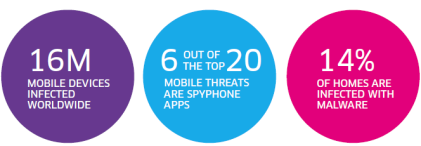
PARIS — As of the end of 2014, 16 million mobile devices worldwide have been infected by malicious software, estimated Alcatel-Lucent’s security arm, Motive Security Labs, in its latest security report released Thursday (Feb. 12).
Such malware is used by “cybercriminals for corporate and personal espionage, information theft, denial of service attacks on business and governments and banking and advertising scams,” the report warned.
Some of the key facts revealed in the report -- released two weeks in advance of the Mobile World Congress 2015 -- could dampen the mobile industry’s renewed enthusiasm for mobile payment systems such as Google Wallet and Apple Pay.
At risk is also the matter of privacy. How safe is your mobile device? Consumers have gotten used to trusting their smartphones, expecting their devices to know them well enough to accommodate their habits and preferences. So the last thing consumers expect them to do is to channel spyware into their lives, letting others monitor calls and track web browsing.
Cyber attacks
The latest in a drumbeat of data
hacking incidents is the massive database breach reported last week by
Anthem Inc., the second largest health insurer in the United States.
There was also the high profile corporate security attack on Sony in
late 2014.
Declaring that 2014 “will be remembered as the year of cyber-attacks,” Kevin McNamee, director, Alcatel-Lucent Motive Security Labs, noted in his latest blog other cases of hackers stealing millions of credit and debit card account numbers at retail points of sale. They include the security breach at Target in 2013 and similar breaches repeated in 2014 at Staples, Home Depot Sally Beauty Supply, Neiman Marcus, United Parcel Service, Michaels Stores and Albertsons, as well as the food chains Dairy Queen and P. F. Chang.
“But the combined number of these attacks pales in comparison to the malware attacks on mobile and residential devices,” McNamee insists. In his blog, he wrote, “Stealing personal information and data minutes from individual device users doesn’t tend to make the news, but it’s happening with increased frequency. And the consequences of losing one’s financial information, privacy, and personal identity to cyber criminals are no less important when it’s you.”
'Workhorse of cybercrime'
Indeed, malware
infections in mobile devices are on the rise. According to the Motive
Security Labs report, malware infections in mobile devices jumped by 25%
in 2014, compared to a 20% increase in 2013.
According to the report, in the mobile networks, “Android devices have now caught up to Windows laptops as the primary workhorse of cybercrime.” The infection rates between Android and Windows devices now split 50/50 in 2014, said the report.
This may be hardly a surprise to those familiar with Android security. There are three issues. First, the volume of Android devices shipped in 2014 is so huge that it makes a juicy target for cyber criminals. Second, Android is based on an open platform. Third, Android allows users to download apps from third-party stores where apps are not consistently verified and controlled.
In contrast, the report said that less than 1% of infections come from iPhone and Blackberry smartphones. The report, however, quickly added that this data doesn’t prove that iPhones are immune to malware.
The Motive Security Labs report cited findings by Palo Alto Networks in early November. The Networks discussed the discovery of WireLurker vulnerability that allows an infected Mac OS-X computer to install applications on any iPhone that connects to it via a USB connection. User permission is not required and the iPhone need not be jail-broken.
News stories reported the source of the infected Mac OS-X apps as an app store in China that apparently affected some 350,000 users through apps disguised as popular games. These infected the Mac computer, which in turn infected the iPhone. Once infected, the iPhone contacted a remote C&C server.
According to the Motive Security Labs report, a couple of weeks later, FireEye revealed Masque Attack vulnerability, which allows third-party apps to be replaced with a malicious app that can access all the data of the original app. In a demo, FireEye replaced the Gmail app on an iPhone, allowing the attacker complete access to the victim’s email and text messages.
Spyware on the rise
It’s important to note that
among varieties of malware, mobile spyware is definitely on the
increase. According to Motive Security Labs, “Six of the mobile malware
top 20 list are mobile spyware.” These are apps used to spy on the
phone’s owner. “They track the phone’s location, monitor ingoing and
outgoing calls and text messages, monitor email and track the victim’s
web browsing,” according to Motive Security Labs.
Impact on mobile payment
For consumers and mobile operators, the malware story hits home hardest
in how it may affect mobile payment. McNamee wrote in his blog:
The rise of mobile malware threats isn’t unexpected. But as Google Wallet, Apple Pay and others rush to bring us mobile payment systems, security has to be a top focus. And malware concerns become even more acute in the workplace where more than 90% of workers admit to using their personal smartphones for work purposes.
Fixed broadband networks
The Motive Security
Labs report didn’t stop at mobile security. It also looked at
residential fixed broadband networks. The report found the overall
monthly infection rate there is 13.6%, “substantially up from the 9%
seen in 2013,” said the report. The report attributed it to “an increase
in infections by moderate threat level adware.”
Why is this all happening?
The short answer to
why this is all happening today is that “a vast majority of mobile
device owners do not take proper device security precautions,” the
report said.
Noting that a recent Motive Security Labs survey found that 65 percent of subscribers expect their service provider to protect both their mobile and home devices, the report seems to suggest that the onus is on operators. “They are expected to take a proactive approach to this problem by providing services that alert subscribers to malware on their devices along with self-help instructions for removing it,” said Patrick Tan, General Manager of Network Intelligence at Alcatel-Lucent, in a statement.
Due to the large market share it holds within communication networks, Alcatel-Lucent says that it’s in a unique position to measure the impact of mobile and home device traffic moving over those networks to identify malicious and cyber-security threats. Motive Security Labs is an analytics arm of Motive Customer Experience Management.
According to Alcatel-Lucent, Motive Security Labs (formerly Kindsight Security Labs), processes more than 120,000 new malware samples per day and maintains a library of 30 million active samples.
In the following pages, we will share the hilights of data collected by Motive Security Labs.
Mobile infection rate since December 2012
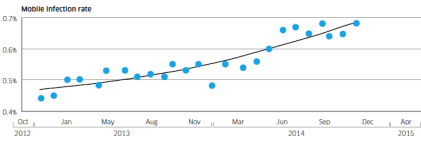
Alcatel-Lucent’s Motive Security Labs found 0.68% of mobile devices are infected with malware.
Using the ITU’s figure of 2.3 billion mobile broadband subscriptions, Motive Security Labs estimated that 16 million mobile devices had some sort of malware infection in December 2014.
The report called this global estimate “likely to be on the conservative side.” Motive Security Labs’ sensors do not have complete coverage in areas such as China and Russia, where mobile infection rates are known to be higher.
Mobile malware samples since June 2012
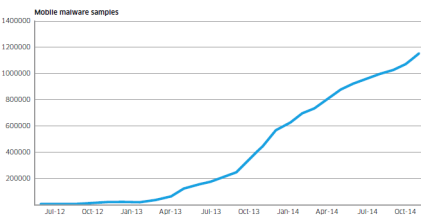
Motive Security Labs used the increase in the number of samples in its malware database to show Android malware growth.
The chart above shows numbers since June 2012. The number of samples grew by 161% in 2014.
In addition to the increase in raw numbers, the sophistication of Android malware also got better, according to Motive Security Labs. Researchers in 2014 started to see malware applications that had originally been developed for the Windows/PC platform migrate to the mobile space, bringing with them more sophisticated command and control and rootkit technologies.
Infected device types in 2013 and 2014
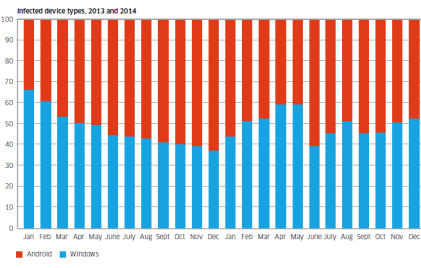
The chart shows the breakdown of infected device types that have been observed in 2013 and 2014. Shown in red is Android and shown in blue is Windows.
While the involvement of such a high proportion of Windows/PC devices may be a surprise to some, these Windows/PCs are connected to the mobile network via dongles and mobile Wi-Fi devices or simply tethered through smartphones.
They’re responsible for about 50% of the malware infections observed.
The report said, “This is because these devices are still the favorite of hardcore professional cybercriminals who have a huge investment in the Windows malware ecosystem. As the mobile network becomes the access network of choice for many Windows PCs, the malware moves with them.”
Android phones and tablets are responsible for about 50% of the malware infections observed.
Currently most mobile malware is distributed as “Trojanized” apps. Android offers the easiest target for this because of its open app environment, noted the report.
Monday, February 02. 2015
ConnectX wants to put server farms in space
Via Geek
-----

The next generation of cloud servers might be deployed where the clouds can be made of alcohol and cosmic dust: in space. That’s what ConnectX wants to do with their new data visualization platform.
Why space? It’s not as though there isn’t room to set up servers here on Earth, what with Germans willing to give up space in their utility rooms in exchange for a bit of ambient heat and malls now leasing empty storefronts to service providers. But there are certain advantages.
The desire to install servers where there’s abundant, free cooling makes plenty of sense. Down here on Earth, that’s what’s driven companies like Facebook to set up shop in Scandinavia near the edge of the Arctic Circle. Space gets a whole lot colder than the Arctic, so from that standpoint the ConnectX plan makes plenty of sense. There’s also virtually no humidity, which can wreak havoc on computers.
They also believe that the zero-g environment would do wonders for the lifespan of the hard drives in their servers, since it could reduce the resistance they encounter while spinning. That’s the same reason Western Digital started filling hard drives with helium.
But what about data transmission? How does ConnectX plan on moving the bits back and forth between their orbital servers and networks back on the ground? Though something similar to NASA’s Lunar Laser Communication Demonstration — which beamed data to the moon 4,800 times faster than any RF system ever managed — seems like a decent option, they’re leaning on RF.
Mind you, it’s a fairly complex setup. ConnectX says they’re polishing a system that “twists” signals to reap massive transmission gains. A similar system demonstrated last year managed to push data over radio waves at a staggering 32gbps, around 30 times faster than LTE.
So ConnectX seems to have that sorted. The only real question is the cost of deployment. Can the potential reduction in long-term maintenance costs really offset the massive expense of actually getting their servers into orbit? And what about upgrading capacity? It’s certainly not going to be nearly as fast, easy, or cheap as it is to do on Earth. That’s up to ConnectX to figure out, and they seem confident that they can make it work.
Friday, December 19. 2014
Bots Now Outnumber Humans on the Web
Via Wired
-----

Getty Images
Diogo Mónica once wrote a short computer script that gave him a secret weapon in the war for San Francisco dinner reservations.
This was early 2013. The script would periodically scan the popular online reservation service, OpenTable, and drop him an email anytime something interesting opened up—a choice Friday night spot at the House of Prime Rib, for example. But soon, Mónica noticed that he wasn’t getting the tables that had once been available.
By the time he’d check the reservation site, his previously open reservation would be booked. And this was happening crazy fast. Like in a matter of seconds. “It’s impossible for a human to do the three forms that are required to do this in under three seconds,” he told WIRED last year.
Mónica could draw only one conclusion: He’d been drawn into a bot war.
Everyone knows the story of how the world wide web made the internet accessible for everyone, but a lesser known story of the internet’s evolution is how automated code—aka bots—came to quietly take it over. Today, bots account for 56 percent of all of website visits, says Marc Gaffan, CEO of Incapsula, a company that sells online security services. Incapsula recently an an analysis of 20,000 websites to get a snapshot of part of the web, and on smaller websites, it found that bot traffic can run as high as 80 percent.
People use scripts to buy gear on eBay and, like Mónica, to snag the best reservations. Last month, the band, Foo Fighters sold tickets for their upcoming tour at box offices only, an attempt to strike back against the bots used by online scalpers. “You should expect to see it on ticket sites, travel sites, dating sites,” Gaffan says. What’s more, a company like Google uses bots to index the entire web, and companies such as IFTTT and Slack give us ways use the web to use bots for good, personalizing our internet and managing the daily informational deluge.
But, increasingly, a slice of these online bots are malicious—used to knock websites offline, flood comment sections with spam, or scrape sites and reuse their content without authorization. Gaffan says that about 20 percent of the Web’s traffic comes from these bots. That’s up 10 percent from last year.
Often, they’re running on hacked computers. And lately they’ve become more sophisticated. They are better at impersonating Google, or at running in real browsers on hacked computers. And they’ve made big leaps in breaking human-detecting captcha puzzles, Gaffan says.
“Essentially there’s been this evolution of bots, where we’ve seen it become easier and more prevalent over the past couple of years,” says Rami Essaid, CEO of Distil Networks, a company that sells bot-blocking software.
But despite the rise of these bad bots, there is some good news for the human race. The total percentage of bot-related web traffic is actually down this year from what it was in 2013. Back then it accounted for 60 percent of the traffic, 4 percent more than today.
Thursday, December 18. 2014
BitTorrent Opens Alpha For Maelstrom, Its New, Distributed, Torrent-Based Web Browser
Quicksearch
Popular Entries
- The great Ars Android interface shootout (128998)
- MeCam $49 flying camera concept follows you around, streams video to your phone (97593)
- Norton cyber crime study offers striking revenue loss statistics (93544)
- The PC inside your phone: A guide to the system-on-a-chip (55378)
- Norton cyber crime study offers striking revenue loss statistics (49773)
Categories

Show tagged entries
Syndicate This Blog
Calendar

|
April '24 | |||||
| Mon | Tue | Wed | Thu | Fri | Sat | Sun |
| 1 | 2 | 3 | 4 | 5 | 6 | 7 |
| 8 | 9 | 10 | 11 | 12 | 13 | 14 |
| 15 | 16 | 17 | 18 | 19 | 20 | 21 |
| 22 | 23 | 24 | 25 | 26 | 27 | 28 |
| 29 | 30 | |||||