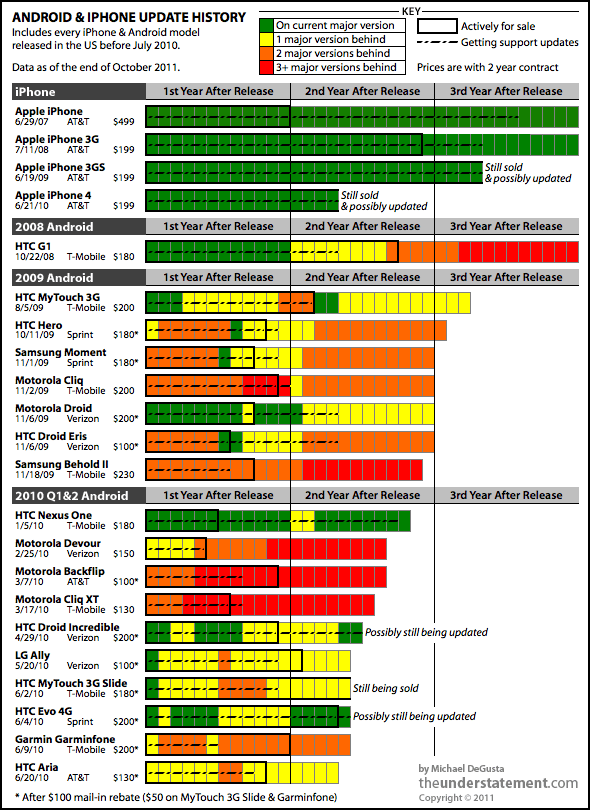
I went back and found every Android phone shipped in the United States1
up through the middle of last year. I then tracked down every update
that was released for each device - be it a major OS upgrade or a minor
support patch - as well as prices and release & discontinuation
dates. I compared these dates & versions to the currently shipping
version of Android at the time. The resulting picture isn’t pretty -
well, not for Android users:
Other than the original G1 and MyTouch, virtually all of the millions of phones represented by this chart are still under contract today. If you thought that entitled you to some support, think again:
7 of the 18 Android phones never ran a current version of the OS.
12 of 18 only ran a current version of the OS for a matter of weeks or less.
10 of 18 were at least two major versions behind well within their two year contract period.
11 of 18 stopped getting any support updates less than a year after release.
13 of 18 stopped getting any support updates before they even stopped selling the device or very shortly thereafter.
15 of 18 don’t run Gingerbread, which shipped in December 2010.
In a few weeks, when Ice Cream Sandwich comes out, every device on here will be another major version behind.
At least 16 of 18 will almost certainly never get Ice Cream Sandwich.
Also worth noting that each bar in the chart starts from the
first day of release - so it only gets worse for people who bought their
phone late in its sales period.
Why Is This So Bad?
This may be stating the obvious but there are at least three major reasons.
Consumers Get Screwed
Ever since the iPhone turned every smartphone into a blank slate, the
value of a phone is largely derived from the software it can run and
how well the phone can run it. When you’re making a 2 year commitment to
a device, it’d be nice to have some way to tell if the software was
going to be remotely current in a year or, heck, even a month. Turns out
that’s nearly impossible - here are two examples:
The Samsung Behold II on T-Mobile was the most expensive Android
phone ever and Samsung promoted that it would get a major update to
Eclair at least. But at launch the phone was already two major versions
behind — and then Samsung decided not to do the update after all, and it fell three major OS versions behind. Every one ever sold is still under contract today.
The Motorola Devour on Verizon launched with a Megan Fox Super Bowl ad, while reviews said it was “built to last and it delivers on features.”
As it turned out, the Devour shipped with an OS that was already
outdated. Before the next Super Bowl came around, it was three major
versions behind. Every one ever sold is still under contract until
sometime next year.
Developers Are Constrained
Besides the obvious platform fragmentation problems, consider this comparison: iOS developers, like Instapaper’s Marco Arment,
waited patiently until just this month to raise their apps’ minimum
requirement to the 11 month old iOS 4.2.1. They can do so knowing that
it’s been well over 3 years since anyone bought an iPhone that couldn’t
run that OS. If developers apply that same standard to Android, it will
be at least 2015 before they can start requiring 2010’s Gingerbread OS.
That’s because everyUScarrier is still selling - even just now introducing2
- smartphones that will almost certainly never run Gingerbread and
beyond. Further, those are phones still selling for actual upfront money
- I’m not even counting the generally even more outdated &
presumably much more popular free phones.
It seems this is one area the Android/Windows comparison holds up:
most app developers will end up targeting an ancient version of the OS
in order to maximize market reach.
Security Risks Loom
In the chart, the dashed line in the middle of each bar indicates how
long that phone was getting any kind of support updates - not just
major OS upgrades. The significant majority of models have received very
limited support after sales were discontinued. If a security or privacy
problem popped up in old versions of Android or its associated apps
(i.e. the browser), it’s hard to imagine that all of these
no-longer-supported phones would be updated. This is only less likely as
the number of phones that manufacturers would have to go back and deal
with increases: Motorola, Samsung, and HTC all have at least 20 models
each in the field already, each with a range of carriers that seemingly
have to be dealt with individually.
Why Don’t Android Phones Get Updated?
That’s a very good question. Obviously a big part of the problem is
that Android has to go from Google to the phone manufacturers to the
carriers to the devices, whereas iOS just goes from Apple directly to
devices. The hacker community (e.g. CyanogenMod, et cetera) has frequently managed to get these phones to run the newer operating systems, so it isn’t a hardware issue.
It appears to be a widely held viewpoint3
that there’s no incentive for smartphone manufacturers to update the
OS: because manufacturers don’t make any money after the hardware sale,
they want you to buy another phone as soon as possible. If that’s really
the case, the phone manufacturers are spectacularly dumb: ignoring the 2
year contract cycle & abandoning your users isn’t going to engender
much loyalty when they do buy a new phone. Further, it’s been fairly
well established that Apple also really only makes money from hardware sales, and yet their long term update support is excellent (see chart).
In other words, Apple’s way of getting you to buy a new phone is to
make you really happy with your current one, whereas apparently Android
phone makers think they can get you to buy a new phone by making you
really unhappy with your current one. Then again, all of this
may be ascribing motives and intent where none exist - it’s entirely
possible that the root cause of the problem is just flat-out bad
management (and/or the aforementioned spectacular dumbness).
A Price Observation
All of the even slightly cheaper phones are much worse than the
iPhone when it comes to OS support, but it’s interesting to note that
most of the phones on this list were actually not cheaper than the
iPhone when they were released. Unlike the iPhone however, the
“full-priced” phones are frequently discounted in subsequent months. So
the “low cost” phones that fueled Android’s generally accepted price
advantage in this period were basically either (a) cheaper from the
outset, and ergo likely outdated & terribly supported or (b)
purchased later in the phone’s lifecycle, and ergo likely outdated &
terribly supported.
Also, at any price point you’d better love your rebates. If you’re
financially constrained enough to be driven by upfront price, you can’t
be that excited about plunking down another $100 cash and waiting weeks
or more to get it back. And sometimes all you’re getting back is a “$100 Promotion Card” for your chosen provider. Needless to say, the iPhone has never had a rebate.
Along similar lines, a very small but perhaps telling point: the
price of every single Android phone I looked at ended with 99 cents -
something Apple has never done (the iPhone is $199, not $199.99). It’s
almost like a warning sign: you’re buying a platform that will
nickel-and-dime you with ads and undeletable bloatware, and it starts
with those 99 cents. And that damn rebate form they’re hoping you don’t
send in.
Notes on the chart and data
Why stop at June 2010?
I’m not going to. I do think that having 15 months or so of history
gives a good perspective on how a phone has been treated, but it’s also
just a labor issue - it takes a while to dredge through the various
sites to determine the history of each device. I plan to continue on and
might also try to publish the underlying table with references. I also
acknowledge that it’s possible I’ve missed something along the way.
Android Release Dates
For the major Android version release dates, I used the date at
which it was actually available on a normal phone you could get via
normal means. I did not use the earlier SDK release date, nor the date
at which ROMs, hacks, source, et cetera were available.
Outside the US
Finally, it’s worth noting that people outside the US have often had
it even worse. For example, the Nexus One didn’t go on sale in Europe
until 5 months after the US, the Droid/Milestone FroYo update happened
over 7 months later there, and the Cliq never got updated at all outside
of the US.
Thanks primarily to CNET & Wikipedia for the list of phones.?
Yes, AT&T committed to Gingerbread updates
for its 2011 Android phones, but only those that had already been
released at the time of the July 25 press release. The Impulse doesn’t
meet that criterion. Nor does the Sharp FX Plus.?
When Tim Berners-Lee arrived at CERN,
Geneva's celebrated European Particle Physics Laboratory in 1980, the
enterprise had hired him to upgrade the control systems for several of
the lab's particle accelerators. But almost immediately, the inventor of
the modern webpage noticed a problem: thousands of people were floating
in and out of the famous research institute, many of them temporary
hires.
"The big challenge for contract programmers was to try to
understand the systems, both human and computer, that ran this fantastic
playground," Berners-Lee later wrote. "Much of the crucial information
existed only in people's heads."
So in his spare time, he wrote up some software to address this
shortfall: a little program he named Enquire. It allowed users to create
"nodes"—information-packed index card-style pages that linked to other
pages. Unfortunately, the PASCAL application ran on CERN's proprietary
operating system. "The few people who saw it thought it was a nice idea,
but no one used it. Eventually, the disk was lost, and with it, the
original Enquire."
Some years later Berners-Lee returned to CERN.
This time he relaunched his "World Wide Web" project in a way that
would more likely secure its success. On August 6, 1991, he published an
explanation of WWW on the alt.hypertext usegroup. He also released a code library, libWWW, which he wrote with his assistant
Jean-François Groff. The library allowed participants to create their own Web browsers.
"Their efforts—over half a dozen browsers within 18 months—saved
the poorly funded Web project and kicked off the Web development
community," notes a commemoration of this project by the Computer History Museum in Mountain View, California. The best known early browser was Mosaic, produced by Marc Andreesen and Eric Bina at the
National Center for Supercomputing Applications (NCSA).
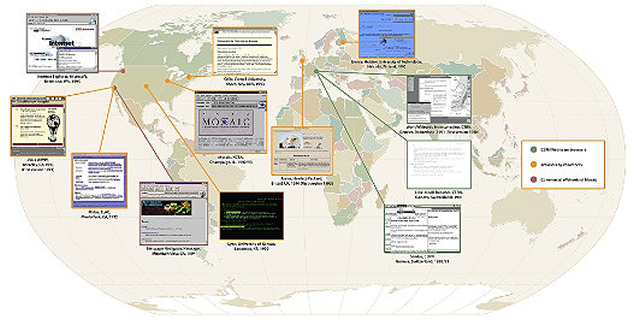
Mosaic was soon spun into Netscape, but it was not the first browser. A map
assembled by the Museum offers a sense of the global scope of the early
project. What's striking about these early applications is that they
had already worked out many of the features we associate with later
browsers. Here is a tour of World Wide Web viewing applications, before
they became famous.
The CERN browsers
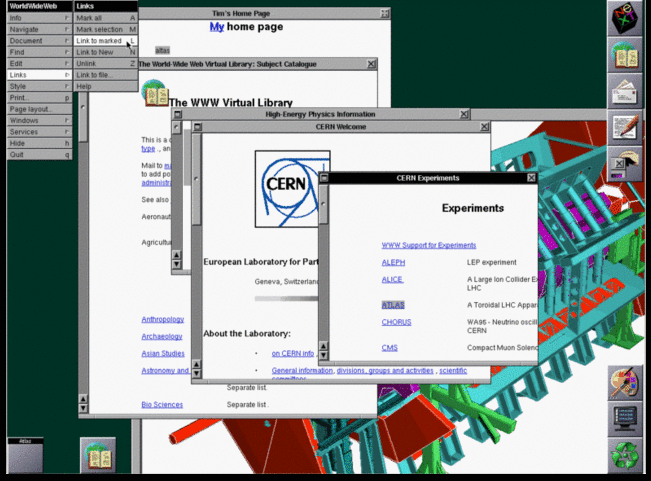
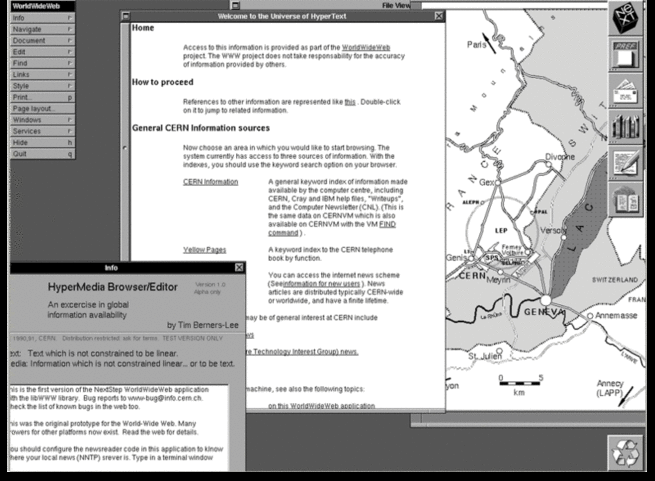
Tim Berners-Lee's original 1990 WorldWideWeb browser was both a
browser and an editor. That was the direction he hoped future browser
projects would go. CERN has put together a reproduction
of its formative content. As you can see in the screenshot below, by
1993 it offered many of the characteristics of modern browsers.
Tim Berners-Lee's original WorldWideWeb browser running on a NeXT computer in 1993
The software's biggest limitation was that it ran on the NeXTStep
operating system. But shortly after WorldWideWeb, CERN mathematics
intern Nicola Pellow wrote a line mode browser that could function
elsewhere, including on UNIX and MS-DOS networks. Thus "anyone could
access the web," explains Internet historian Bill Stewart, "at that point consisting primarily of the CERN phone book."
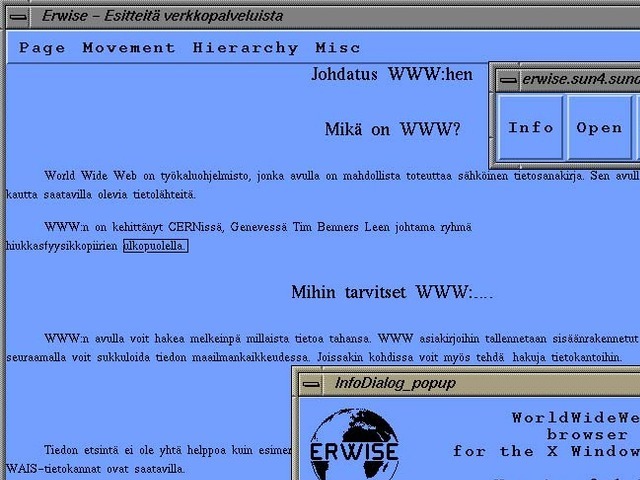
Erwise came next. It was written by four Finnish college students in 1991 and released in 1992. Erwise is credited as the first browser that offered a graphical interface. It could also search for words on pages.
Berners-Lee wrote a review
of Erwise in 1992. He noted its ability to handle various fonts,
underline hyperlinks, let users double-click them to jump to other
pages, and to host multiple windows.
"Erwise looks very smart," he declared, albeit puzzling over a
"strange box which is around one word in the document, a little like a
selection box or a button. It is neither of these—perhaps a handle for
something to come."
So why didn't the application take off? In a later interview, one of
Erwise's creators noted that Finland was mired in a deep recession at
the time. The country was devoid of angel investors.
"We could not have created a business around Erwise in Finland then," he explained.
"The only way we could have made money would have been to continue our
developing it so that Netscape might have finally bought us. Still, the
big thing is, we could have reached the initial Mosaic level with
relatively small extra work. We should have just finalized Erwise and
published it on several platforms."
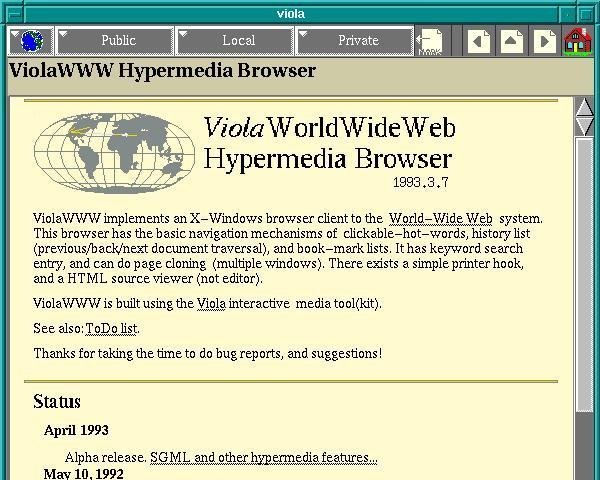
ViolaWWW was released in April
of 1992. Developer
Pei-Yuan Wei wrote it at the University of California at Berkeley via
his UNIX-based Viola programming/scripting language. No, Pei Wei didn't
play the viola, "it just happened to make a snappy abbreviation" of
Visually Interactive Object-oriented Language and Application, write
James Gillies and Robert Cailliau in their history of the World Wide
Web.
Wei appears to have gotten his inspiration from the early Mac
program HyperCard, which allowed users to build matrices of formatted
hyper-linked documents. "HyperCard was very compelling back then, you
know graphically, this hyperlink thing," he later recalled. But the
program was "not very global and it only worked on Mac. And I didn't
even have a Mac."
But he did have access to UNIX X-terminals at UC Berkeley's
Experimental Computing Facility. "I got a HyperCard manual and looked at
it and just basically took the concepts and implemented them in
X-windows." Except, most impressively, he created them via his Viola
language.
One of the most significant and innovative features of ViolaWWW was
that it allowed a developer to embed scripts and "applets" in the
browser page. This anticipated the huge wave of Java-based applet
features that appeared on websites in the later 1990s.
In his documentation, Wei also noted various "misfeatures" of ViolaWWW, most notably its inaccessibility to PCs.
Not ported to PC platform.
HTML Printing is not supported.
HTTP is not interruptable, and not multi-threaded.
Proxy is still not supported.
Language interpreter is not multi-threaded.
"The author is working on these problems... etc," Wei acknowledged
at the time. Still, "a very neat browser useable by anyone: very
intuitive and straightforward," Berners-Lee concluded in his review
of ViolaWWW. "The extra features are probably more than 90% of 'real'
users will actually use, but just the things which an experienced user
will want."
In September of 1991, Stanford Linear Accelerator physicist Paul
Kunz visited CERN. He returned with the code necessary to set up the
first North American Web server at SLAC. "I've just been to CERN," Kunz
told SLAC's head librarian Louise Addis, "and I found this wonderful
thing that a guy named Tim Berners-Lee is developing. It's just the
ticket for what you guys need for your database."
Addis agreed. The site's head librarian put the research center's
key database over the Web. Fermilab physicists set up a server shortly
after.
Then over the summer of 1992 SLAC physicist Tony Johnson wrote Midas, a graphical browser for the Stanford physics community. The big draw
for Midas users was that it could display postscript documents, favored
by physicists because of their ability to accurately reproduce
paper-scribbled scientific formulas.
"With these key advances, Web use surged in the high energy physics community," concluded a 2001 Department of Energy assessment of SLAC's progress.
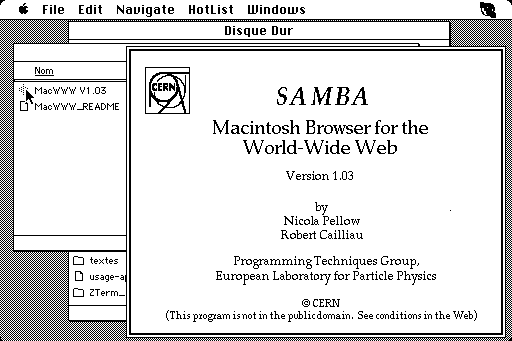
Meanwhile, CERN associates Pellow and Robert Cailliau released the
first Web browser for the Macintosh computer. Gillies and Cailliau
narrate Samba's development.
For Pellow, progress in getting Samba up and running was slow,
because after every few links it would crash and nobody could work out
why. "The Mac browser was still in a buggy form,' lamented Tim
[Berners-Lee] in a September '92 newsletter. 'A W3 T-shirt to the first
one to bring it up and running!" he announced. The T shirt duly went to
Fermilab's John Streets, who tracked down the bug, allowing Nicola
Pellow to get on with producing a usable version of Samba.
Samba "was an attempt to port the design of the original WWW
browser, which I wrote on the NeXT machine, onto the Mac platform,"
Berners-Lee adds,
"but was not ready before NCSA [National Center for Supercomputing
Applications] brought out the Mac version of Mosaic, which eclipsed it."
Mosaic was "the spark that lit the Web's explosive growth in 1993,"
historians Gillies and Cailliau explain. But it could not have been
developed without forerunners and the NCSA's University of Illinois
offices, which were equipped with the best UNIX machines. NCSA also had
Dr. Ping Fu, a PhD computer graphics wizard who had worked on morphing
effects for Terminator 2. She had recently hired an assistant named Marc Andreesen.
"How about you write a graphical interface for a browser?" Fu
suggested to her new helper. "What's a browser?" Andreesen asked. But
several days later NCSA staff member Dave Thompson gave a demonstration
of Nicola Pellow's early line browser and Pei Wei's ViolaWWW. And just
before this demo, Tony Johnson posted the first public release of Midas.
The latter software set Andreesen back on his heels. "Superb!
Fantastic! Stunning! Impressive as hell!" he wrote to Johnson. Then
Andreesen got NCSA Unix expert Eric Bina to help him write their own
X-browser.
Mosaic offered many new web features, including support for video
clips, sound, forms, bookmarks, and history files. "The striking thing
about it was that unlike all the earlier X-browsers, it was all
contained in a single file," Gillies and Cailliau explain:
Installing it was as simple as pulling it across the network and
running it. Later on Mosaic would rise to fame because of the
<IMG> tag that allowed you to put images inline for the first
time, rather than having them pop up in a different window like Tim's
original NeXT browser did. That made it easier for people to make Web
pages look more like the familiar print media they were use to; not
everyone's idea of a brave new world, but it certainly got Mosaic
noticed.
"What I think Marc did really well," Tim Berners-Lee later wrote,
"is make it very easy to install, and he supported it by fixing bugs via
e-mail any time night or day. You'd send him a bug report and then two
hours later he'd mail you a fix."
Perhaps Mosaic's biggest breakthrough, in retrospect, was that it
was a cross-platform browser. "By the power vested in me by nobody in
particular, X-Mosaic is hereby released," Andreeson proudly declared on
the www-talk group on January 23, 1993. Aleks Totic unveiled his Mac
version a few months later. A PC version came from the hands of Chris
Wilson and Jon Mittelhauser.
The Mosaic browser was based on Viola and Midas, the Computer History museum's exhibit notes.
And it used the CERN code library. "But unlike others, it was reliable,
could be installed by amateurs, and soon added colorful graphics within
Web pages instead of as separate windows."
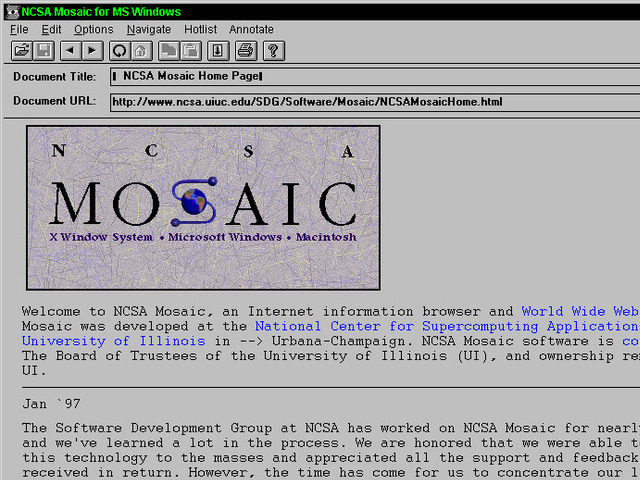
The Mosaic browser was available for X Windows, the Mac, and Microsoft Windows
But Mosaic wasn't the only innovation to show up on the scene around that same time. University of Kansas student Lou Montulli
adapted a campus information hypertext browser for the Internet and
Web. It launched in March, 1993. "Lynx quickly became the preferred web
browser for character mode terminals without graphics, and remains in
use today," historian Stewart explains.
And at Cornell University's Law School, Tom Bruce was writing a Web
application for PCs, "since those were the computers that lawyers tended
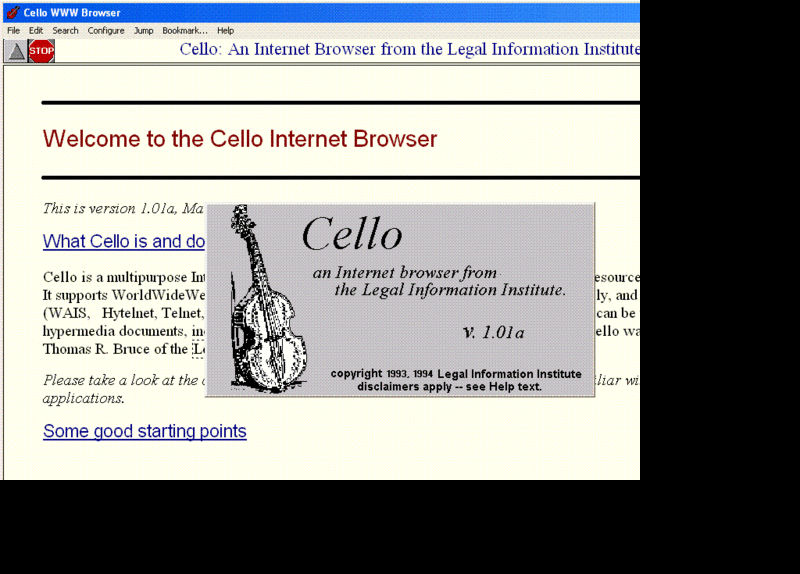
to use," Gillies and Cailliau observe. Bruce unveiled his browser Cello on June 8, 1993, "which was soon being downloaded at a rate of 500 copies a day."
Cello!
Six months later, Andreesen was in Mountain View, California, his
team poised to release Mosaic Netscape on October 13, 1994. He, Totic,
and Mittelhauser nervously put the application up on an FTP server. The
latter developer later recalled the moment. "And it was five minutes and
we're sitting there. Nothing has happened. And all of a sudden the
first download happened. It was a guy from Japan. We swore we'd send him
a T shirt!"
But what this complex story reminds is that is that no innovation is
created by one person. The Web browser was propelled into our lives by
visionaries around the world, people who often didn't quite understand
what they were doing, but were motivated by curiosity, practical
concerns, or even playfulness. Their separate sparks of genius kept the
process going. So did Tim Berners-Lee's insistence that the project stay
collaborative and, most importantly, open.
"The early days of the web were very hand-to-mouth," he writes. "So many things to do, such a delicate flame to keep alive."
Further reading
Tim Berners-Lee, Weaving the Web: The Original Design and Ultimate Destiny of the World Wide Web
James Gillies and R. Cailliau, How the web was born
Outside of its remarkable sales, the real star of the iPhone 4S show
has been Siri, Apple’s new voice recognition software. The intuitive
voice recognition software is the closest to A.I. we’ve seen on a
smartphone to date.
Over the weekend I noted
that Siri has some resemblance to the IBM supercomputer, Watson, and
speculated that someday Watson would be in our pockets while the
supercomputers of the future might look a lot more like the Artificial
Intelligence we’ve read about in science fiction novels today, such as
the mysterious Wintermute from William Gibson’s Neuromancer.
Over at Wired, John Stokes explains how Siri and the Apple cloud could lead to the advent of a real Artificial Intelligence:
In
the traditional world of canned, chatterbot-style “AI,” users had to
wait for a software update to get access to new input/output pairs. But
since Siri is a cloud application, Apple’s engineers can continuously
keep adding these hard-coded input/output pairs to it. Every time an
Apple engineer thinks of a clever response for Siri to give to a
particular bit of input, that engineer can insert the new pair into
Siri’s repertoire instantaneously, so that the very next instant every
one of the service’s millions of users will have access to it. Apple
engineers can also take a look at the kinds of queries that are popular
with Siri users at any given moment, and add canned responses based on
what’s trending.
In this way, we can expect Siri’s repertoire of clever
comebacks to grow in real-time through the collective effort of hundreds
of Apple employees and tens or hundreds of millions of users, until it
reaches the point where an adult user will be able to carry out a
multipart exchange with the bot that, for all intents and purposes,
looks like an intelligent conversation.
Meanwhile, the technology undergirding the software and iPhone
hardware will continue to improve. Now, this may not be the AI we had in
mind, but it also probably won’t be the final word in Artificial
Intelligence either. Other companies, such as IBM, are working to
develop other ‘cognitive computers‘ as well.
And while the Singularity may indeed be far, far away, it’s still exciting to see how some forms of A.I. may emerge at least in part through cloud-sourcing.
As new platform versions get released more and more quickly,
are users keeping up? Zeh Fernando, a senior developer at Firstborn,
looks at current adoption rates and points to some intriguing trends
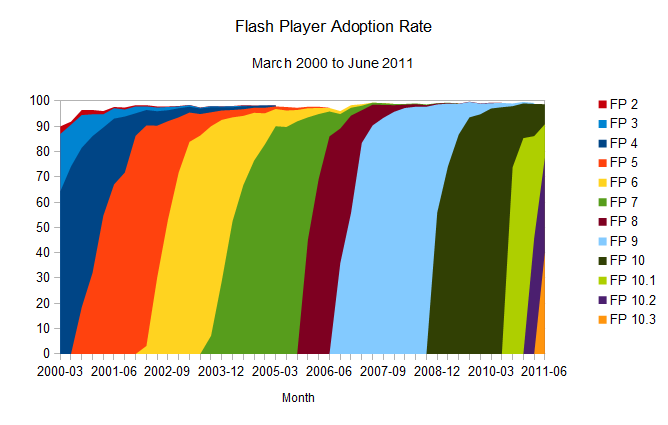
There's a quiet revolution happening on the web, and it's related to one aspect of the rich web that is rarely discussed: the adoption rate of new platform versions.
First,
to put things into perspective, we can look at the most popular browser
plug-in out there: Adobe's Flash Player. It's pretty well known that
the adoption of new versions of the Flash plug-in happens pretty
quickly: users update Flash Player quickly and often after a new version
of the plug-in is released [see Adobe's sponsored NPD, United
States, Mar 2000-Jun 2006, and Milward Brown’s “Mature markets”, Sep
2006-Jun 2011 research (here and here) collected by way of the Internet Archive and saved over time; here’s the complete spreadsheet with version release date help from Wikipedia].
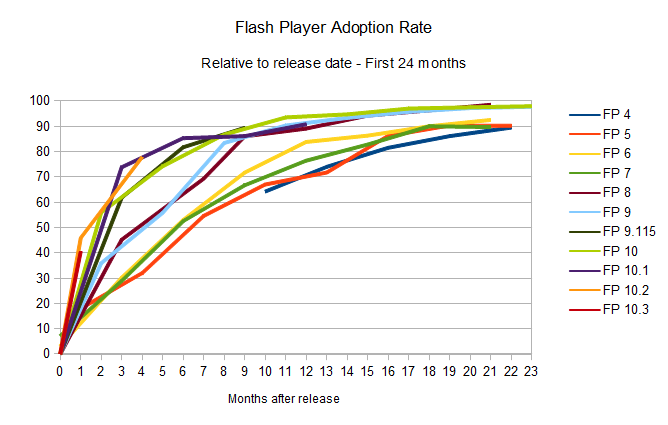
To
simplify it: give it around eight months, and 90 per cent of the
desktops out there will have the newest version of the plug-in
installed. And as the numbers represented in the charts above show, this
update rate is only improving. That’s party due to the fact that
Chrome, now a powerful force in the browser battles, installs new
versions of the Flash Player automatically (sometimes even before it is
formally released by Adobe), and that Firefox frequently detects the
user's version and insists on them installing an updated, more secure
version.
Gone are the days where the Flash platform needed an
event such as the Olympics or a major website like MySpace or YouTube
making use of a new version of Flash to make it propagate faster; this
now happens naturally. Version 10.3 only needed one month to get to a
40.5 per cent install base, and given the trends set by the previous
releases, it's likely that the plug-in's new version 11 will break new speed records.
Any technology that can allow developers and publishers to take advantage of it in a real world scenario
so fast has to be considered a breakthrough. Any new platform feature
can be proposed, developed, and made available with cross-platform
consistency in record time; such is the advantage of a proprietary
platform like Flash. To mention one of the more adequate examples of
the opposite effect, features added to the HTML platform (in any of its
flavours or versions) can take many years of proposal and beta support
until they're officially accepted, and when that happens, it takes many
more years until it becomes available on most of the computers out
there. A plug-in is usually easier and quicker to update than a browser
too.
That has been the story so far. But that's changing.
Advertisement
Google Chrome adoption rate
Looking
at the statistics for the adoption rate of the Flash plug-in, it's easy
to see it's accelerating constantly, meaning the last versions of the
player were finding their way to the user's desktops quicker and quicker
with every new version. But when you have a look at similar adoption
rate for browsers, a somewhat similar but more complex story unfolds.
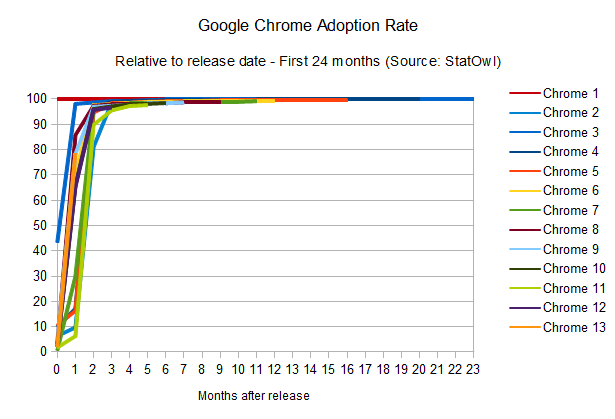
Let's
have a look at Google Chrome's adoption rates in the same manner I've
done the Flash player comparisons, to see how many people had each of
its version installed (but notice that, given that Chrome is not used by
100 per cent of the people on the internet, it is normalised for the
comparison to make sense).
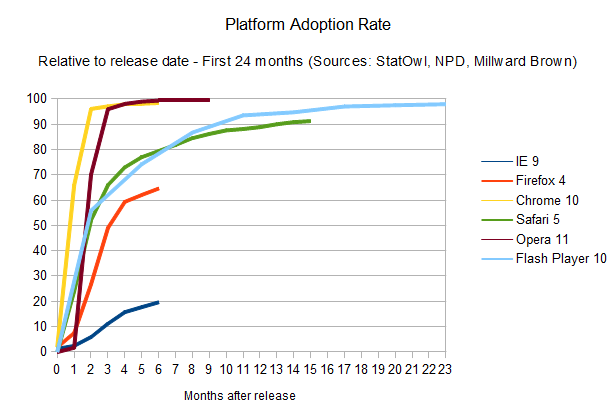
The striking thing here is that the adoption rate of Google Chrome manages to be faster than Flash Player itself [see StatOwl's web browser usage statistics, browser version release dates from Google Chrome on
Wikipedia]. This is helped, of course, by the fact that updates happens
automatically (without user approval necessary) and easily (using its smart diff-based update engine to
provide small update files). As a result, Chrome can get to the same 90
per cent of user penetration rate in around two months only; but what
it really means is that Google manages to put out updates to their HTML engine much faster than Flash Player.
Of
course, there's a catch here if we're to compare that to Flash Player
adoption rate: as mentioned, Google does the same auto-update for the
Flash Player itself. So the point is not that there's a race and
Chrome's HTML engine is leading it; instead, Chrome is changing the
rules of the game to not only make everybody win, but to make them win faster.
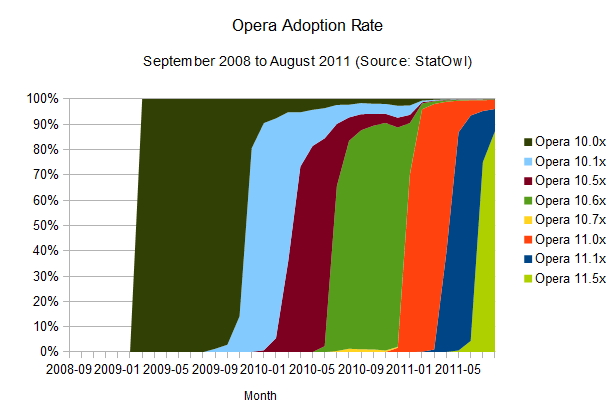
Opera adoption rate
The
fast update rate employed by Chrome is not news. In fact, one smaller
player on the browser front, Opera, tells a similar story.
Opera also manages to have updates reach a larger audience very quickly [see browser version release dates from History of the Opera web browser, Opera 10 and Opera 11
on Wikipedia]. This is probably due to its automatic update feature.
The mass updates seem to take a little bit longer than Chrome, around
three months for a 90 per cent reach, but it's important to notice that
its update workflow is not entirely automatic; last time I tested, it
still required user approval (and Admin rights) to work its magic.
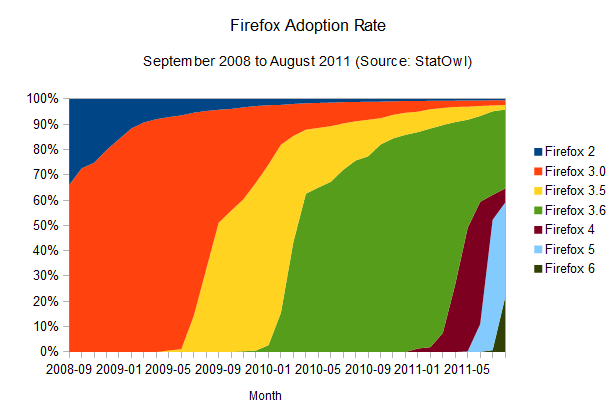
Firefox adoption rate
The
results of this browser update analysis start deviating when we take a
similar look at the adoption rates of the other browsers. Take Firefox,
for example:
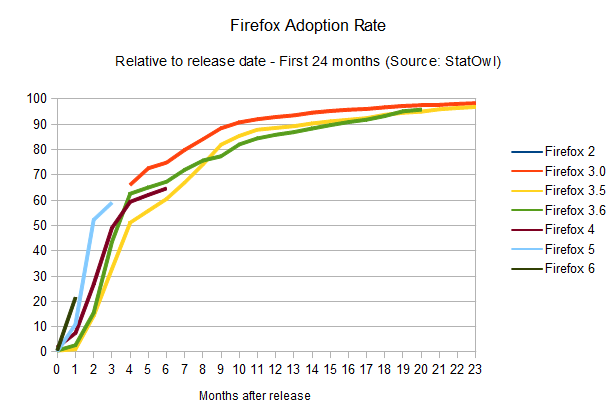
It's also clear that Firefox's update rate is accelerating (browser version release dates from Firefox on
Wikipedia), and the time-to-90-per-cent is shrinking: it should take
around 12 months to get to that point. And given Mozilla's decision to
adopt release cycles that mimics Chrome's,
with its quick release schedule, and automatic updates, we're likely to
see a big boost in those numbers, potentially making the update
adoption rates as good as Chrome's.
One interesting point here is
that a few users seem to have been stuck with Firefox 3.6, which is the
last version that employs the old updating method (where the user has
to manually check for new versions), causing Firefox updates to spread
quickly but stall around the 60 per cent mark. Some users still need to
realise there's an update waiting for them; and similarly to the problem the Mozilla team had to face with Firefox 3.5, it's likely that we'll see the update being automatically imposed upon users soon, although they'll still be able to disable it. It's gonna be interesting to see how this develops over the next few months.
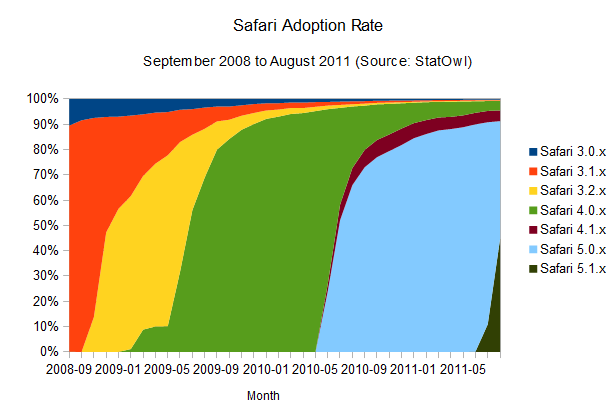
What does Apple's Safari look like?
Safari adoption rate
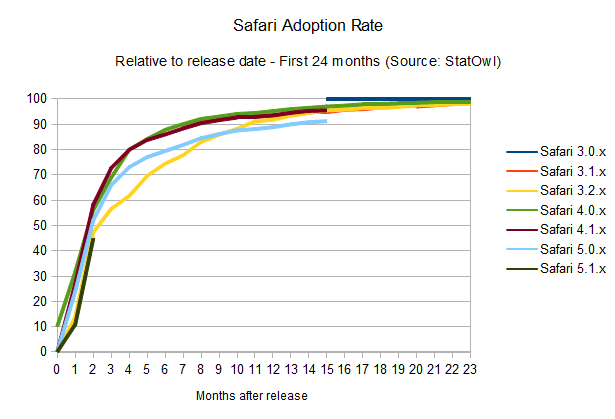
Right now, adoption rates seem on par with Firefox (browser version release dates from Safari on
Wikipedia), maybe a bit better, since it takes users around 10 months
to get a 90 per cent adoption rate of the newest versions of the
browser. The interesting thing is that this seems to happen in a pretty solid
fashion, probably helped by Apple's OS X frequent update schedule,
since the browser update is bundled with system updates. Overall, update
rates are not improving – but they're keeping at a good pace.
Notice
that the small bump on the above charts for Safari 4.0.x is due to the
public beta release of that version of the browser, and the odd area for
Safari 4.1.x is due to its release in pair with Safari 5.0.x, but for a
different version of OSX.
IE adoption rate
All in all it seems to me that browser vendors, as well as the users, are starting to get it. Overall, updates are happening faster and the cycle from interesting idea to a feature that can be used on a real-world scenario is getting shorter and shorter.
There's just one big asterisk in this prognosis: the adoption rate for the most popular browser out there.
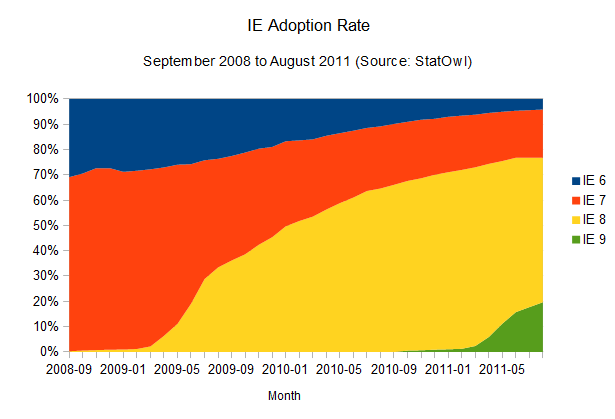
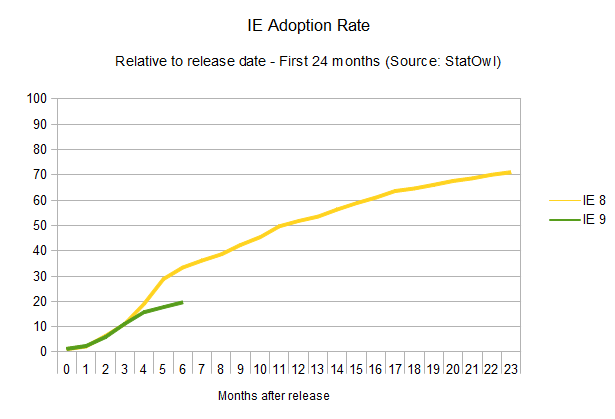
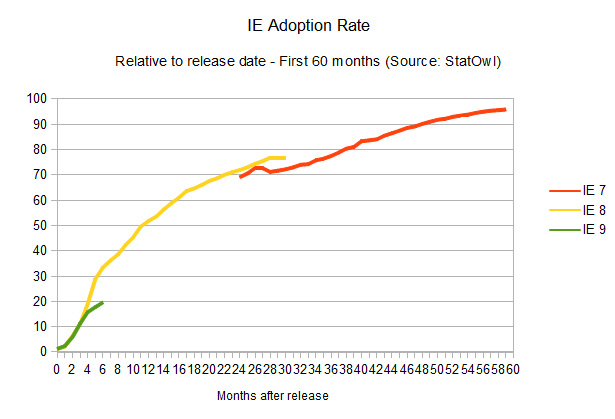
The adoption rate of updates to Internet Explorer is not improving at all (browser version release dates from Internet Explorer on Wikipedia). In fact, it seems to be getting worse.
As
is historically known, the adoption rate of new versions of Internet
Explorer is, well, painstakingly slow. IE6, a browser that was released
10 years ago, is still used by four per cent of the IE users, and newer
versions don't fare much better. IE7, released five years ago, is still
used by 19 per cent of all the IE users. The renewing cycle here is so
slow that it's impossible to even try to guess how long it would take
for new versions to reach a 90 per cent adoption rate, given the lack of
reliable data. But considering update rates haven't improved at all for
new versions of the browser (in fact, IE9 is doing worse than IE8 in
terms of adoption), one can assume a cycle of four years until any released version of Internet Explorer reaches 90 per cent user adoption. Microsoft itself is trying to make users abandon IE6,
and whatever the reason for the version lag – system administrators
hung up on old versions, proliferation of pirated XP installations that
can't update – it's just not getting there.
And the adoption rates
of new HTML features is, unfortunately, only as quick as the adoption
rate of the slowest browser, especially when it's someone that still
powers such a large number of desktops out there.
Internet Explorer will probably continue to be the most popular browser for a very long time.
The long road for HTML-based tech
The
story, so far, has been that browser plug-ins are usually easier and
quicker to update. Developers can rely on new features of a proprietary
platform such as Flash earlier than someone who uses the native HTML
platform could. This is changing, however, one browser at a time.
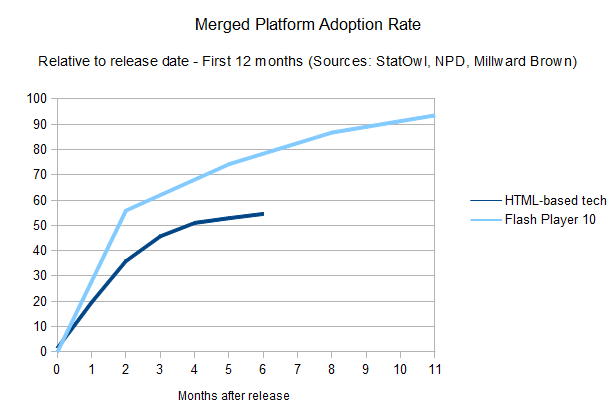
A merged
chart, using the weighted distribution of each browser's penetration
and the time it takes for its users to update, tells that the overall
story for HTML developers still has a long way to go.
Of course, this shouldn't be taken into account blindly. You should always have your audience in mind when developing a website,
and come up with your own numbers when deciding what kind of features
to make use of. But it works as a general rule of thumb to be taken into
account before falling in love with whatever feature has just been
added to a browser's rendering engine (or a new plug-in version, for
that matter). In that sense, be sure to use websites like caniuse.com to
check on what's supported (check the “global user stats” box!), and
look at whatever browser share data you have for your audience (and
desktop/mobile share too, although it's out of the scope of this
article).
Conclusion
Updating the browser has always been a
certain roadblock to most users. In the past, even maintaining
bookmarks and preferences when doing an update was a problem.
That
has already changed. With the exception of Internet Explorer, browsers
vendors are realising how important it is to provide easy and timely
updates for users; similarly, users themselves are, I like to believe,
starting to realise how an update can be easy and painless too.
Personally,
I used to look at the penetration numbers of Flash and HTML in
comparison to each other and it always baffled me how anyone would
compare them in a realistic fashion when it came down to the speed that
any new feature would take to be adopted globally. Looking at them this
time, however, gave me a different view on things; our rich web
platforms are not only getting better, but they're getting better at
getting better, by doing so faster.
In retrospect, it
seems obvious now, but I can only see all other browser vendors adopting
similar quick-release, auto-update features similar to what was
introduced by Chrome. Safari probably needs to make the updates install
without user intervention, and we can only hope that Microsoft will
consider something similar for Internet Explorer. And when that happens,
the web, both HTML-based and plug-ins-based but especially on the HTML
side, will be moving at a pace that we haven't seen before. And
everybody wins with that.
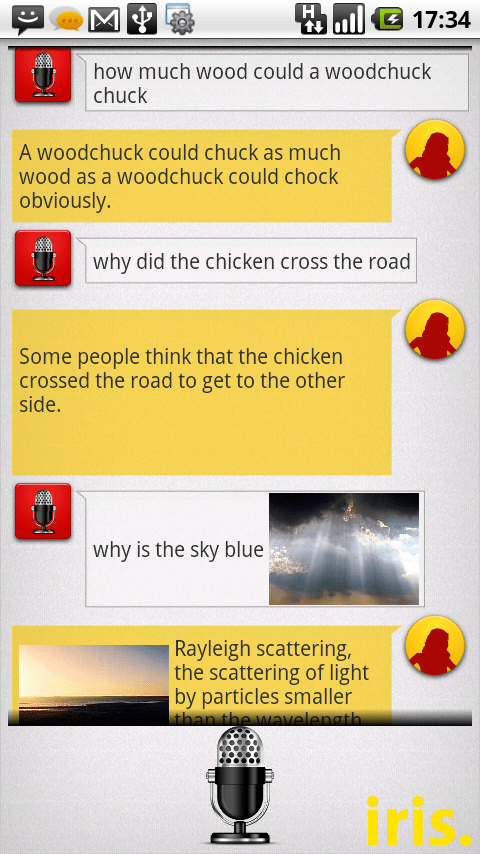
While voice control has been part of Android since the dawn of time, Siri
came along and ruined the fun with its superior search and
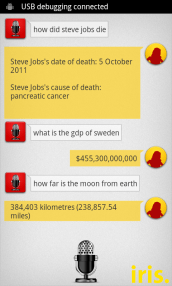
understanding capabilities. However, an industrious team of folks from Dexetra.com, led by Narayan Babu, built a Siri-alike in just 8 hours during a hackathon.
Iris allows you to search on various subjects including conversions,
art, literature, history, and biology. You can ask it “What is a fish?”
and it will reply with a paragraph from Wikipedia focusing on our finned
friends.
The app will soon be available soon from the Android Marketplace but I
tried it recently and found it a bit sparse but quite cool. It uses
Android’s speech-to-text functions to understand basic questions and
Narayan and his buddies are improving the app all the time.
The coolest thing? The finished the app in eight hours.
When we started seeing results, everyone got excited and
started a high speed coding race. In no time, we added Voice input,
Text-to-speech, also a lot of hueristic humor into Iris. Not until late
evening we decided on the name “iris.”, which would be Siri in reverse.
And we also reverse engineered a crazy expansion – Intelligent Rival
Imitator of Siri. We were still in the fun mode, but when we started
using it the results were actually good, really good.
You can grab the early, early beta APK here
but I recommend waiting for the official version to arrive this week.
It just goes to show you that amazing things can pop up everywhere.
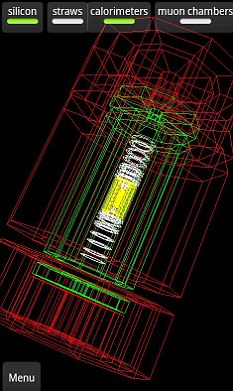
The app allows you to 'build' a 3D view of the reactions inside the LHC, and the huge banks of detectors surrounding the chamber, layer by layer. It's a spectacular insight into the machines at CERN
The new LHSEE app, free on Google Android phones and tablets, lets users see events unfolding live inside the particle accelerator in a 3D view. You can even see individual protons colliding.
The app has already been downloaded more than 10,000 times.
It was created by scientists at Oxford University, and has the full approval of CERN.
Naturally, it can't capture everything - the LHC produces gigabytes of data every second - but the view offers an exhilarating insight into 'Big Science'.
Tutorial videos about the ATLAS detector provide a relatively easy 'way in', and the 3D views allow you to view a stripped down version, then add layers of detectors.
It gives a very immediate, physical sense of the reactions going on inside - you can rotate the 3D model to view reactions from any angle.
It is pitched, according to Android market, at 'experts and non-experts alike', and offers the chance to explore different parts of the detector and learn about the reactions it's looking for.
Be warned, though - despite a game entitled 'Hunt the Higgs', it isn't exactly Angry Birds. You have to comb slides of reactions, guessing which subatomic particles are involved.
The app was built a team headed by Oxford University physicist Dr Alan Barr.
'For ages I’d been thinking that with the amazing capabilities on modern smartphones we really ought to be able to make a really great app - something that would allow everybody to access the LHC data,' said Barr on the official Oxford science blog.
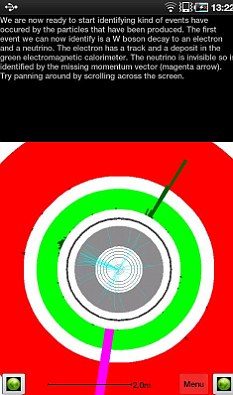
The app initially looks intimidating, but if you persist, the tutorial modes give a fairly gentle 'learning curve' towards understanding how the detectors surrounding the LHC work, and what they are looking for
'I’d sounded out a few commercial companies who said they could do the job but I found that it would be expensive, and of course I’d have to teach their designers a lot of physics. So the idea was shelved.'
'Then, a few months later, I had one of those eureka moments that make Oxford so wonderful.
'I was having a cuppa in the physics common room, and happened to overhear a conversation from Chris Boddy, one of our very many bright Oxford physics graduate students.'
'He was telling his friends that for fun he was writing some small test games for his Android phone. Well you just can’t let moments like that pass.'
By leading users through the coloured slides produced by the LHC, the app 'reverse engineers' the imagery so home users can understand the reactions - eventually. With the LHC predicted to either find the Higgs Boson or prove its non-existence next year, the capacity to watch events 'live' should also prove popular.
'With the app you can understand what these strange shapes and lines actually mean - in terms of the individual particles detected. Our hope is that people can now appreciate the pictures and the science all the more - and perhaps even be a little inspired,' said Barr.
As yet, the team has announced no plans for an iPhone version.
A computer virus has infected the cockpits of America’s Predator and Reaper drones, logging pilots’ every keystroke as they remotely fly missions over Afghanistan and other warzones.
The virus, first detected nearly two weeks ago by the military’sHost-Based Security System, has not prevented pilots at Creech Air Force Base in Nevada from flying their missions overseas. Nor have there been any confirmed incidents of classified information being lost or sent to an outside source. But the virus has resisted multiple efforts to remove it from Creech’s computers, network security specialists say. And the infection underscores the ongoing security risks in what has become the U.S. military’s most important weapons system.
“We keep wiping it off, and it keeps coming back,” says a source familiar with the network infection, one of three that told Danger Room about the virus. “We think it’s benign. But we just don’t know.”
Military network security specialists aren’t sure whether the virus and its so-called “keylogger” payload were introduced intentionally or by accident; it may be a common piece of malware that just happened to make its way into these sensitive networks. The specialists don’t know exactly how far the virus has spread. But they’re sure that the infection has hit both classified and unclassified machines at Creech. That raises the possibility, at least, that secret data may have been captured by the keylogger, and then transmitted over the public internet to someone outside the military chain of command.
Drones have become America’s tool of choice in both its conventional and shadow wars, allowing U.S. forces to attack targets and spy on its foes without risking American lives. Since President Obama assumed office, a fleet of approximately 30 CIA-directed drones have hit targets in Pakistanmore than 230 times; all told, these drones havekilled more than 2,000 suspected militants and civilians, according to theWashington Post. More than 150 additional Predator and Reaper drones, under U.S. Air Force control, watch over the fighting in Afghanistan and Iraq. American military dronesstruck 92 timesin Libya between mid-April and late August. And late last month, an American dronekilled top terrorist Anwar al-Awlaki— part of anescalating unmanned air assaultin the Horn of Africa and southern Arabian peninsula.
But despite their widespread use, the drone systems are known to have security flaws. Many Reapers and Predators don’t encrypt the video they transmit to American troops on the ground. In the summer of 2009, U.S. forces discovered “days and days and hours and hours” of the drone footage on the laptops of Iraqi insurgents. A$26 piece of software allowed the militants to capture the video.
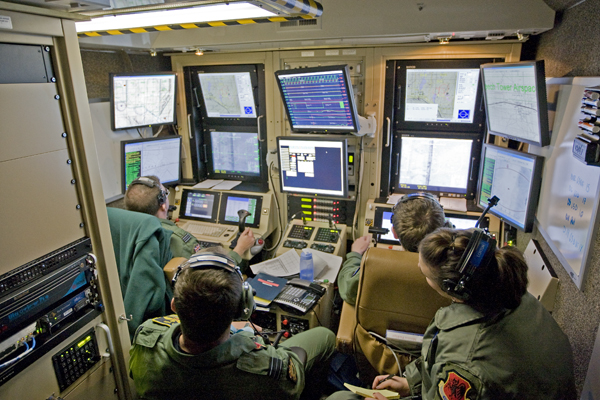
Thelion’s share of U.S. drone missionsare flown by Air Force pilots stationed atCreech, a tiny outpost in the barren Nevada desert, 20 miles north of a state prison and adjacent to a one-story casino. In a nondescript building, down a largely unmarked hallway, is a series of rooms, each with a rack of servers and a “ground control station,” or GCS. There, a drone pilot and a sensor operator sit in their flight suits in front of a series of screens. In the pilot’s hand is the joystick, guiding the drone as it soars above Afghanistan, Iraq, or some other battlefield.
Some of the GCSs are classified secret, and used for conventional warzone surveillance duty. The GCSs handling more exotic operations are top secret. None of the remote cockpits are supposed to be connected to the public internet. Which means they are supposed to be largely immune to viruses and other network security threats.
Use of the drives is now severely restricted throughout the military. But the base at Creech was one of the exceptions, until the virus hit. Predator and Reaper crews use removable hard drives to load map updates and transport mission videos from one computer to another. The virus is believed to have spread through these removable drives. Drone units at other Air Force bases worldwide have now been ordered to stop their use.
In the meantime, technicians at Creech are trying to get the virus off the GCS machines. It has not been easy. At first, they followed removal instructions posted on the website of the Kaspersky security firm. “But the virus kept coming back,” a source familiar with the infection says. Eventually, the technicians had to use a software tool calledBCWipeto completely erase the GCS’ internal hard drives. “That meant rebuilding them from scratch” — a time-consuming effort.
The Air Force declined to comment directly on the virus. “We generally do not discuss specific vulnerabilities, threats, or responses to our computer networks, since that helps people looking to exploit or attack our systems to refine their approach,” says Lt. Col. Tadd Sholtis, a spokesman for Air Combat Command, which oversees the drones and all other Air Force tactical aircraft. “We invest a lot in protecting and monitoring our systems to counter threats and ensure security, which includes a comprehensive response to viruses, worms, and other malware we discover.”
However, insiders say that senior officers at Creech are being briefed daily on the virus.
“It’s getting a lot of attention,” the source says. “But no one’s panicking. Yet.”
The Apple “Let’s Talk iPhone” event has
concluded. Tim Cook and a slew of Apple execs have taken it in turns to
tell us about the latest and greatest Apple goodies, and rather
underwhelmingly there’s no iPhone 5 and just significant takeaways: a
cheaper and faster iPhone 4S, and an interesting software package called
Siri. You can read all about the iPhone 4S on our sister sites Geek and PC Mag — here we’re going to talk about Siri.
If
we look past the rather Indian (and feminine) name, Siri is a portable
(and pocketable) virtual personal assistant. She has a
speech-recognition module which works out what you’re saying, and then a
natural language parser combs through your words to work out what
you’re trying to do. Finally, an artificial intelligence gathers the
possible responses and works out which one is most likely to be
accurate, given the context, your geographical location, iOS’s current
state, and so on.
Siri
is, in essence, a computer that you can interrogate for answers, kind
of like a search engine that runs locally on your phone. If you’ve seen IBM’s Watson play Jeopardy,
Siri is basically a cut-down version. She isn’t intelligent per se, but
if she has access to enough data, she can certainly appear intelligent.
Siri’s data sources are open APIs, like Wikipedia or Wolfram Alpha, and
in theory there’s no limit to the number of sources that can be added
(though it does require significant developer time to add a new data
set). For now you can ask Siri about the weather or the definition of a
word, but in the future, if Apple links Siri up to United Airlines,
you’ll be able to book a plane ticket, just by talking. Because Siri
runs locally, she can also send SMSes or set reminders, or anything else
that Apple (or app developers) allow her to do.
Artificial
intelligence isn’t cheap in terms of processing power, though: Siri is
expected to only run on the iPhone 4S, which sports a new and
significantly faster processor than its predecessors, the A5. Siri
probably makes extensive use of Apple’s new cloud computer cluster, too,
much in the same way that Amazon Silk splits web browsing between the cloud and the local device.
Noise
That’s
enough about what Siri is and how it works. Let’s talk about whether
anyone will actually use Siri, which is fundamentally a glorified voice
control search engine. Voice commands have existed in some semblance
since at least as far back as the Nokia 3310, which was released in
2000. Almost every phone since then has had the ability to voice dial,
or in the case of modern smartphones, voice activate apps and features.
When
was the last time you saw someone talk to their phone? Driving and
other hands-otherwise-occupied activities don’t count. When was the last
time you walked down the street and heard someone loudly dictate “call
mom” into their phone? Can you really see yourself saying “Siri, I want a
kebab” in public?
It might lose its social stigma if everyone
talks to their phone, but isn’t it already annoying enough that people
swan down streets with hands-free headsets, blabbing away? It’s not like
voice recognition is at the stage where you can whisper or mumble a
command into your phone, either: you’re going to have to say, nice and
clearly, “how do I get to the bank?” in public. Now imagine that you’ve
just walked past the guy who’s talking to Siri — is he asking you for
directions, or Siri? Now imagine what it would be like if everyone
around you is having a one-sided phone conversation or talking to Siri.
Finally,
there’re practical implications to consider, which Apple usually
ignores in its press events. For example, will Siri only recognize my
voice? What if I leave my phone in the living room and my girlfriend
shouts out “honey, we should go to that Italian restaurant” — will Siri
then make a reservation? On a more nefarious note, will my wife be able
to say “Siri, show me my husband’s hidden email.” When walking down a
street, will Siri overhear other conversations and react accordingly?
Siri
will be fantastic in the car, that’s for certain. She will also be very
accommodating when you’re on your own — imagine shouting across the
room “Siri, do I need to wear a jacket today?” or “Siri, download the
latest episode of Glee.” Siri will be unusable in public, though, while
on the move — and that’s the one time where you really don’t want to be
looking down at that darn on-screen keyboard.
What if one of the world's most popular 3D engines, the same one used to power many of the most popular console games in the world, also ran in your web browser? That would be pretty interesting, right?
Things just got interesting: Epic Games has announced that their incredibly popular Unreal Engine 3 now works in Adobe Flash, demoing a version ofUnreal Tournament 3 running inside the new Adobe Flash Player 11.
That means porting existing games to work in a browser-based solution—and there are aton of games on Unreal Engine 3—would be more or less turnkey.
A quick look at the screenshots provided by Epic indicate that the engine isn't as powerful as a non-browser-based engine—no big surprise there—but that it's still very much a "real" 3D experience. (I haven't yet seen the engine in motion.)
Even better, developers will be able to migrate their games from, say, iOS over to a browser-based environment without much hassle, making it possible to easily sell browser-based games that play the same games as apps on mobile devices.
But the real thing that should make you arch an eyebrow is Facebook.Nearly every game you can play on Facebook runs on Flash. And now Flash can run hardware-accelerated 3D, just like Real Games.
When Microsoft released the Windows 8 Developer Preview
last month it warned that it was unstable, incomplete, a very early
build which has a long way to go before it's ready for release.
That
doesn't sound too promising - but on installing it we were surprised to
see just how many great new features Windows 8 already contained.
From
the shiny new Metro interface and interesting Explorer tweaks, to new
applets and major performance enhancements, Windows 8 is - even at this
early stage - packed with essential functionality.
Here are 18 cool things Windows 8 does that Windows 7 doesn't
1. Boot quickly - by default
Yes, we know - every version of Windows promises boot time improvements. But this time Microsoft has really delivered.
Our test Dell Inspiron 1090 (a seriously basic laptop) took 48 seconds to launch Windows 7 from the boot loader.
Choose the Windows 8 option, though, and the Metro screen appeared in only nine seconds - more than five times faster.
How
does it work? There are many tweaks, but maybe the most important
happens when the system shuts down. It closes all your programs as
normal, but the kernel is now hibernated, its RAM contents saved to your
hard drive. This doesn't take long, and when you reboot your system can
be reinitialised far faster than before.
2. Display alerts immediately
Your
Windows 8 laptop won't just load faster, it'll also display useful
information right away, without you having to do anything at all.
And
that's because your lock screen, where you'll normally log in, can now
be customised with apps which show you details on waiting emails, your
schedule, RSS feeds, whatever you like.
So Windows 8 means you
won't necessarily have to turn on your laptop, wait for an age as it
loads, then wait even longer to launch an application, just to discover
some really basic item of data: it could be available on the lock screen
in seconds.
3. Log on without passwords
If you already
have more than enough passwords to remember, then the good news is that
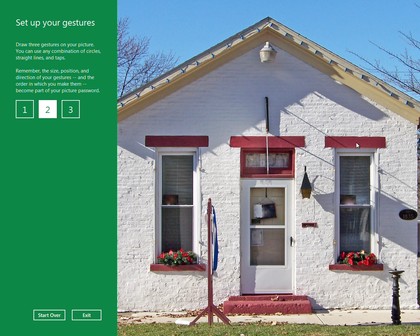
Windows 8 will offer you an unusual alternative: the picture password.
You'll
be able to point Windows to a picture you'd like to use, which you then
click, tap or draw on with your mouse or using a touch screen. So if
you choose a picture of your house, say, you might draw an outline
around the roof, then tap on a window and the front door. Windows will
remember your gestures, and won't allow anyone to log in later unless
they can repeat them.
If that doesn't sound appealing, don't worry
- you can continue to log in with a regular alphanumeric password if
you prefer, just as before.
4. Enjoy a dynamic desktop
The
Windows 8 Metro interface doesn't give you static shortcuts to launch
its applications. Instead you get dynamic tiles, which you can change in
size to reflect an app's importance, and freely organise into whatever
groups best suits your needs.
And, again, these tiles aren't just
used to launch the apps. They can also display information from them, so
if something interesting has just appeared on an RSS feed you're
watching, then you'll get to see it right away.
5. Synchronise your settings
Of
course, with so much functionality on the Metro desktop, it may take a
while to set it up just the way you like. But don't worry, you only have
to do this once, even if you've several Windows 8 PCs, because you'll
be able to synchronise your Metro apps, their settings and application
histories (as well as login details for applications and websites)
across all your systems, entirely automatically.
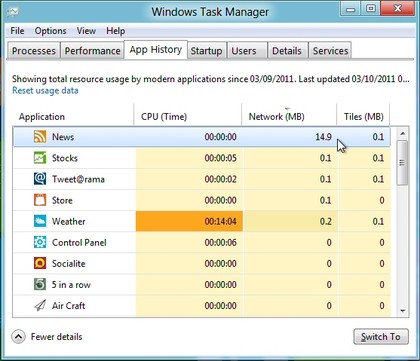
6. Spot resource hogs
All
this syncing, email-checking, RSS monitoring and so on could become a
little expensive if you're using a metered 3G connection, of course. So
it's just as well that the new Windows 8 Task Manager includes an App
History feature which can show you exactly who's hogging all your
network bandwidth (as well as your CPU time, hard drive and RAM).
7. Close apps automatically
Traditionally
Windows has left it up to you to manage the programs you run. So you
can launch as many as you like, and the system won't complain: it'll
just get slower, and slower, and slower as you run out of RAM and it
starts swapping to disk.
Windows 8 is fortunately a little
different, at least when running Metro apps. If you're running short of
resources then it'll close down anything you've not used for a while, to
try to help out. Don't worry, the app's state is saved first, so you
don't lose anything; relaunch it and you'll carry on exactly where you
left off.
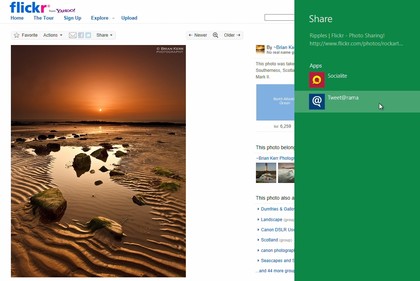
8. Share easily
Sharing something you've found
online is an everyday experience for most web users, and so it's great
to see Microsoft build that idea into Windows 8. If you've discovered a
great photo or web page in IE10
then simply hit the Share button and you'll be able to send its link
via any compatible app you've installed - and they'll then update your
Twitter, Facebook or other account right away.
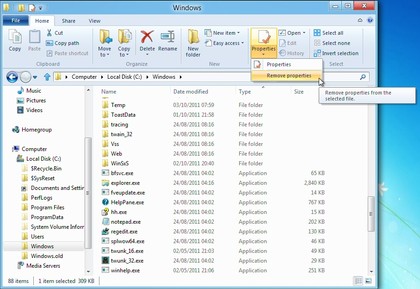
9. Work on files with ease
The Windows 8 Explorer now uses a
ribbon-style interface, which brings many otherwise tricky to find
options within very easy reach.
If you want to remove metadata
containing personal information in Windows 7, for instance, you must
right-click the file, select Properties, choose the Details tab, and
click "Remove Properties and Personal Information".
In Windows 8, all you have to do is click the file and choose Remove Properties from the Properties list: much easier.
There
are many similar shortcuts. But if they're not enough, then you can
make any Explorer ribbon option even easier to access it by adding it to
the Quick Access toolbar, which appears in the Explorer title bar.
It'll then only ever be a couple of clicks away.
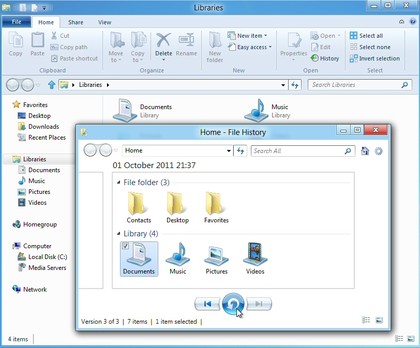
10. Back up automatically
Windows
8 includes a very easy-to-use File History feature, which can
automatically back up whatever folders you like, at the frequency you
specify.
This could be a complete system backup to a network
drive, if you like. But it could also just save key folders like
Documents and Pictures to a USB flash drive, and once you've set this up
there's no further configuration required. Simply plug in the drive
every few days, File History will automatically detect it, and your
preferred files will automatically be backed up.
11. Download safely
Internet
Explorer's SmartScreen filter is a handy technology which can check
downloads against a database of known malicious sites and dangerous
programs, blocking the file if it finds a match. Previously this was
only available within IE, but in Windows 8 SmartScreen will be used
system-wide, so you'll have an extra layer of protection no matter which
browser you're using.
12. Mount ISO files
Windows 7
gained the ability to burn ISO images to disc, but if you just want to
check or access their contents then Windows 8 goes one better. Just
right-click the image, select Mount, and a new virtual optical drive
will appear in Explorer. Double-click this to view the image contents,
launch whatever programs it contains, or generally treat it just like
any other disc.
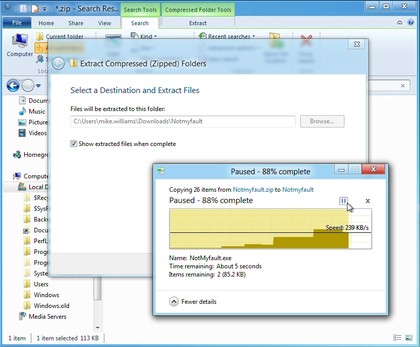
13. Pause file copies
Once you've started a
Windows file copy operation, that used to be it: you had to wait until
it was finished. But not any more. The new File Copy dialog includes a
tiny pause button, so if you need to do something else for a moment,
just click to pause the copies, click again to resume.
14. Fix problems easily
If
your PC is in a bad way then you've always been able to reinstall
Windows. But you'd have to find your Windows disc, first, and pay close
attention to the installation options to make sure you choose the one
you need.
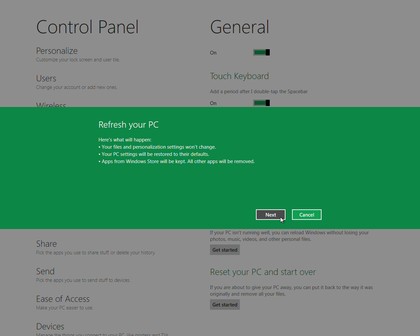
Windows 8 gets rid of all that hassle by introducing a
"Refresh your PC" option (Control Panel > General). This also
essentially reinstalls Windows, but there's no disc required, no complex
options to consider, not even very long to wait: we've used it two or
three times and it's quickly repaired any glitches we encountered.
15. Run other operating systems
If,
despite all of this, you still feel that Windows 7 has some advantages -
then that may not be a problem. Because Windows 8 now includes
Microsoft's Client Hyper-V virtualisation platform, which allows you to
install other operating systems onto virtual machines and run them on
your desktop.
You will need to be running 64-bit Windows,
however, and have a CPU which supports Second Level Address Translation
(that's Intel's Core i3, i5 and i7 and AMD's Barcelona processors).
But
if your system qualifies then you'll find this is a far better and more
powerful solution than Microsoft's Virtual PC, or Windows 7's XP Mode,
and should be ideal for running most legacy applications on your Windows
8 system.