We've had a bit of a love / hate relationship with the Google
Chromebook since the first one crossed our laps back in 2011 -- the Samsung Series 5.
We loved the concept, but hated the very limited functionality provided
by your $500 investment. Since then, the series of barebones laptops
has progressed, and so too has the barebones OS they run, leading to our
current favorite of the bunch: the 2012 Samsung Chromebook.
In that laptop's review, we concluded that "$249 seems like an
appropriate price for this sort of device." So, then, imagine our
chagrin when Google unveiled a very similar sort of device, but
one that comes with a premium. A very hefty premium. It's a high-end,
halo sort of product with incredible build quality, an incredible screen
and an incredible price. Is a Chromebook that starts at more than five
times the cost of its strongest competition even worth considering?
Let's do the math.
Hardware
Wow. This is certainly a departure. If you're going to charge an
obscene premium for a laptop with an incredibly limited OS, you'd better
produce something that is incredibly well-made. In that regard, the
Chromebook Pixel is a complete success. If you'll forgive us just one
cliche, Google has gone from zero to hero with the Pixel. It's truly
something to behold.
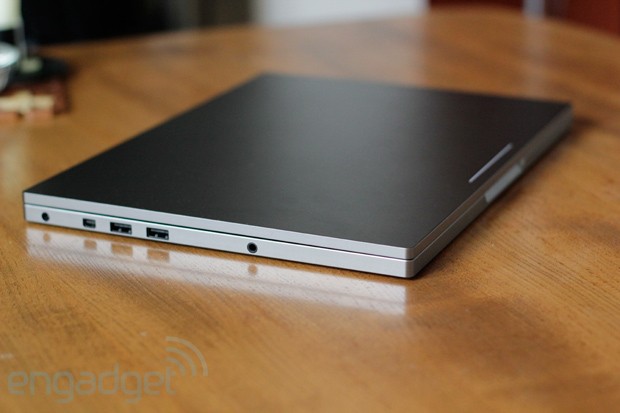
First impressions are of a laptop with
surprising density. Apple's MacBook Pros, with their precisely hewn
aluminum exteriors, have long been the benchmark against which other
laptops were held in when it comes to a sense of solidity. In its first
attempt, Google has managed to match that feeling of innate integrity
with the Pixel, and in some ways go beyond it.
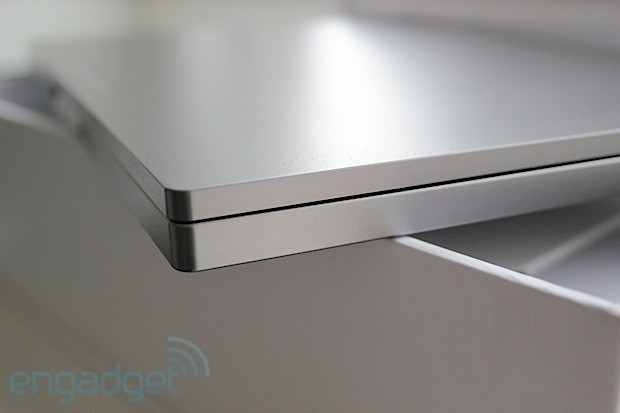
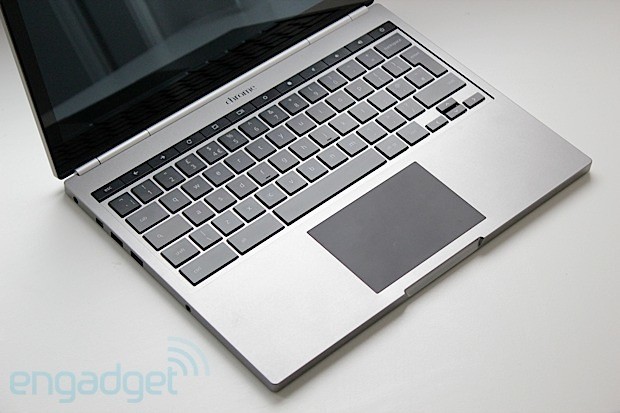
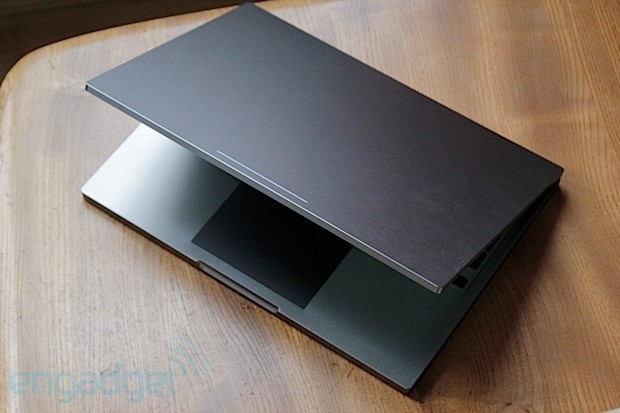
It's all machined
aluminum, anodized in a dark, almost gunmetal color that successfully
bridges the gap between sophisticated and cool. Everything is very
angular; vertical sides terminate abruptly at the horizontal plane that
makes up the typing surface. In fact, the only thing not bridged by
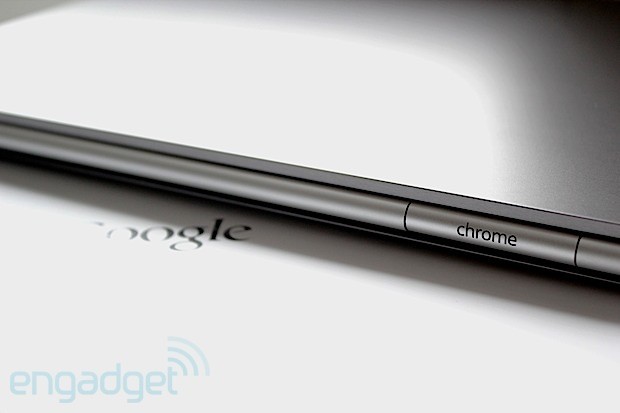
right angles is the cylindrical hinge running nearly the entire width of
the machine, but thankfully the edges of the entire laptop are just
rounded enough to keep it from digging into your wrists uncomfortably.
Battle scars received while typing have become a bit of an annoyance in
many modern, aluminum-bodied machines.
A good, quick test of a laptop's rigidity is to open it up, grab it
on both sides of the keyboard and try to twist. On a flimsy product
you'll hear some uncomfortable-sounding noises coming from beneath the
keys and, if you're really unlucky, you might send a letter or two
flying. Not so with the Pixel. The torsional rigidity is impressive for a
machine that is as thin, and as light, as this.
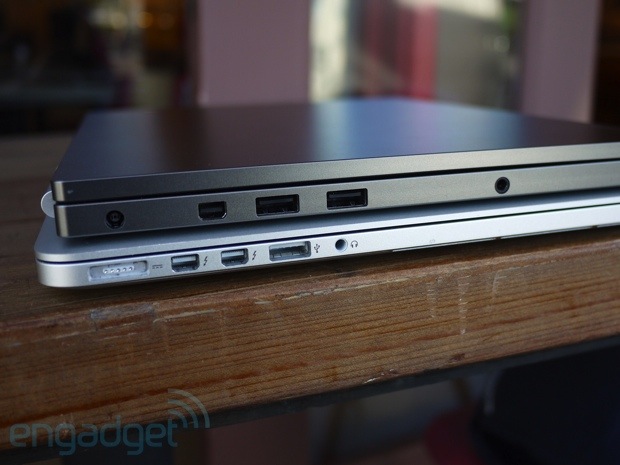
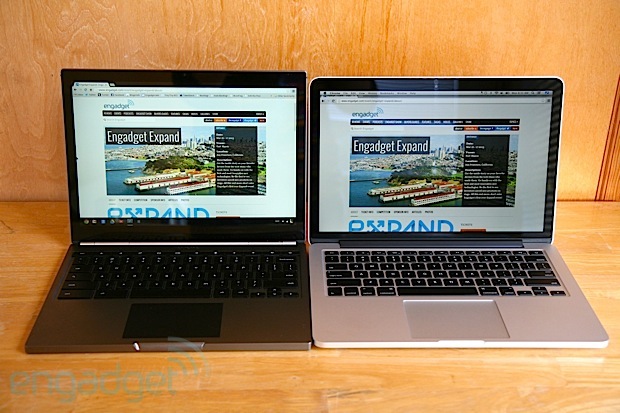
To put some numbers on that, the laptop measures 16mm (0.62 inch) in
thickness and 3.35 pounds (1.52kg) in heft. That compares very favorably
to the 13-inch MacBook Pro with Retina, the one that we would most
closely pit this against, which is 19mm (0.75 inch) thick and weighs
3.57 pounds (1.62kg). So it's thinner and lighter, and with a very
similar 12.85-inch, 2,560 x 1,700 display (which we'll thoroughly
discuss momentarily), but with lower performance. It is, however, on par
with the 13-inch MacBook Air when it comes to speed, and is only
slightly thicker (0.06 inch) and heavier (0.39 pound).
A
dual-core Intel 1.8GHz Core i5 chip is the one and only processor on
offer here, paired with 4GB of DDR3 RAM and generally providing more
than enough oomph to drive the very minimalist operating system, which
is installed on either a 32 or 64GB SSD. The larger option is only
available if you opt for the $1,449 laptop, which also adds
Verizon-compatible LTE to the mix (along with GPS). Either model sports
dual-band MIMO 802.11a/b/g/n along with Bluetooth 3.0. For those who
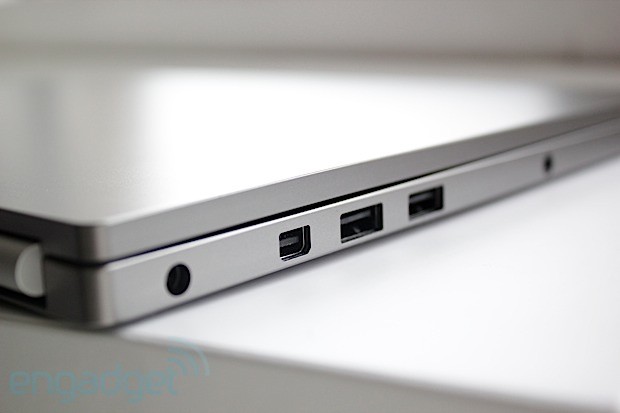
like to keep it physical, there are two USB ports on the left (sadly
just 2.0) situated next to a Mini DisplayPort and a 3.5mm headphone
jack. On the right is an SD card reader, along with the SIM card tray --
assuming you paid for the WWAN upgrade.
For those who aren't
interested in making use of that headphone jack, there are what Google
calls "powerful speakers" built in here -- though they're hard to spot.
They're integrated somewhere below the keyboard and, believe it or not,
that "powerful" description is quite apt. You won't be giving your
neighbors anything to complain about if these are cranked to maximum
volume, nor do you need to concern yourself about cracking the masonry
thanks to the bass, but the output here is respectably loud and
good-sounding. These speakers are at least on par with your average
mid-range Bluetooth unit, meaning you'll have one less thing to pack.
For the receiving end, Google has also integrated an array of
microphones throughout the machine to help with active noise
cancellation, including one positioned to detect (and eliminate)
keyboard clatter when you're typing whilst in a Hangout or the like.
Without the ability to selectively disable this microphone we can't be
sure how great an effect it had, but we can say that plenty of
QWERTY-based noise got through in our test calls. Google, though, has
indicated it will continue to refine the behavior of that mic, so
there's hope for improvement.
Integrated in the bezel is a webcam
situated in the center-top of the bezel, next to a small status LED to
let you know when Big Brother is watching. One final piece is the power
plug, a largish wall wart that takes a cue from Apple by including a
removable section. Here you can slot in either a flip-out, two-prong end
or a longer, three-prong cable. The inspiration is obvious, but we're
not complaining. This lets you have both a short, easy-to-pack version
when you're traveling light and a longer but rather more clunky version
for those times when you need a bit more reach.
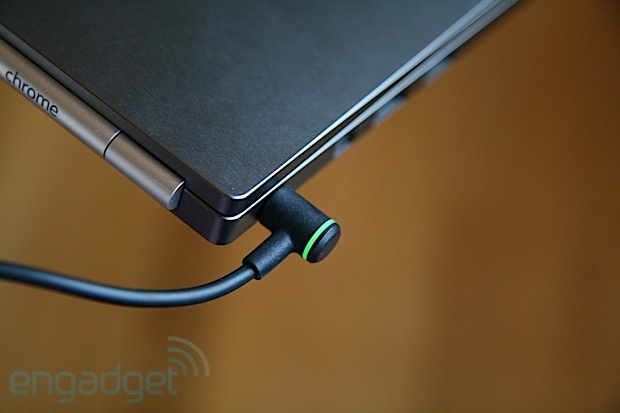
We do, however,
wish Google had also taken inspiration from Apple and Microsoft and
included some sort of magnetic power connector. We found that the small
plug, with its traditional, single-prong-style connector, had a tendency
to slowly work its way out of the laptop when the cable had any tension
from the left. Thankfully, a bright glowing light on the connector lets
you know when the laptop is charged or charging -- and thus when the
thing has slid out far enough to lose connection.
Keyboard and trackpad
Island-style keyboards continue to be all the rage and, for the most
part, Google makes no exception for its latest Chromebook. The primary
keys float in a slightly recessed area, comfortably sized and
comfortably spaced. Each has great feel and great resistance. Typing on
this machine is a joy.
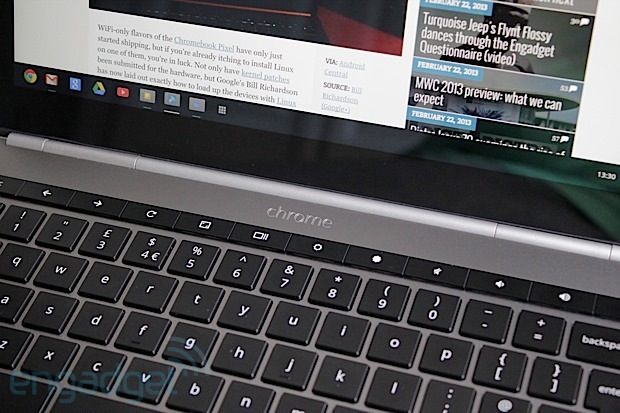
However, the row of function keys that
rest atop the number keys, discrete buttons for adjusting volume and
brightness and the like, is a different story. These are flush with each
other and far stiffer than the normal keys. This isn't much of a
bother, since you won't be using them nearly as frequently as the rest,
but butting them right up against each other makes them difficult to
find by touch. Thankfully, all are backlit, so locating them in the dark
is no problem.
We also wished for dedicated Home and End keys,
after finding the Chrome OS alternative of Ctrl + Alt + Up or Down to be
a bit of a handful. Regardless, you'll quickly learn to type around
these relatively minor shortcomings and enjoy the great keyboard.
Thankfully, the trackpad is equally good.
It's a glass unit,
darkly colored and positioned in the center of the wrist rest, which
makes it slightly shifted to the right compared to the space bar. It has
a matte coating but still feels quite smooth, resulting in a very nice
swiping sensation indeed. Of course, with a 12.85-inch touch-sensitive
display, you may find yourself using it less frequently than you think.
Display
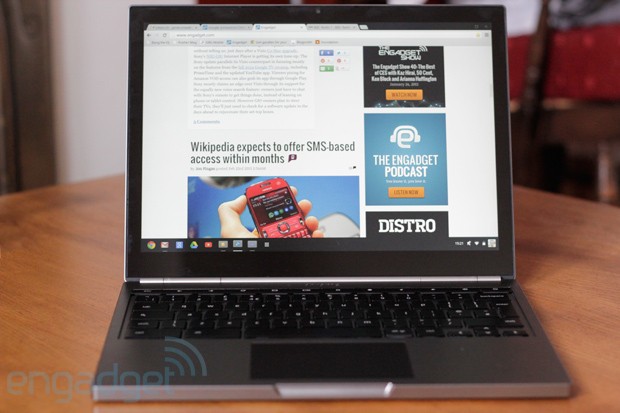
Again, up top is a 12.85-inch, 2,560 x 1,700 IPS LCD panel that we
can't look at without thinking of the very similar 13.3-inch, 2,560 x
1,600 panel on the 13-inch MacBook Pro with Retina display. It's smaller
but packs an extra 100 pixels vertically, giving it a slightly higher
pixel density of 239 ppi. Naturally, that's far from the full story
here, and those who are really into proportions will know that
resolution equates to a 3:2 aspect ratio. In other words: it's rather
tall.
A 16:9 aspect ratio (or something close to it) is the
prevailing trend among non-Macs these days, but even when acknowledging
that, this one feels particularly tall. Still, we didn't exactly mind
it. As mentioned above, the keyboard is plenty roomy, and given that
Chrome OS isn't particularly friendly to multi-window
multi-tasking (manually justifying windows is a real chore) we were
rarely left wanting a wider display.
That was, really, our only
minor reservation about this panel. Otherwise we have nothing but love
for the thing. It is, of course, a ridiculously high resolution, which
makes pixels basically disappear. Indeed the simple, clean and stark
Chrome OS looks great when rendered with such clarity, but we couldn't
help but lament the occasional excess of white space that's becoming
common across many of Google's web apps. For a display with a pixel
density this high, it feels somewhat under-utilized.
That is
until, of course, you boot up the 4K sample footage Google thoughtfully
pre-installed on the machine, which looks properly mind-blowing -- even
if it is only being rendered at slightly higher than half its native
resolution.
This is a glossy panel, tucked behind a pane of Gorilla Glass,
so glare may be a bit of a problem if your work setup has bright lights
positioned behind you. Still, reflectivity seemed to be on par with the
latest, optically bonded panels -- that is to say, far from the
"mirror, mirror" effect provided by many of the earlier gloss displays.
Contrast is quite good from all angles, though the color accuracy drops
off if you look at it from too high or low, with everything quickly
getting a bit pink. Slightly pretty.
And, finally, this is indeed
a touch-enabled panel, something we didn't know we needed on a
Chromebook -- and frankly we're still not sure we do. We'll discuss that
in more detail in the software section below.
Performance and battery life
Again we're dealing with a 1.8GHz Intel Core i5 processor here, a
bit on the mild side compared to most higher-end laptops. Still, it
proves to be more than enough to run the lightweight Chrome OS. That's
paired with 4GB of DDR3 RAM and, predictably, integrated graphics
courtesy of Intel's HD 4000 chipset.
It's no barnstormer, but it
runs a browser with aplomb. And, really, that's about all it's likely to
do with the limited selection of apps available for Chrome. Everything
we threw at it ran fine, though after extended sessions we did notice
heavier websites started to get a little bit stuttery. It's nothing that
rebooting the browser didn't fix.
High-def videos play smoothly,
though when pushing the pixels (or running games), the machine does get
fairly warm. The fan vents are below the hinge; a thin sliver of an
opening that thankfully doesn't seem to dump a lot of hot air into your
lap. It's noticeable, but it isn't particularly loud or annoying and
again, since you likely won't be doing too much taxing stuff here, don't
expect to hear it all that often.
When it comes to battery life,
Google estimates the 59Wh battery will provide "up to" five hours of
continuous use. And, indeed it may. On our standard battery run-down
test, which loops a video at fixed brightness, the machine clocked in at
four hours and eight minutes for the WiFi model. The LTE model, with
its LTE antenna on, came in about 30 minutes shorter at 3:34.
These numbers are rather poor, unfortunately. The 13-inch MacBook Pro
with Retina clocks in at more than six hours on the same battery test,
while both the 13-inch MacBook Air and the latest Samsung Chromebook
score about 30 minutes more even than that.
Connectivity
As mentioned above, both Chromebook Pixel models include dual-band MIMO
802.11a/b/g/n, which means you'll be sucking down bits at an optimal
rate more or less regardless of what sort of router you're connecting
to.
Stepping up to the $1,449 LTE version of course means you can
walk away from those routers. That machine includes a Qualcomm MDM9600
chipset to receive on LTE band 13, intended for Verizon in the US only.
So, then, we tested it in the US in two different LTE markets on both
coasts. Speeds varied widely from location to location, but in general
matched or exceeded the speeds we saw from other Verizon-compatible
mobile devices.
In terms of more practical connectivity concerns,
it's worth noting that the modem takes about 30 seconds to reconnect
after the laptop resumes from its suspended state, which is a bit
annoying but certainly no slower than your average LTE USB modem. Also,
Verizon is kindly including 100MB of data each month for free for your
first two years of Chromebook ownership, but after that you'll be stuck
paying up for one of Verizon's tiered data plans.
Oh, and the
Pixel lacks an Ethernet port, and does not include an adapter. We tried a
few standard USB Ethernet adapters and all worked without a hitch.
Software
As we concluded in our review of the most recent version,
Chrome OS has come a long, long way since that first Chromebook crossed
our laps. What we have now is a far more sophisticated and
comprehensive experience than we did a few years ago, but it's still
incredibly limited compared to the broader world of desktop operating
systems.
Simple tasks like file management can be a real chore if
you're doing anything other than moving a file into a subdirectory. And
while the OS itself has a refreshingly simple visual style, it's also
very stark and, frankly, a somewhat wasteful design. Not to keep harping
on the file explorer, but each file in a list is separated by a sea of
white big enough to basically double the effective height. When you're
skimming through a big 'ol list of files in a directory, it takes a lot
more scrolling than should be necessary given the resolution of this
display.
At least Google made the scrolling easy. As mentioned
above, the trackpad is quite good and very responsive. Multi-finger
gestures are responsive, so good that you might not be inclined to reach
up to that touch panel. But, you should, because the experience is
generally good as well, though you'll rarely be doing anything more than
scrolling webpages or documents. There's not really a whole lot more
Chrome OS can do, but even in games like Cut the Rope and Angry Birds, touch was just as good as... well, as it is on an Android tablet.
That said, it's disappointing that Google didn't introduce any
gestures to the OS to match its newfound touch compatibilities. In fact,
you can't even pinch-zoom in the image viewer or even on most pages in
the Chrome browser -- only in specifically pinch-friendly websites (like
Google Maps). There are no three- or four-finger gestures for switching
apps, and swiping in from the bezels does nothing. Except, that is, for
a swipe up from the bottom, which alternatively shows or hides the
launcher bar.
Again, we won't restate the entire review of Chrome
OS, but it's important to note at least briefly that functionality here
is still very minimal. There are built-in apps for viewing photos and
videos, for browsing files, for taking photos from the integrated
webcam, an app for taking notes and... the web browser. That, of course,
is the most important part. Suffice to say, if you can't do all your
work from inside of an instance of Chrome on some other platform (like
Windows or Mac), you probably won't be able to do it here, either.
Still, we did want to point out one important part of the software, and
that is it's easily replaceable. The bootloader is not locked and we've
already seen the thing rocking Linux -- and looking quite good
while doing it. So, if you happen to be looking for an incredibly
well-designed laptop to run that most noble of open-source operating
systems, this could be it.
Pricing and competition
We can keep the pricing bit short, because there are only two options
here. For $1,299, you can get yourself the WiFi model with 32GB of local
SSD storage. For $1,449 you step up to the LTE model, which throws in
64GB of storage in a bid to sweeten the deal.
Should that still
be too bitter for your tastes -- and we're thinking there's a very good
chance it will be -- Google has included plenty of other incentives that
are at least mildly saccharine. First among these are 12 free Gogo
passes for in-flight connectivity, each one worth about $14 for a total
of $168. The other, rather more compelling add-in, is 1TB of online
storage free for three years.
That, believe it or not, is worth a
whopping $1,800, which of course means that if you were looking to rent
that much data for a period of three years you'd actually be better off
just buying a Pixel. It would, effectively, just be a nice, free toy.
For everyone not
interested in storing copious quantities of stuff in the cloud, both
price points are rather dear to put it mildly. As ever, it's difficult
to compare a Chromebook to other laptops on the market thanks to the
limited functionality provided by the OS. So, we'll focus primarily on
hardware comparisons, and as we mentioned above, we find ourselves
inclined to compare this to the 13-inch MacBook Pro with Retina display.
That machine, with a full operating system and a faster, 2.5GHz Core
i5 processor, starts at $1,499. That, though, has a 128GB of SSD, twice
that of the biggest Pixel. We could also see many comparing this
against the 13-inch MacBook Air, which offers the same CPU, integrated
graphics and 4GB of RAM for the same $1,199. It's lacking the high-res
screen but it perhaps makes up for that with, again, 128GB of storage.
On the PC side of things, that resolution is unmatched, but the other
specs certainly aren't. We recently had reasonably good feelings about Samsung's Series 5 UltraTouch,
a 13-incher packing a similar Core i5 CPU, 4GB of RAM, but again a
500GB platter-based hard disk. An SSD isn't an option, but the $849
price is certainly more palatable.
Again, none of these is an
apples-to-apples comparison, as the Pixel offers a touchscreen,
something all the Macs lack, and offers LTE connectivity, thus making it
even more of a rare bird on the laptop scene. Whether these unique
attributes, plus the various goodies Google is throwing in, turn this
into a compelling proposition compared to the competition is something
you'll have to decide for yourself.
Wrap-up
Again we reach the dreaded wrap-up section on a Chromebook review. It's
simply never easy to classify these machines. In some regards, the
Pixel is even harder to pigeonhole than its predecessors. The level of
quality and attention to detail here is quite remarkable for what is,
we'll again remind you, Google's first swing at building a laptop.
Boot-ups are quick, performance is generally good and, of course,
there's that display.
But, with one single statistic, Google has
made the Chromebook Pixel even easier to write off than any of its
quirky predecessors: price. For an MSRP that is on par with some of the
best laptops in the world, the Pixel doesn't provide anywhere near as
much potential when it comes to functionality. It embraces a world where
everyone is always connected and everything is done on the web -- a
world that few people currently live in.
The Chromebook Pixel, then, is a lot like the Nexus Q:
it's a piece of gorgeous hardware providing limited functionality at a
price that eclipses the (often more powerful) competition. It's a lovely
thing that everyone should try to experience but, sadly, few should
seriously consider buying.
The frosted-glass doors on the 11th floor of Google’s NYC
headquarters part and a woman steps forward to greet me. This is an
otherwise normal specimen of humanity. Normal height, slender build; her
eyes are bright, inquisitive. She leans in to shake my hand and at that
moment I become acutely aware of the device she’s wearing in the place
you would expect eyeglasses: a thin strip of aluminum and plastic with a
strange, prismatic lens just below her brow. Google Glass.
What was a total oddity a year ago, and little more than an
experiment just 18 months ago is now starting to look like a real
product. One that could be in the hands (or on the heads, rather) of
consumers by the end of this year. A completely new kind of computing
device; wearable, designed to reduce distraction, created to allow you
to capture and communicate in a way that is supposed to feel completely
natural to the wearer. It’s the anti-smartphone, explicitly fashioned to
blow apart our notions of how we interact with technology.
But as I release from that handshake and study the bizarre device
resting on my greeter’s brow, my mind begins to fixate on a single
question: who would want to wear this thing in public?
Finding Glass
The Glass project was started "about three years ago" by an engineer
named Babak Parviz as part of Google’s X Lab initiative, the lab also
responsible for — amongst other things — self-driving cars and neural
networks. Unlike those epic, sci-fi R&D projects at Google, Glass is
getting real much sooner than anyone expected. The company offered
developers an option to buy into an early adopter strategy called the
Explorer Program during its I/O conference last year, and just this week
it extended that opportunity to people in the US
in a Twitter campaign which asks potential users to explain how they
would put the new technology to use. Think of it as a really aggressive
beta — something Google is known for.
I was about to beta test Glass myself. But first, I had questions.
Seated in a surprisingly bland room — by Google’s whimsical office
standards — I find myself opposite two of the most important players in
the development of Glass, product director Steve Lee and lead industrial
designer Isabelle Olsson. Steve and Isabelle make for a convincing pair
of spokespeople for the product. He’s excitable, bouncy even, with big
bright eyes that spark up every time he makes a point about Glass.
Isabelle is more reserved, but speaks with incredible fervency about the
product. And she has extremely red hair. Before we can even start
talking about Glass, Isabelle and I are in a heated conversation about
how you define the color navy blue. She’s passionate about design — a
condition that seems to be rather contagious at Google these days — and
it shows.
Though the question of design is at the front of my mind, a picture
of why Glass exists at all begins to emerge as we talk, and it’s clearly
not about making a new fashion accessory. Steve tries to explain it to
me.
"Why are we even working on Glass? We all know that people love to be
connected. Families message each other all the time, sports fanatics
are checking live scores for their favorite teams. If you’re a frequent
traveler you have to stay up to date on flight status or if your gate
changes. Technology allows us to connect in that way. A big problem
right now are the distractions that technology causes. If you’re a
parent — let’s say your child’s performance, watching them do a soccer
game or a musical. Often friends will be holding a camera to capture
that moment. Guess what? It’s gone. You just missed that amazing game."
Isabelle chimes in, "Did you see that Louis C.K. stand up when he was
telling parents, ‘your kids are better resolution in real life?’"
Everyone laughs, but the point is made.
Human beings have developed a new problem since the advent of the
iPhone and the following mobile revolution: no one is paying attention
to anything they’re actually doing. Everyone seems to be looking down at
something or through something. Those perfect moments watching your
favorite band play or your kid’s recital are either being captured via
the lens of a device that sits between you and the actual experience, or
being interrupted by constant notifications. Pings from the outside
world, breaking into what used to be whole, personal moments.
Steve goes on. "We wondered, what if we brought technology closer to
your senses? Would that allow you to more quickly get information and
connect with other people but do so in a way — with a design — that gets
out of your way when you’re not interacting with technology? That’s
sort of what led us to Glass." I can’t stop looking at the lens above
his right eye. "It’s a new wearable technology. It’s a very ambitious
way to tackle this problem, but that’s really sort of the underpinning
of why we worked on Glass."
I get it. We’re all distracted. No one can pay attention. We’re
missing all of life’s moments. Sure, it’s a problem, but it’s a new
problem, and this isn’t the first time we’ve been distracted by a new
technology. Hell, they used to think car radios would send drivers
careening off of the highways. We’ll figure out how to manage our
distraction, right?
Maybe, but obviously the Glass team doesn’t want to wait to find out.
Isabelle tells me about the moment the concept clicked for her. "One
day, I went to work — I live in SF and I have to commute to Mountain
View and there are these shuttles — I went to the shuttle stop and I saw
a line of not 10 people but 15 people standing in a row like this," she
puts her head down and mimics someone poking at a smartphone. "I don’t
want to do that, you know? I don’t want to be that person. That’s when
it dawned on me that, OK, we have to make this work. It’s bold. It’s
crazy. But we think that we can do something cool with it."
Bold and crazy sounds right, especially after Steve tells me that the
company expects to have Glass on the market as a consumer device by the
end of this year.
Google-level design
Forget about normal eyeglasses for a moment. Forget about chunky
hipster glasses. Forget about John Lennon’s circle sunglasses. Forget
The Boys of Summer; forget how she looks with her hair slicked back and
her Wayfarers on. Pretend that stuff doesn’t exist. Just humor me.
The design of Glass is actually really beautiful. Elegant,
sophisticated. They look human and a little bit alien all at once.
Futuristic but not out of time — like an artifact from the 1960’s,
someone trying to imagine what 2013 would be like. This is Apple-level
design. No, in some ways it’s beyond what Apple has been doing recently.
It’s daring, inventive, playful, and yet somehow still ultimately
simple. The materials feel good in your hand and on your head, solid but
surprisingly light. Comfortable. If Google keeps this up, soon we’ll be
saying things like "this is Google-level design."
Even the packaging seems thoughtful.
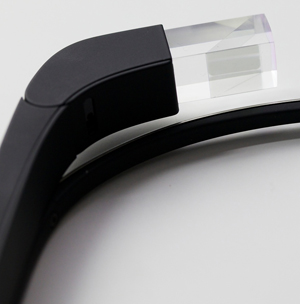
The system itself is made up of only a few basic pieces. The main
body of Glass is a soft-touch plastic that houses the brains, battery,
and counterweight (which sits behind your ear). There’s a thin metal
strip that creates the arc of the glasses, with a set of rather typical
pad arms and nose pads which allow the device to rest on your face.
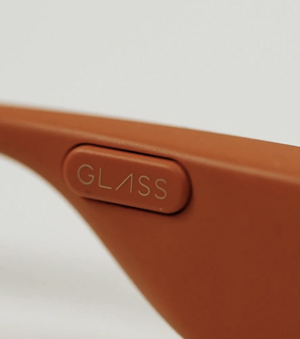
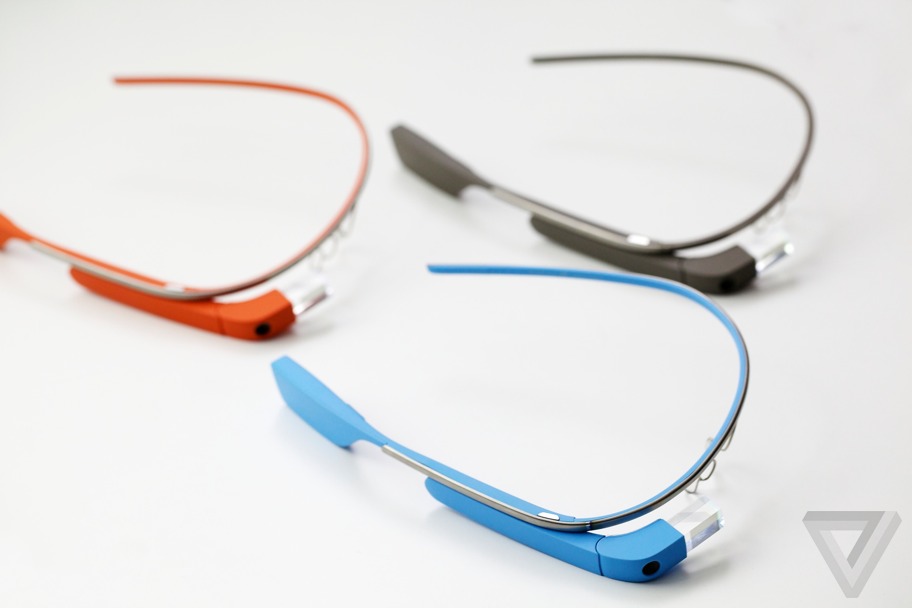
Google is making the first version of the device in a variety of
colors. If you didn’t want to get creative, those colors are: gray,
orange, black, white, and light blue. I joke around with Steve and
Isabelle about what I think the more creative names would be. "Is the
gray one Graphite? Hold on, don’t tell me. I’m going to guess." I go
down the list. "Tomato? Onyx? Powder — no Avalanche, and Seabreeze."
Steve and Isabelle laugh. "That’s good," Isabelle says.
But seriously. Shale. Tangerine. Charcoal. Cotton. Sky. So close.
That conversation leads into discussion of the importance of color in
a product that you wear every day. "It’s one of those things, you think
like, ‘oh, whatever, it is important,’ but it’s a secondary thing. But
we started to realize how people get attached to the device… a lot of it
is due to the color," Isabelle tells me.
And there is something to it. When I saw the devices in the different
colors, and when I tried on Tangerine and Sky, I started to get
emotional about which one was more "me." It’s not like how you feel
about a favorite pair of sunglasses, but it evokes a similar response.
They’re supposed to feel like yours.
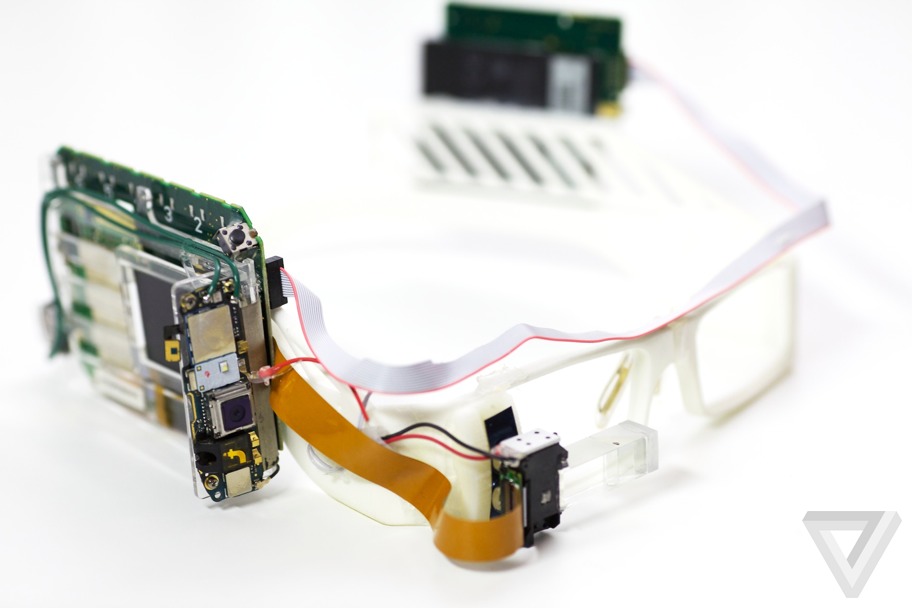
Isabelle came to the project and Google from Yves Behar’s design
studio. She joined the Glass team when their product was little more
than a bizarre pair of white eyeglass frames with comically large
circuit boards glued to either side. She shows me — perhaps ironically —
a Chanel box with the original prototype inside, its prism lens limply
dangling from the right eye, a gray ribbon cable strewn from one side to
the other. The breadboard version.
It was Isabelle’s job to make Glass into something that you could wear, even if maybe you still weren’t sure you wanted to wear it. She gets that there are still challenges.
The Explorer edition which the company will ship out has an
interchangeable sunglass accessory which twists on or off easily, and I
must admit makes Glass look slightly more sane. I also learn that the
device actually comes apart, separating that center metal rim from the
brains and lens attached on the right. The idea is that you could attach
another frame fitted for Glass that would completely alter the look of
the device while still allowing for the heads-up functionality. Steve
and Isabelle won’t say if they’re working with partners like Ray-Ban or
Tom Ford (the company that makes my glasses), but the New York Times
just reported that Google is speaking to Warby Parker, and I’m inclined
to believe that particular rumor. It’s obvious the company realizes the
need for this thing to not just look wearable — Google needs people to
want to wear it.
So yes, the Glass looks beautiful to me, but I still don’t want to wear it.
Topolsky in Mirrorshades
Finally I get a chance to put the device on and find out what using
Glass in the real world actually feels like. This is the moment I’ve
been waiting for all day. It’s really happening.
When you activate Glass, there’s supposed to be a small screen that
floats in the upper right-hand of your field of vision, but I don’t see
the whole thing right away. Instead I’m getting a ghost of the upper
portion, and the bottom half seems to melt away at the corner of my eye.
Steve and Isabelle adjust the nose pad and suddenly I see the glowing box. Victory.
It takes a moment to adjust to this spectral screen in your vision,
and it’s especially odd the first time you see it, it disappears, and
you want it to reappear but don’t know how to make it happen. Luckily
that really only happens once, at least for me.
Here’s what you see: the time is displayed, with a small amount of
text underneath that reads "ok glass." That’s how you get Glass to wake
up to your voice commands. Actually, it’s a two-step process. First you
have to touch the side of the device (which is actually a touchpad), or
tilt your head upward slowly, a gesture which tells Glass to wake up.
Once you’ve done that, you start issuing commands by speaking "ok glass"
first, or scroll through the options using your finger along the side
of the device. You can scroll items by moving your finger backwards or
forward along the strip, you select by tapping, and move "back" by
swiping down. Most of the big interaction is done by voice, however.
The device gets data through Wi-Fi on its own, or it can tether via
Bluetooth to an Android device or iPhone and use its 3G or 4G data while
out and about. There’s no cellular radio in Glass, but it does have a
GPS chip.
Let me start by saying that using it is actually nearly identical to
what the company showed off in its newest demo video. That’s not CGI —
it’s what Glass is actually like to use. It’s clean, elegant, and makes
relative sense. The screen is not disruptive, you do not feel burdened
by it. It is there and then it is gone. It’s not shocking. It’s not
jarring. It’s just this new thing in your field of vision. And it’s
actually pretty cool.
Glass does all sorts of basic stuff after you say "ok glass." Things
you’ll want to do right away with a camera on your face. "Take a
picture" snaps a photo. "Record a video" records ten seconds of video.
If you want more you can just tap the side of the device. Saying "ok
glass, Google" gets you into search, which plugs heavily into what
Google has been doing with Google Now and its Knowledge Graph. Most of
the time when you ask Glass questions you get hyper-stylized cards full
of information, much like you do in Google Now on Android.
The natural language search works most of the time, but when it
doesn’t, it can be confusing, leaving you with text results that seem
like a dead-end. And Glass doesn’t always hear you correctly, or the
pace it’s expecting you to speak at doesn’t line up with reality. I
struggled repeatedly with Glass when issuing voice commands that seemed
to come too fast for the device to interpret. When I got it right
however, Glass usually responded quickly, serving up bits of information
and jumping into action as expected.
Some of the issues stemmed from a more common problem: no data. A
good data connection is obviously key for the device to function
properly, and when taking Glass outside for stroll, losing data or
experiencing slow data on a phone put the headset into a near-unusable
state.
Steve and Isabelle know the experience isn’t perfect. In fact, they
tell me that the team plans to issue monthly updates to the device when
the Explorer program starts rolling. This is very much a work in
progress.
But the most interesting parts of Glass for many people won’t be its
search functionality, at least not just its basic ability to pull data
up. Yes, it can tell you how old Brad Pitt is (49 for those keeping
count), but Google is more interested in what it can do for you in the
moment. Want the weather? It can do that. Want to get directions? It can
do that and display a realtime, turn-by-turn overlay. Want to have a
Google Hangout with someone that allows them to see what you’re seeing?
Yep, it does that.
But the feature everyone is going to go crazy with — and the feature
you probably most want to use — is Glass’ ability to take photos and
video with a "you are there" view. I won’t lie, it’s amazingly powerful
(and more than a little scary) to be able to just start recording video
or snapping pictures with a couple of flicks of your finger or simple
voice commands.
At one point during my time with Glass, we all went out to navigate
to a nearby Starbucks — the camera crew I’d brought with me came along.
As soon as we got inside however, the employees at Starbucks asked us to
stop filming. Sure, no problem. But I kept the Glass’ video recorder
going, all the way through my order and getting my coffee. Yes, you can
see a light in the prism when the device is recording, but I got the
impression that most people had no idea what they were looking at. The
cashier seemed to be on the verge of asking me what I was wearing on my
face, but the question never came. He certainly never asked me to stop
filming.
Once those Explorer editions are out in the world, you can expect a
slew of use (and misuse) in this department. Maybe misuse is the wrong
word here. Steve tells me that part of the Explorer program is to find
out how people want to (and will) use Glass. "It’s really important," he
says, "what we’re trying to do is expand the community that we have for
Glass users. Currently it’s just our team and a few other Google people
testing it. We want to expand that to people outside of Google. We
think it’s really important, actually, for the development of Glass
because it’s such a new product and it’s not just a piece of software.
We want to learn from people how it’s going to fit into their
lifestyle." He gets the point. "It’s a very intimate device. We’d like
to better understand how other people are going to use it. We think
they’ll have a great opportunity to influence and shape the opportunity
of Glass by not only giving us feedback on the product, but by helping
us develop social norms as well."
I ask if it’s their attempt to define "Glass etiquette." Will there
be the Glass version of Twitter’s RT? "That’s what the Explorer program
is about," Steve says. But that’s not going to answer questions about
what’s right and wrong to do with a camera that doesn’t need to be held
up to take a photo, and often won’t even be noticed by its owner’s
subjects. Will people get comfortable with that? Are they supposed to?
The privacy issue is going to be a big hurdle for Google with Glass.
Almost as big as the hurdle it has to jump over to convince normal
people to wear something as alien and unfashionable as Glass seems right
now.
But what’s it actually like to have Glass on? To use it when you’re walking around? Well, it’s kind of awesome.
Think of it this way — if you get a text message or have an incoming
call when you’re walking down a busy street, there are something like
two or three things you have to do before you can deal with that
situation. Most of them involve you completely taking your attention off
of your task at hand: walking down the street. With Glass, that
information just appears to you, in your line of sight, ready for you to
take action on. And taking that action is little more than touching the
side of Glass or tilting your head up — nothing that would take you
away from your main task of not running into people.
It’s a simple concept that feels powerful in practice.
The same is true for navigation. When I get out of trains in New York
I am constantly jumping right into Google Maps to figure out where I’m
headed. Even after more than a decade in the city, I seem to never be
able to figure out which way to turn when I exit a subway station. You
still have to grapple with asking for directions with Glass, but
removing the barrier of being completely distracted by the device in
your hand is significant, and actually receiving directions as you walk
and even more significant. In the city, Glass make you feel more
powerful, better equipped, and definitely less diverted.
I will admit that wearing Glass made me feel self-conscious, and
maybe it’s just my paranoia acting up (or the fact that I look like a
huge weirdo), but I felt people staring at me. Everyone who I made eye
contact with while in Glass seemed to be just about to say "hey, what
the hell is that?" and it made me uncomfortable.
Steve claims that when those questions do come, people are excited to
find out what Glass is. "We’ve been wearing this for almost a year now
out in public, and it’s been so interesting and exciting to do that.
Before, we were super excited about it and confident in our design, but
you never know until you start wearing it out and about. Of course my
friends would joke with me ‘oh no girls are going to talk to you now,
they’ll think it’s strange.’ The exact opposite happened."
I don’t think Glass is right for every situation. It’s easy to see
how it’s amazing for parents to capture all of the adorable things their
kids are doing, or for skydivers and rock climbers who clearly don’t
have their hands free and also happen to be having life changing
experiences. And yes, it’s probably helpful if you’re in Thailand and
need directions or translation — but this might not be that great at a
dinner party, or on a date, or watching a movie. In fact, it could make
those situations very awkward, or at the least, change them in ways you
might not like.
Sometimes you want to be distracted in the old fashioned ways. And
sometimes, you want people to see you — not a device you’re wearing on
your face. One that may or may not be recording them right this second.
And that brings me back to the start: who would want to wear this thing in public?
Not if, but when
Honestly, I started to like Glass a lot when I was wearing it. It
wasn’t uncomfortable and it brought something new into view (both
literally and figuratively) that has tremendous value and potential. I
don’t think my face looks quite right without my glasses on, and I
didn’t think it looked quite right while wearing Google Glass, but after
a while it started to feel less and less not-right. And that’s
something, right?
The sunglass attachment Google is shipping with the device goes a
long way to normalizing the experience. A partnership with someone like
Ray-Ban or Warby Parker would go further still. It’s actually easy to
see now — after using it, after feeling what it’s like to be in public
with Glass on — how you could get comfortable with the device.
Is it ready for everyone right now? Not really. Does the Glass team
still have huge distance to cover in making the experience work just the
way it should every time you use it? Definitely.
But I walked away convinced that this wasn’t just one of Google’s
weird flights of fancy. The more I used Glass the more it made sense to
me; the more I wanted it. If the team had told me I could sign up to
have my current glasses augmented with Glass technology, I would have
put pen to paper (and money in their hands) right then and there. And
it’s that kind of stuff that will make the difference between this being
a niche device for geeks and a product that everyone wants to
experience.
After a few hours with Glass, I’ve decided that the question is no longer ‘if,’ but ‘when?’
Korean trams and buses are moving away from overhead power wires and high-voltage third rails—literally.
Researchers at the Korea Advanced Institute of Science and Technology
(KAIST) have made major advances in wireless power transfer for mass
transit systems. The fruits of their labor, systems called On-line
Electric Vehicles (OLEV), are already being road tested around Korea.
At it’s heart, the technology uses inductive coupling
to wirelessly transmit electricity from power cables embedded in
roadways to pick-up coils installed under the floor of electric
vehicles.
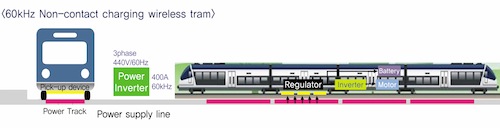
Engineers say the transmitting technology supplies 180 kW of stable,
constant power at 60 kHz to passing vehicles that are equipped with
receivers. The initial OLEV models above received
100 kW of power at 20 kHz through an almost eight-inch air gap. They
have recorded 85 percent transmission efficiency through testing so far.
(A concept drawing for an OLEV tram. Courtesy KAIST.)
The wireless electricity that powers the vehicle’s motors and systems
is also used to charge an on-board battery that supplies energy to the
vehicle when it is away from the power line.
KAIST plans to start deploying the OLEV technology to tramlines in May and high-speed trains in September.
“We have greatly improved the OLEV technology from the early
development stage by increasing its power transmission density by more
than three times,” said Dong-Ho Cho, the director of KAIST’s Center for
Wireless Power Transfer Technology Business Development, in a release.
“The size and weight of the power pickup modules have been reduced as
well. We were able to cut down the production costs for major OLEV
components, the power supply, and the pickup system, and in turn, OLEV
is one step closer to being commercialized.”
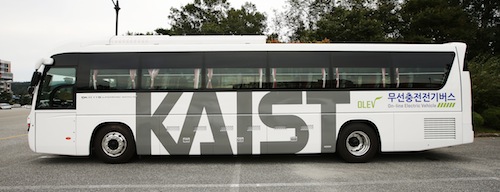
The institute announced that buses equipped with the wireless power
transfer technology are already used daily by students on the KAIST
campus in Daejeon, while others are undergoing road tests in Seoul. Two more OLEV buses will begin trial operations in the city of Gumi in July.
Proponents say that the technology banishes overhead power lines and
rails for electric trams and buses, dramatically lowers the costs of
railway wear and tear and allows smaller tunnels to be built for
electric vehicle infrastructure, lowering construction costs.
(An OLEV shuttle bus that provides rides to students and faculty on
the KAIST campus in Daejeon. Courtesy Hyung-Joon Jeon/KAIST.)
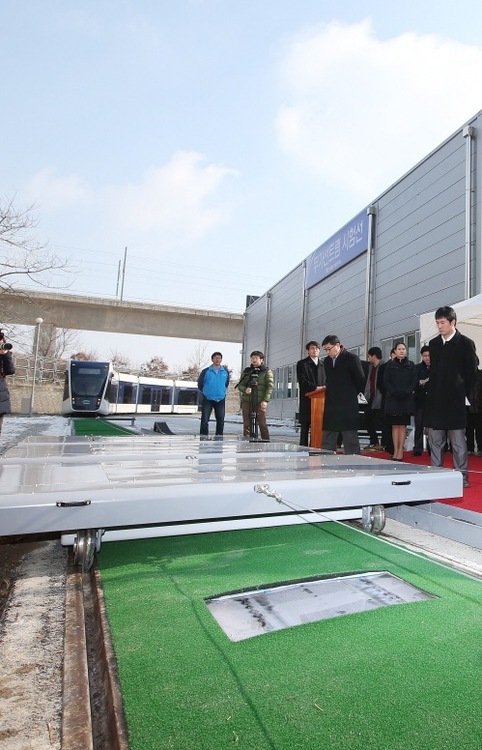
Top Image: KAIST and Korea Railroad Research
Institute displayed wireless power transfer technology to the public on
Feb. 13 by testing it on railroad tracks at Osong Station in Korea.
Photo courtesy Hyung-Joon Juen/KAIST.
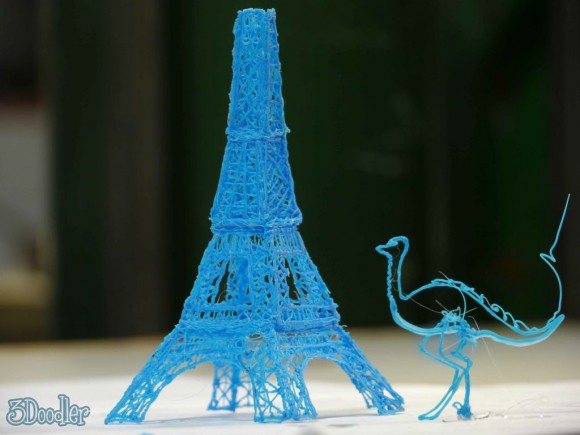
3D printers are undeniably cool, but their price also puts them out of the reach of most; that’s where 3Doodler steps in, a 3D printing pen hitting Kickstarter today
and promising to make sketches physical. The chubby stylus squirts out
of a stream of thermoplastic from its 270 degree-C nib, which is
instantly cooled by an integrated fan. By laying different streams of
plastic, tugging up streams of it to make 3D structures, and piecing
different layers together, you can create 3D designs on a budget.
In fact, early Kickstarter backers will be able to get the 3Doodler
from $50, though that award tier is already nearly halfway claimed at
time of writing. Next is the $75 bracket, which should stick around a
little longer, with the eventual Kickstarter goal being $30,000.
Unlike traditional printers, which require programming, the 3Doodler
takes a more abstract approach. You can freeform draw sketches, or
alternatively trace out patterns that have been printed, and then peel
the set plastic off; 3Doodler suggests possibilities include jewelry, 3D
models, artwork, and more.
It’s not going to be the way you print your next
coffee cup or car wheel, as we’ve seen promised from regular 3D
printers, but the plug-and-play approach has plenty of appeal
nonetheless. The Kickstarter runs for the next month, with first
deliveries expected in the fall of 2013 assuming it’s funded.
Mobile computing's rise from niche market to the mainstream is among
the most significant technological trends in our lifetimes. And to a
large extent, it's been driven by the bounty of Moore’s Law—the rule
that transistor density doubles every 24 months. Initially, most mobile
devices relied on highly specialized hardware to meet stringent power
and size budgets. But with so many transistors available, devices
inevitably grew general-purpose capabilities. Most likely, that wasn't
even the real motivation. The initial desire was probably to reduce
costs by creating a more flexible software ecosystem with better re-use
and faster time to market. As such, the first smartphones were very much
a novelty, and it took many years before the world realized the
potential of such devices. Apple played a major role by creating
innovative smartphones that consumers craved and quickly adopted.
To some extent, this is where we still stand today. Smartphones are
still (relatively) expensive and primarily interesting to the developed
world. But over the next 10 years, this too will change. As Moore’s Law
rolls on, the cost of a low-end smartphone will decline. At some point,
the incremental cost will be quite minimal and many feature phones of
today will be supplanted by smartphones. A $650 unsubsidized phone is
well beyond the reach of most of the world compared to a $20 feature
phone, but a $30 to $40 smartphone would naturally be very popular.
In this grand progression, 2013 will certainly be a significant
milestone for mobile devices, smartphones and beyond. It's likely to be
the first year in which tablets out-ship notebooks in the US. And in the
coming years, this will lead to a confluence of high-end tablets and
ultra-mobile notebooks as the world figures out how these devices
co-exist, blend, hybridize, and/or merge.
Against this backdrop, in this two-part series, we'll explore the
major trends and evolution for mobile SoCs. More importantly, we'll look
to where the major vendors are likely going in the next several years.
Tablet and phone divergence
While phones and tablets are mobile devices that often share a great
deal of software, it's becoming increasingly clear the two are very different products. These two markets have started to diverge and will continue doing so over time.
From a technical perspective, smartphones are far more compact and
power constrained. Smartphone SoCs are limited to around 1W, both by
batteries and by thermal dissipation. The raison d’etre of a
smartphone is connectivity, so a cellular modem is an absolute
necessity. For the cost sensitive-models that make up the vast majority
of the market, the modem is integrated into the SoC itself. High-end
designs favor discrete modems with a greater power budget instead. The main smartphone OSes
today are iOS and Android, though Windows is beginning to make an
appearance (perhaps with Linux or BlackBerry on the horizon). Just as
importantly, phone vendors like HTC must pass government certification
and win the approval of carriers. There is very much a walled-garden
aspect, where carriers control which devices can be attached to their
networks, and in some cases devices can only be sold through a
certain carrier. The business model places consumers quite far removed
from the actual hardware.
In contrast, tablets are far more akin to the PC both technically and
economically. The power budget for tablet SoCs is much greater, up to
4W for a passively cooled device and as high as 7-8W for systems with
fans. This alone means there is a much wider range of tablet designs
than smartphones. Moreover, the default connectivity for tablets is
Wi-Fi rather than a cellular modem. The vast majority of tablets do not
have cellular modems, and even fewer customers actually purchase a
wireless data plan. As a result, cellular modems are almost always
optional discrete components of the platform. The software ecosystem is
relatively similar, with Microsoft, Apple, and Google OSes available.
Because tablets eschew cellular modems, the time to market is faster,
and they are much more commonly sold directly to consumers rather than
through carriers. In terms of usage models, tablets are much more
PC-like, with reasonable-sized screens that make games and media more
attractive.
Looking forward, these distinctions will likely become more
pronounced. Many tablets today use high-end smartphone SoCs, but the
difference in power targets and expected performance is quite large. As
the markets grow in volume, SoCs will inevitably bifurcate to focus on
one market or the other. Even today, Apple is doing so, with the A6 for
phones and the larger A6X for tablets. Other vendors may need to wait a
few years to have the requisite volume, but eventually the two markets
will be clearly separate.
Horizontal business model evolution
Another aspect of the mobile device market that is currently in flux
and likely to change in the coming years is the business model for the
chip and system vendors. Currently, Apple is the only company truly
pursuing a vertically integrated model, where all phones and tablets are
based on Apple’s own SoC designs and iOS. The tight integration between
hardware and software has been a huge boon for Apple, and it has
yielded superb products.
Samsung
is one of the few others companies that takes a vertically integrated
approach to phones and tablets, although in truth its strategy seems to
be ambivalent on that point. Unlike Apple, Samsung’s SoCs are readily
available to third parties, and some Samsung devices, such as the S7562
Galaxy S Duos, use SoCs from competitors. More recently though, there
has been a trend of Samsung devices using Samsung SoCs, at least for the
premier products. For the moment, Samsung’s approach is best
characterized as a hybrid, particularly as the company lacks a bespoke
OS.
The rest of the major SoC vendors (e.g., Intel, Qualcomm, Nvidia, TI,
Mediatek, etc.) have stayed pretty far away from actual mobile devices.
These companies tend to focus on horizontal business models that avoid
competing with customers or suppliers.
In the long term, mobile devices are likely to evolve similarly to
the PC and favor a horizontal business model. The real advantage is one
of flexibility; as costs drop and the market expands, it will be
increasingly necessary for vendors like HTC to offer a wide range of
phones based on radically different SoCs. While a vertically integrated
company like Apple can focus and maintain leadership in a specific (and
highly lucrative) niche, it would be very difficult to expand in many
growing areas of the market. The differences between an iPhone 6 and a
$20 feature phone are tremendous and would be very difficult for a
single company to bridge.
However, SoC vendors will attempt to reap the benefits of vertical
integration by providing complete reference platforms to OEMs.
Conceptually, this is a form of "optional" system integration, where the
phone vendor or carrier can get the entire platform from the SoC
supplier. This has the principal advantages of reducing time to market
while also providing a baseline quality and experience for consumers.
Currently, this approach has mostly been tested in emerging markets, but
it's likely to become more common over time. There is a crucial
distinction between reference platforms and vertical integration.
Namely, OEMs can always choose to customize a platform to differentiate,
and the SoC vendor avoids dealing with consumers directly. Typically,
most of the customization is in terms of software on top of a base
operating system.
Focus on the intellectual
One unique aspect of mobile devices is the availability and
prevalence of third-party intellectual property (IP). Unlike the PC
industry, it is a common practice for SoC vendors to use a variety of
external and internal IP. ARM and Imagination Technologies are the best
known IP vendors, with reputations established for CPUs and GPUs
respectively. Most major SoC blocks are available as IP, which creates a
very broad and diverse ecosystem. Even vertically integrated companies
such as Apple rely on third-party IP.
Vertical integration of IP within the context of a single chip makes
tremendous sense and is likely to be the future for most SoC vendors.
While third-party IP is highly flexible and can reduce time to market
and development costs, it comes with real trade-offs. The licensing
costs are typically on a per-unit basis and thus are increasingly
problematic at high volume. At a certain point, the variable licensing
costs outweigh the fixed development costs, and it makes more sense to
use internal resources.
Moreover, there are risks associated with third-party IP that are
more difficult to control. For instance, Intel’s Clovertrail tablet has
been delayed, likely due to problems with the Imagination Technologies
graphics drivers for Windows 8. And third-party IP is often intended to
address a wider market and may not fit with the intentions of a specific
vendor. For instance, licensed ARM cores cannot be substantially
modified, which removes an element of flexibility for companies with
good CPU design teams.
Over the next decade, the higher volume vendors will likely focus on
reducing the amount of external IP and emphasizing internal development
expertise. That means licensing ARM’s instruction set and designing
custom cores (as Apple has done with the A6), rather than using the
stock cores. In other cases, SoC vendors will develop or acquire the
necessary building blocks, such as baseband processors. One area where
third-party IP will probably continue to be popular is graphics, largely
because of the complexity of the software stack. Modern graphics APIs
and drivers are very challenging, and the development cost may prove
prohibitive for all but the very largest companies.
Manufacturing trends
The SoCs for mobile devices are inextricably tied to semiconductor
manufacturing, and any look into the future must be based on a realistic
assessment of the underlying technology. While Moore’s Law has
continued to operate, certain aspects of silicon scaling stopped roughly
a decade ago. In particular, shrinking transistors ceased granting an
intrinsic increase in performance. The industry adapted and embraced a
number of novel technologies to boost performance where appropriate.
Perhaps the biggest question looming over the industry is the fate of
Moore’s Law and whether transistors will continue to shrink. Ten years
is a very long time to make technical projections with any degree of
certainty. However, there is no reason to believe that process
technology scaling will stop—the advantages of shrinking are still quite
large. In the next few years, the industry will move from 193nm
conventional lithography to 13nm EUV lithography, which should last for
quite some time. Going forward, though, innovations in materials will be
absolutely necessary for Moore’s Law, and these will happen at a faster
pace. To date, the major changes in manufacturing have been copper
interconnects, strained silicon, high-k/metal gates, and now fully
depleted transistors (e.g. FinFETs or FD-SOI), and there is plenty of
promising research for the roadmap.
However, these new techniques are increasingly expensive from both a
development and variable cost standpoint. Each new technique tends to
winnow the field of manufacturers a bit more. Fujitsu and TI both have
excellent process technology, but they could not afford to develop
high-k/metal gates at the 32nm node and instead moved to a fabless model
for digital logic. It's nearly certain that the number of leading edge
manufacturers will shrink to just a handful. Intel, TSMC, and Samsung
have the volume and can continue to afford the pace of Moore’s Law, but
the economics may be prohibitive for everyone else.
Even so, a fabless model is not necessarily a panacea because of the
rising variable costs. In the past, TSMC and many foundries have been
able to avoid expensive techniques, but that option is no longer
feasible. For instance, conventional lithography cannot draw features
below 80nm without multiple patterning. If double patterning is required
for a process step, it will cut the throughput of that step in half.
FinFETs are similarly complex and will impact throughput as well. These
costs (along with profits for TSMC or GlobalFoundries) are ultimately
passed along to foundry customers as higher wafer prices.
Long-term, this translates into an advantage for the two IDMs: Intel
and Samsung. First, an IDM essentially pockets the profits from both
manufacturing and design, whereas fabless companies only collect the
latter and must give up the former to TSMC or GlobalFoundries. Second,
IDMs have greater control over the supply chain and are less likely to
be subject to availability problems as a result of manufacturing
challenges. Third, the cost delta between IDMs and foundries is likely
to erode for the technical reasons outlined above.
One new technique which will be adopted across the industry over the
next decade is 3D integration. Many mobile devices already use chip
stacking, where several different integrated circuits are vertically
stacked in a single package. Typically, chip stacking relies on
connecting different layers of the stack with low-density bond wires or
solder bumps. However, many companies are actively working on solutions
to connect different layers via through-silicon vias (TSVs), which are
much denser and offer greater connectivity and power savings. 3D
integration using TSVs is far more sophisticated than 3D packaging,
since a single integrated circuit can span multiple layers. The primary
use case for 3D integration is packaging high-speed memory with an SoC
to deliver superior bandwidth for graphics. Currently, the only products
using 3D integration are FPGAs from Xilinx, but the technology should
become relatively common during the next few years, and it should be
available later to all mobile vendors.
Manufacturing roadmap
Currently, Intel is about two years ahead of the rest of the industry
in terms of high-volume manufacturing for high-performance products
(i.e. server, desktop, and notebook SoCs). Intel’s 22nm Ivy Bridge went
into production at the end of 2011, around the same time that TSMC
started producing 28nm GPUs. Additionally, Intel tends to be about one
node ahead of the industry for performance features such as strained
silicon, high-k/metal gates, and FinFETs (e.g. Intel introduced
high-k/metal gates in 2007, foundries in 2011 and 2012). Looking
forward, Intel’s manufacturing is expected to stay on a two-year cadence
at least through the 10nm node in late 2015, and there is no reason to
expect any deviation from this trend further out.
However, Intel’s mobile SoC designs are two years behind the cutting
edge of manufacturing, with 32nm SoCs shipping today. Over the next two
to three years, Intel will pick up the pace of SoC development, hitting
22nm by the end of 2013 and 14nm by the end of 2014. Long-term, the
mobile SoCs will probably reach about six months behind the PC designs
in terms of manufacturing, driven by cost constraints. Specifically,
Intel’s fabs are quite expensive for the first year, when yields are
still ramping up and the factory is depreciating. The ASPs for notebooks
and desktops are high enough to amortize these costs. After six to 12
months, the costs are much lower and more amenable to phone and tablet
products.
Looking at the foundries is a little more challenging and confusing.
First of all, TSMC, GlobalFoundries, and Samsung tend to announce
production well in advance of actual mobile SoCs shipping. However,
assuming a two-year cadence is a very reasonable guideline. That places
the 20nm planar node (and attendant SoCs) in late 2013 or early 2014.
The 14nm node will be quite problematic for the foundries, though.
Without EUV, it will be necessary to use double patterning on the metal
interconnects, which will substantially increase costs. Instead, the
foundries are developing a hybrid process that uses a 14nm FinFET to
boost performance, but they're keeping the same 20nm metal interconnect.
From a practical standpoint, this means the foundry 14nm process will
be comparable to Intel’s 22nm process in terms of performance and
density, despite the name. The foundries claim that the hybrid 14nm/20nm
process will arrive in 2015, which seems somewhat optimistic given the
challenges involved in achieving yield for FinFETs. Moreover, that will
make the transition to a 10nm node even more difficult, as the foundries
will have to move from 20nm interconnects to 10nm interconnects and
skip a generation.
Long-term, it seems like the foundries are expending significant
effort to narrow the gap with Intel. Historically, this has proven to be
an elusive goal, and there are few fundamental changes that suggest
this would be feasible. It's most likely Intel’s mobile SoCs will
accelerate over the next few years and ultimately reach and then
maintain a 12 to 18 month lead in process technology (and hence density)
over the competition. The real question is how fast the foundries will
be able to implement techniques like FinFETs and other performance
enhancements. It is quite possible this gap could narrow from the
current four to five years down to three to four years.
In the conclusion of this series, we will explore how these trends
come together and impact the leading mobile SoC vendors and where they
are expected to evolve over the next five to ten years.
David Kanter is Principal Analyst and Editor-in-Chief at Real World Tech,
which focuses on microprocessors, servers, graphics, computers, and
semiconductors. He is also a consultant specializing in intellectual
property evaluation/development and technical/competitive analysis.
If you’re terrified of the
possibility that humanity will be dismembered by an insectoid master
race, equipped with robotic exoskeletons (or would that be
exo-exoskeletons?), look away now. Researchers at the University of
Tokyo have strapped a moth into a robotic exoskeleton, with the moth
successfully controlling the robot to reach a specific location inside a
wind tunnel.
In all, fourteen male silkmoths were tested, and
they all showed a scary aptitude for steering a robot. In the tests, the
moths had to guide the robot towards a source of female sex pheromone.
The researchers even introduced a turning bias — where one of the
robot’s motors is stronger than the other, causing it to veer to one
side — and yet the moths still reached the target.
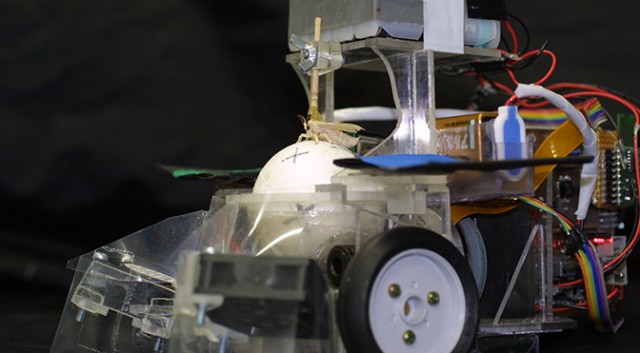
As you can see
in the photo above, the actual moth-robot setup is one of the most
disturbing and/or awesome things you’ll ever see. In essence, the
polystyrene (styrofoam) ball acts like a trackball mouse. As the
silkmoth walks towards the female pheromone, the ball rolls around.
Sensors detect these movements and fire off signals to the robot’s drive
motors. At this point you should watch the video below — and also not
think too much about what happens to the moth when it’s time to remove
the glued-on stick from its back.
Fortunately, the Japanese
researchers aren’t actually trying to construct a moth master race: In
reality, it’s all about the moth’s antennae and sensory-motor system.
The researchers are trying to improve the performance of autonomous
robots that are tasked with tracking the source of chemical leaks and
spills. “Most chemical sensors, such as semiconductor sensors, have a
slow recovery time and are not able to detect the temporal dynamics of
odours as insects do,” says Noriyasu Ando, the lead author of the
research. “Our results will be an important indication for the selection
of sensors and models when we apply the insect sensory-motor system to
artificial systems.”
Of course, another possibility is that we simply keep the moths. After all,
why should we spend time and money on an artificial system when mother
nature, as always, has already done the hard work for us? In much the
same way that miners used canaries and border police use sniffer dogs,
why shouldn’t robots be controlled by insects? The silkmoth is graced
with perhaps the most sensitive olfactory system in the world. For now
it might only be sensitive to not-so-useful scents like the female sex
pheromone, but who’s to say that genetic engineering won’t allow for silkmoths that can sniff out bombs or drugs or chemical spills?
Who
nose: Maybe genetically modified insects with robotic exoskeletons are
merely an intermediary step towards real nanobots that fly around,
fixing, cleaning, and constructing our environment.